 |
is
a Tagalog/Filipino phrase HOW-TO |
|
is
a Tagalog/Filipino phrase HOW-TO |
How to do screen shots
Doing screen shots can be done two ways - capturing the entire screen and capturing the active window. Either method you use the button marked PrtSc/SysRq which is located on the upper right portion of your keyboard. By the way, PrtSc stands for Print Screen and SysRq means System Request.
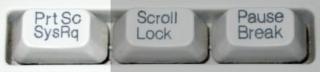
To do a screen shot of the entire desktop, you follow these steps:
1. Press the PrtSc/SysRq key. Your mouse cursor may blink momentarily.
2. Click Start > Programs > Accessories > Paint. This will bring up the built-in picture editor of Windows.
3. In Paint, click Edit > Paste. If you receive a message box "The image in the clipboard is larger than the bitmap. Would you like the bitmap enlarged?" click the Yes button.
That's it. You can do whatever you like to the picture - crop it, resize, print, save, etc.
There are cases wherein you don't need a screen shot of of the entire desktop, only the active window, like the webcam box for instance. To do that, you follow these steps:
1. Make sure the window you want to capture is in front of all other windows and is in-focus. A window is active or in-focus when you see the color of the window's title bar different from all other open windows on your desktop.
2. Press and hold down the Alt key then press the PrtSc/SysRq key. Release both keys.
3. Click Start > Programs > Accessories > Paint. This will bring up the built-in picture editor of Windows.
4. In Paint, click Edit > Paste. If you receive a message box "The image in the clipboard is larger than the bitmap. Would you like the bitmap enlarged?" click the Yes button.
That's it. You can do whatever you like to the picture - crop it down further, resize, print, save, etc.
Did this page help you solve
your problem?
| Tell me what
you think | What
others have to say | Back
to main page |
 TIPS AND TRICKS