
|
||||||||||||||||||
 What Is FG?
FG: Movie FG: Return Episode Guide Character Bios Archive News Web Articles The Voices The Gags List Song Lyrics  Grabpics
Wallpapers Tutorials Small Puzzle XP/AOL Icons  Support TSS
About TSS Peter's W.O.W Stewie List Advertisments  Bios
Bios
Plot |
GRABPIC TUTORIAL
The "My Way" of making a basic Grabpic. I use only two programs but before you can start you need and image. There are tons of sites out there that have tons but if you have a program, such as PowerDVD you can supplie the images yourself. Best thing to do is to RESIZE the image to something over 1024 (width) and 768 (height) but nothing over 1500 (width) and 1125 (height). Once you've done that, sort out the Brightness and Contrast, something like 50 (or 20, that's what I usually have it has) by -50. You image should look like the one below: 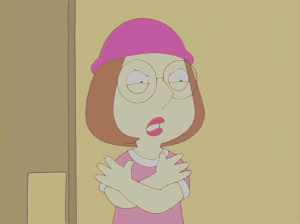
Make sure you save the file, because I don't use the programme til the end now. Go to the folder you saved this image under and press on the image, wait a second for a screen to pop up with you image, "*IMAGE NAME* Windows Picture and Fax Viewer". Press on the little icon towards the bottom that is inbetween the floppy disc and ?. This'll bring up your image in MSPaint! That's what you want. Now what you do is what is in the image below: 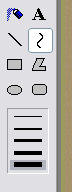
Now use this to go over the lines, adjusting them to the right length (as you become more advantaged as you do more and more of these yourll get them more properly done and more neater.) It should look something like the image below: 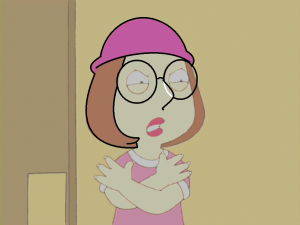
Continue this until you have competed going around all the lines. Now you can press Save (Ctrl + S) and come out of the image's paint. Go to the art programme you used to save the image on and open it up in there by going on File, it should be at the bottom here but if not OPEN ans serach for the folder/image. Now before colouring, you change the Brightness and Contrast again, by 78 by -50. it'll leave something like the image below: 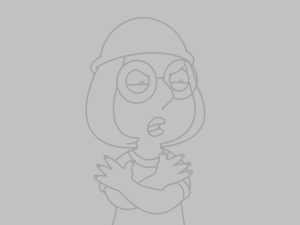
Just paint the dark grey, that is the outlines in Black, and continue to colour in the image. Now you can resize the image by going Image and Resize to something small, and then cut to suit your size and save the image. You sould end up with a nicely finished grabpic like the one below: 
|
You can check out the names of the new episodes of Family Guy at the Official Family Guy Site.


|
|||||||
 |
|||||||||