 |
| Anim8or
and Flash
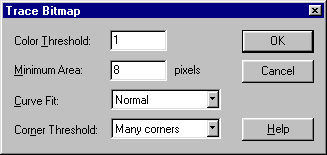
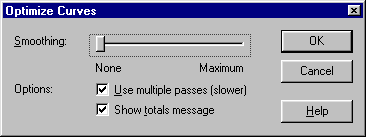
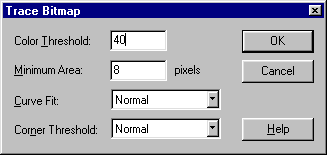
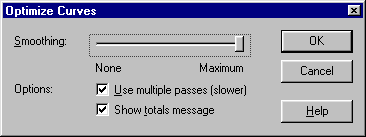
Some test animations made with Anim8or and Flash. Notes: You'll need Flash 4 player for viewing these. These animations are generated from the walk animation tutorial of Anim8or. The resolution of rendered images is 1024x768. No anti-aliasing is used, as Flash does the tracing better if there's no smoothing pixels on the edges. Images are imported into Flash as a sequence, then they are Traced ("Modify->Trace Bitmap...") and optimized ("Modify->Curves->Optimize..."). Test 1: Flat shading To achieve flat shading in images rendered with Anim8or, all objects you use must be meshes. You can convert cylinders or spheres to meshes from "Build->Convert to Mesh". Then - to make it flat-shaded - double-click the object to bring up object properties, and set Smooth Angle to 0.00. Other way to achieve the same effect is to select all edges from the mesh and set them to "Creased" from "Edit->Edge Properties...". When building your figure, you should use only "real" objects made this way, not the pre-made spheres and cylinders available in "Build->Add Cylinder" and "Build->Add Sphere" in Figure editor. The tracing and optimization settings in Flash are as follows:
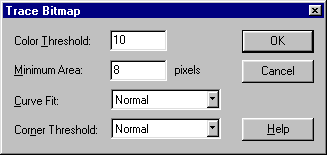
The resulting animation has size of 752 kb. I have tried to use settings that don't reduce the quality of the original animation at all - with flat shading this is possible as there's no colour gradients. The result is really crisp and looks like a 3d-model, not as a Flash animation, but has typical qualities of flat shaded images, as all polygons are clearly visible. Taking this into account when designing the models will make this kind of animations look better of course. View the flash file test1.swf, 752 kb. Test 2: Phong shading, high quality tracing This test is rendered with normal Phong shading and smooth surfaces (but no anti-aliasing for better tracing in Flash). The tracing and optimization settings in Flash are as follows:
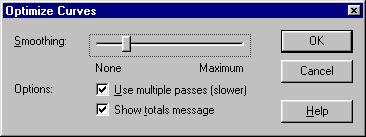
The resulting animation has the size of 1336 kb, which is far too much for online use. I have tried to use settings that give adequate quality, but still there's visible banding in colour gradients and edges don't follow the original shape everywhere. View the Flash file test2.swf, 1336 kb. Test 3: Phong shading, low quality tracing The original image sequence is the same as in Test 2. The tracing and optimization settings in Flash are as follows:
The resulting file is the smallest of the three, only 355 kb, but the quality is really poor as well. There's bad banding on curved surfaces, and the edges follow the original shape very loosely at places. The result looks more like a badly traced Flash animation than a 3d-model. View the Flash file test3.swf, 355 kb. Summary: In real life situation a complete rendering
of an animation for online use results too big files, even when quality
is considerably dropped. For rendering small looping sequences to be used
as symbols in Flash these techniques are adequate though.
Last updated
20th July 2000
|
      |