Rasterization As you know, the most computer screens from today can only display 2D images, since the screen is only a Plane with some shining dot's on it. So this means displaying a 3D Object on a Screen is quite troublesome. Simply ignoring the Z-Axis is possible, but will not deliver the feel of depth. So this is not an option for us. It is however quite usefull when creating a CAD. Anyways, like said before, our screen is simply a Plane in a 3D space. We can think of this plane as our 'window' to the 3D world. 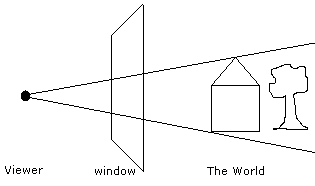 (Window to the World) As you can see in the picture, the person looking through the window, the viewer, has a certain distance to the window. The nearer he is to the window, the more he can see, therefor the further away he is, the less he can see. This will be important lateron, but first we will see how this helps us. Well, in the picture we see that each object in the 3D world projects its image through the window into the viewers eyes. We can use this piece of information, by simply calculating the intersection between the eye and the object, with the window, like in the next picture. 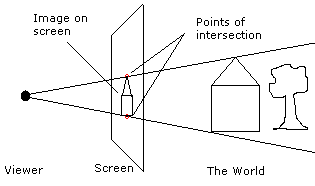 (Screen) This point of intersection with the window is the point we have to draw our object on the screen. This process is called rasterization. What we did in 3D can also be called 'projection', since we did nothing more that project the object onto the window. With this info we create a small formula:
         ScreenX = (ScreenWidth/2) + Distance * X/Z
         ScreenY = (ScreenHeight/2) + Distance * Y/Z
ScreenX/ScreenY is simply the point on the screen, and X/Y/Z are the coordinates of the same point, but in 3D. Distance is the Distance the viewer is away of the window, this will influence the Field of view through the window. 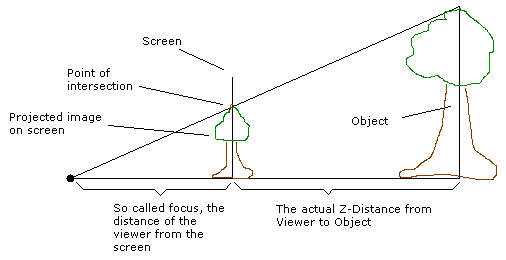 (Distances) This picture shows how the Distance * X/Z part comes together, simply by applying linear algebra. The ScreenWidth/2 part is simply, that the point 0/0/Z is always in the middle of the screen. leaving out this part, one might think that only 1/4 of the whole screen is visible. With this knowledge we can calculate any 3D Points Screen coordinates. Therefor we could already create a simple wireframe program. Download Example program in VB Here Back to the Last Tutorial or on to the next one |