|
The
Past
Master
Club
| 3D STUDIO WIZARD R2
| advanced computer training for engineers
| Author: Klaas Van Fleet
|
|---|
|
|---|
3D STUDIO VIZ R2 TRAINING CURRICULUM
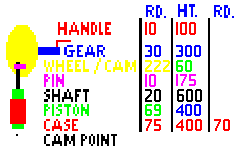
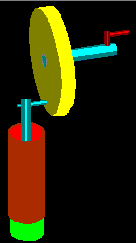
Animating a Pump
| 1. | LINKING THE OBJECTS: to create the above pump.
| | The 1st set of pairs.
|
|---|
| | a. |  First select the CASE in red. First select the CASE in red.
|
|---|
| | b. |  Click the motion icon. Click the motion icon.
|
|---|
| | c. | Now choose the option Parameters and Assign Controller.
|
|---|
| | d. |  Click on transform's text in window. Click on transform's text in window.
|
|---|
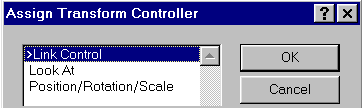
| | e. |  Click on the activated green assign arrow to access menu below left. Click on the activated green assign arrow to access menu below left.
|
|---|
| | f. | Select 'Link Control' below and click OK.
|
|---|
|
|---|
|
|
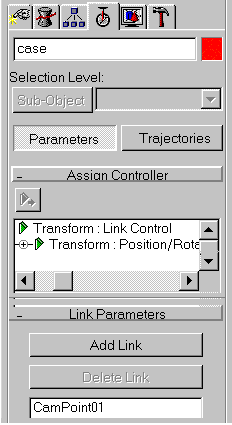
| 1. | g. | Now 'Add Link' CamPoint at next input window,
|
|---|
| | | to the right, to show the following output for
|
|---|
| | | Parent=CamPoint & Child=Case:
|
|---|
| | h. | Repeat all the above steps 1 - 6 for piston-link-
| | | case and shaft-link-piston to finish the 1st. set
|
|---|
| | | of objects.
|
|---|
| | NOTE:
|
|---|
| | The main Parent here for the 1st set of objects
|
|---|
| | is CamPoint; since, all the rotation is about
|
|---|
| | CamPoint - explained later.
|
|---|
|
|---|
|
|
|