Internet Architecture and Programming --- Deitel Exercise
Get project description
Page 591 - 9.4 Modify the HttpSession example of Fig. 9.24 to list prices for each book in the book recommendations. Also, allow the user to select some or all of the recommended books and "order" them. Deploy your Web application on the Tomcat server.
Project Notes and Activies: (click here for project document)
Kira Swab
04/15/02
Session Tracking with HTTPSESSION-
1. Created 'webapps' directory in 'tomcat'
2. Created 'advjhtp1' directory in 'webapps'
3. Created 'servlets' and 'sessions' and 'WEB-INF' directories in 'advjhtp1'
4. Created 'classes' directory in WEB-INF
5. Created web.xml in WEB-INF
*****************************************
web.xml
*****************************************
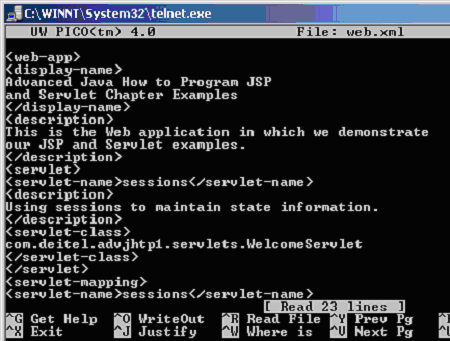
*****************************************
6. Updated web.xml to follow the session example as shown in Figure 9.26, page 577
7. Moved SessionSelectLanguage.html to servlets
8. Moved SessionServlet.class to classes subdirectory of WEB-INF in the advjhtp1 context root.
9. Tomcat Server needs restart
10. The following URL should work:
http://144.80.64.40:8180/advjhtp1/servlets/SessionSelectLanguage.html
paths tomcat/webapps/advjhtp1/web-inf/
tomcat/webapps/advjhtp1/servlets/
tomcat/webapps/advjhtp1/sessions/
tomcat/webapps/advjhtp1/web-inf/web.xml
Links:
View Source Code to SessionServlet.java
View Source Code to SessionSelectLanguage.html
View SessionSelectLanguage.html
Modifications:
To list prices for each book in the book recommendations:
1. Insert after line 144 �out.println( name + �How to program. � + �Price is: � + pricevalue + �*br /*� );
2. The pricevalue would have been set one line above using the session.getAttribute( price ).toString();
3. Else { out.println( �*h1*No Price� ); out.println(�*p*You did not select a language.*/p*}


