


|
|
|
|
|
|
|
|
|
|
|
|
|
|
|
|
|
|
|
|
|
|
|
|
|
| Hands-Free Workstation | ||||||||||||||||||||||||
| Home Resume Links My AOL | ||||||||||||||||||||||||
|
||||||||||||||||||||||||
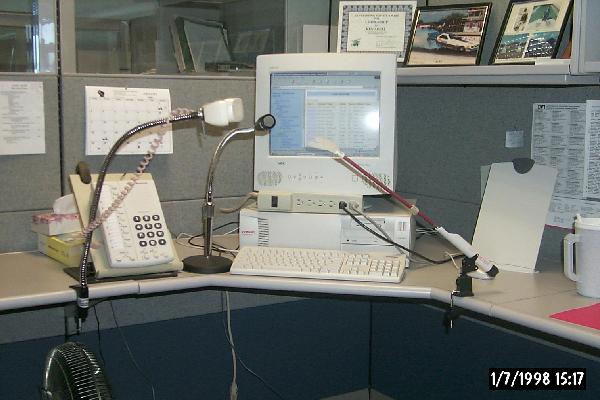
| This Workstation is set up for completely hands-free operation. There are low technology components that really make the difference. Using a mouth stick to boot up the computer and run a few keystrokes will allow me to get to the high-technology part. The Sticky Key accessibility feature allows me to launch the voice recognition software giving me complete control. | ||||||||||||||||||||||||
|
||||||||||||||||||||||||
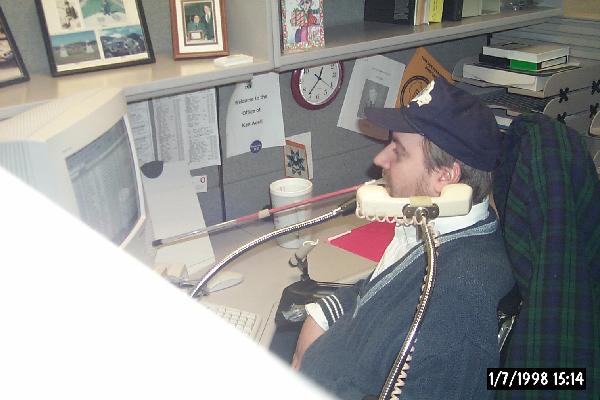
| Pictured right, after driving into position (it is very important not to be tethered) I am using the mouth stick to turn on the computer. This mouth stick is also used to answer the phone, transfer calls, conference calls, or just checking messages. Once the computer is booted I launch voice recognition software. I can then put the stick down (until the phone rings), and begin working on the computer very efficiently (web sites, reports and keeping Excel files for various projects. | ||||||||||||||||||||||||
|
||||||||||||||||||||||||
|
||||||||||||||||||||||||
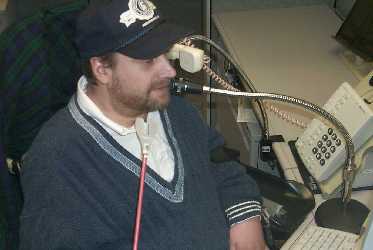
| The photo to the left is showing me using the voice recognition system. In the State of Wisconsin Division of Vocational Rehabilitation we set up a completely Internet accessible case filing system. So that counselors could access any file on any client from any location. Eventually the program will be developed further so that individual consumers of Wisconsin VR can access their own case notes. The system allows the consumer to apply online and get a response from a counselor within five working days. | ||||||||||||||||||||||||
|
||||||||||||||||||||||||
|
||||||||||||||||||||||||
| Home Resume Links | ||||||||||||||||||||||||
| [email protected] | ||||||||||||||||||||||||