|
To begin downloading software,
click on the link below:
Download

Download
Step-By-Step Download Information
for the New Internet User:
1. Click
on the Download link at the top of this page.
A "File Download" dialog box will appear. Select
"Open".
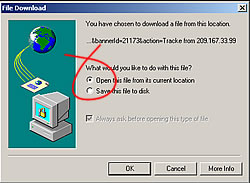
2. Another
"File Download" dialog box will open and ask
you if you would like to open the file or save
it to your computer. Select "Open" to start
downloading the file.
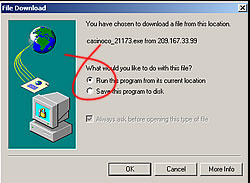
The time
required to perform this task varies according
to the speed of your computer's modem. Internet
delays can cause a longer download time.
3. Follow
the easy on-screen instructions given by the
setup program.
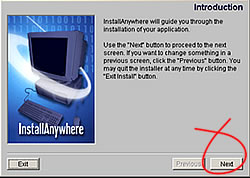
That's all
there is to it! Now you can start having fun!
When you have finished installing, a CasinoCo
Online Casino icon will remain on your Desktop.
The next
time you want to play, just click on the icon
to activate the casino software! You will
be updated as the Casinoco Online Casino adds
new games and services to its casino.
|