




|
Personal page of Konjengbam |
|
“Bluetooth adopter, technology enabler and innovative thinking” |




IntroductionThe layout of XML Topic is based on simple topic format. Each topic is represented by a single HTML page, a topic consisting of one or more sub-topics. Each sub-topic will have a heading and if left blank, will continue with the next paragraph.
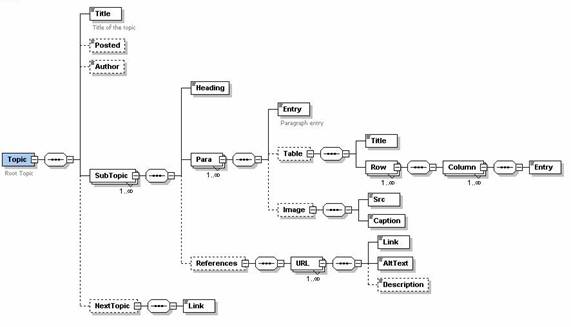
Within each paragraph again, there are optional fields like Image sources and References. This can be used for detailing a sub-topic when required. The schema design diagram of the Topic XML scheme is shown below in Fig. 1-A. |
|
In this section, we will show only the above paragraphs utilization and the image above. The schema diagram above is prepared using Altova's Home Edition of XMLSpy 5.0. You can download a limited trial version from their website (http://www.xmlxpy.com). Further sections will discuss on elaborate issues of the design and usage techniques. ObjectiveThe objective of this design and implementation is to come up with a generic layout for technical documents, including FAQ and E-Forum documents which will enable software developers to interchange well-crafted documents. As an example, I'll show here an example of a mail written to CASIO regarding some development support where not only questions were asked but also pertinent issues on problems and other similar things, such as results, were tabulated and presented in a more readable format. Design DetailsBefore I show you the XML version of the email, perhaps it would be interesting to explain and go deeper in the XML and schema design. As mentioned earlier, each sub-topic will consists of a unique heading, set of paragraphs and optionally, references (link of URLs). The heading field uniquely describes the sub-topic but if you omit it (which is okay too), the following paragraph will be treated as succession of the last paragraph of the previous sub-topic. This ensures continuity too. The 'Para' component is interesting here. What I am writing now is within this 'Para' field, inside the 'Entry' as text/ string data. If this field is empty then, no effective paragraphs will be produced. If you see the design above, the relationship with 'SubTopic' is one to many (1..n). This means that a sub-topic can have one or more paragraphs which makes sense too. This field is later formatted as paragraph only (HTML). Each paragraph contains a main entry text area, represented as 'xs:string' data type in the schema. Paragraph data comes within the bounds of this field. Optional elements of a paragraph are Table and Image elements/ fields. Let's see how the "Table" node works here, which is also an optional component in the schema design. You will see that a table consists if one or more rows, where each row can have 1..n column entries. This paragraph now is a demonstration of continuation of the first para of the next sub-topic where the sub-topic heading has not been defined to preserve the state of continuity. This is a good illustration to extend your earlier sub-topic without creating a mess all in one sub-topic. Fine! We have come up to this stage. Let's see how table's are arranged. I have been wanting to show you this dynamic table. This feature is rich enough to contain any number of rows and columns, while still not enforcing user to maintain rows and column conformity. Its like a very flexible matrix. By default, the heading row will be of special format (bold). However, if you want to avoid that special format stuff, you could create a blank row in the XML file. |
|
Fig. 1-A - Schema Design of the Topic XML |
Table Demonstration at workName: Jayanta Konjengbam Address: Pasteurstrasse 36, 10407 Berlin Email: [email protected] |
How about using the Reference field?If you see the schema above, you see the leaf 'References' within the sub-topic. This is optional. So, if you want to include a list of URLs below a sub-topic (which will appear after the paras), you can specify some interesting links associated with the description if the foregoing discussion above. Below, I am giving an example. These are not interesting links but that should do some useful work. Btw, I believe Google is interesting though. · When I try looking for something on the Web, this is what I always use -- Google. Can't live without it now! (Google Search here) · Visit Microsoft Web Site Here!!
Yup! That's it fellas -- end of a small demonstration. Now, hereafter all documents will be based on this format. The beauty of this is that all documents are styled in the same format. This is good for forums etc. where people don't expect a very artistic and pretty web-site. This activity will however guarantee a clean and uniformed (plus, easy to maintain) Web Site. That's about XML. · Click here for the XML file. (Topic.xml) click here for the XSL file. (Topic.xls) |