


Personal page of Konjengbam

“Bluetooth adopter, technology enabler and innovative thinking”

Web-HMI

Before starting, let me talk about how industry data could be monitored and manipulated at an ordinary PC. Earlier, preferred device used to be the conventional HMIs and other similar instruments. Data from could factory/manufacturing floor would arrive at these HMIs via the field bus. What I am about to talk about is the use of ordinary modern devices like PCs and PDAs (such as Pocket PCs) as the replacement for the HMIs, and not only that I shall touch the idea of web-enabling the data streaming services. In way, we shall have some form of web-HMIs now. This way, engineer can log into the industrial data system and be ready for maintenance work etc. Some form of secured login mechanism needs to be devised and based upon the user’s access rights, he/she can have varying level of data access and manipulation.

The assumed knowledge in this article is OPC Data Access & Alarms. In brief, they are specifications for OPC Data Access & Alarms, where OPC stands for OLE (Object Linking & Embedding) for Process Control. This is a standard released by the OPC foundation
(http://www.opcfoundation.org). Companies such as ICONICS, FactorySoft, ABB, Siemens, Softing, Wintech, etc are members of this non-profit organization and they all work together to bring an organized and uniform standard for data exchange between industry data, avoiding coupling of software drivers with hardware. The specification lays down the interface adherence rules and minimum common features that all OPC applications should implement. The underlying architecture is COM and the foundation also provides Automation Wrapper DLLs for VB Applications. What is of interest for our web-HMI is this Automation Wrapper, so that we can invoke the OPC server components from within the VBScript module of an ASP page. Nothing can be simpler than that, right?

I shall not try diving deep into OPC architecture and it’s variety of terms and definitions. You can read them from the OPC foundation, the address mentioned above.

So, let’s start with the real thing – our objective of obtaining a web-HMI. Hummn, sounds interesting. By the way, HMI stands for Human Machine Interface and you don’t want to handle this device because it is not like your ordinary PC machine. It is a customized industrial screen panel solely created for the purpose of monitoring and manipulating plant data, and they don’t have Cntl + Alt + Del (so, beware!)

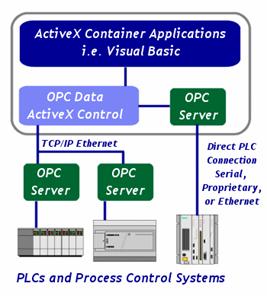
Let me present you a diagram for illustration.

Description

The design and general schema is similar to "Software Toolbox". In our schema, we use general ActiveX object, online data producer, from running OPC servers. It is not an ActiveX control in our case in the sense that we do not provide any user interface from the ActiveX object. For running this internet application, we need this middleware component – the OPC client ActiveX component. The remote server is activated through this component and server object is saved at Application object of the IIS. I tried saving in the Session object, but did not give satisfactory results. So, our PM suggested we save the server instance in the Application object. All clients then connect to this same server instance. There are some extra things we needed to do. One thing is, fiddling something in the component management services and add a COM+ application – registering our ActiveX component, LwActiveX_OPC_Client.DLL. Another thing, it’s good to configure the application to run the server at a separate process. Configuration data can be loaded in one of the two ways:
     1) Using Excel Sheet,
     2) Using Database Tables.
There are other ways also, but I decided to use these methods. If you ask me what is this configuration data, well, I store the loading preferences – the OPC items (like, device channels, location of the devices and some more). Actually, devising a relational database model is more effective and firing SQL with filters provides better modeling techniques and also provides ease of maintenance and scalability. Using the database model, I could also use SML Spy suite and using the tools options, I could generate XML data from the Access database. If I were using Oracle or SQL Server, I wouldn’t need to have use third party IDE/ software to generate this XML data. With this XML data, I can offer a more presentable and customized screen for remote viewing – for the available and configurable data. This is useful for remote administration of the configuration data.

So much said about components and loading mechanisms which are only trivial for the application. Now, what we need is a server script to invoke the remote OPC server object. We may have a Connect.ASP to do the work, which may called LoadData.ASP also before attempting the OPC connection. What I have for the implementation looks something like this:
"/bgu/Connect_viaDatabase.asp?ServerID=Lesswire.Demo_OPCServer&NextURL=/bgu/Unit1.asp"

Unit1.ASP represents the first screen panel of interest. There, we may monitor devices that are associated with Unit1. You can read industry data online at real time and you may modify data also, provided you have the access rights for modifying. What you may not know underneath is that some serial communication takes place between the OPC servers and the PC interface cards (PLCs), like Siemen’s Simatic S7-200/300, etc. This is not of relevance to the middleware component of this application. However, if you have to develop server application based on OPC specs, you would need certain level of COM port, interrupts, serial communication programming expertise. In a nutshell, embedded programming. On page refresh, item values are updated and OPC items can be written as well via the HTTP request like,
http://lw40/bgu/unit1.asp?Item1=1&Item2=1 (Depends upon client implementation)


For a detailed implementation hint and specific designs to enable web-HMIs and rendering OPC services through the internet, please have a look at the given link here.

(Ref: Softing Toolbox, was too lazy to prepare my own image file)

(featured article)

Hosted by www.Geocities.ws

1