
CAD ADVICE
Welcome to Jim's Advice Column
Featured Dilemma:
Dimensioning in paperspace


Armando,
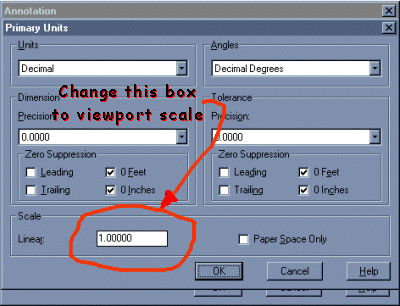
If you bring up your dimension style dialoge box
"DDIM" select "Annotation" and then "Units" and then you will see a paperspace scaling option. Its
physical location is at the bottom lefthand side of
the dialoge box (click here for location). Set your scale factor here i.e. 1=100 type in 100 1=20 type in 20. Now you can dimension in paperspace and have your dimensions reflect the model distances. Another way is to scale all of your paperspace entities up to the viewport scale factor. Scaling paperspace saves you from a lot of problems. This is one of problem that scaling paperspace up to model space solves.
Always remember this, with AutoCAD there is ALWAYS
more than one way to do things. The one that is easiest for you is the right way.
Good Luck
Jim
Jim,
The book I'm using to learn Autocad says that if the dimensions can
change it is better to do them in paper space,but I do not understand how
I can do that. Please, could you explain.
Thanks Armando


Email: [email protected]