Little Chicks Tutorial pg1
of 2
|
|
In this tutorial I will attempt to take you through step by step how I
made the little chicks you can see in the title.
I used Paint shop pro7
and KPT's5 Fiber Optix to make them, but if you don't have Kpt's then you
could substitute the FiberOptix steps for PSP's fur or Eye Candy fur.
The steps below are meant as a guide you don't have to follow them to
the letter, there are several places where you could experiment with your
own settings.
Please respect my rights as the creator of this tutorial and do not
download, duplicate, copy, upload to another server, or distribute it in
any other way, except in the form of a link to Tutorial Index page. You may however Print
a personal copy out for ease of use while following it.
Ok now
on with the tutorial:
|
| Open New Image 300x300 background
black
Make a new layer name it Body
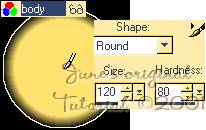
Select your paintbrush tool  ,
set paint color to a light warm yellow. In the paintbrush
tool options dialog box use the following settings: ,
set paint color to a light warm yellow. In the paintbrush
tool options dialog box use the following settings:
Shape= round
Size= 120
Hardness=80
place your paintbrush over the center of
your image and click once. You should now have a fuzzy yellow
spot.
|
 |
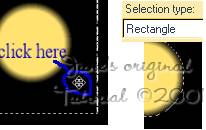
Now change to your selection tool  .
set it to Rectangle, anti alias unchecked, feather 0. .
set it to Rectangle, anti alias unchecked, feather 0.
drag out a large rectangle around your yellow spot then place your
mouse cursor just inside the rectangle and click once. you
will notice the selection has now closed in around your circle.
|
 |
| With
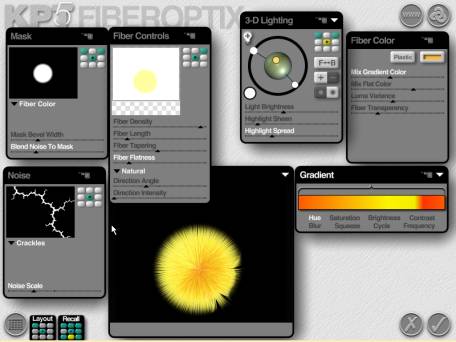
the spot still selected go to your plugins and open KPT5's
FiberOptix... |
|
|
|
| This is where you
can really have fun and experiment with your own settings if you
want. If you prefer to stick to the tutorial here are the settings I
used: |
|
|
|
|
Mask
set to: fiber color
Mask bevel width= 29%
Blend noise to mask= 27% |
|
Fiber
Controls
Density= 95%
Length= 15%
Taper=48%
Flatness= 17%
Flow style= Natural
Direction angle= -29%, Intensity= 0% |
|
Lighting
(refer to screenshot above for placement of lights)
Light brightness= 42%
Highlight sheen= 13%
Highlight spread= 29% |
|
Fiber
Color
Plastic, set color to warm yellow
Mix gradient color= 42%
Mix flat color= 68%
Luma variance= 62%
Fiber transparency=29% |
|
Noise
Crackles
Noise scale= -44% |
|
Gradient
you can experiment with your own gradients here or Download
my chick gradients
|
|