Save Dialog: Icon View
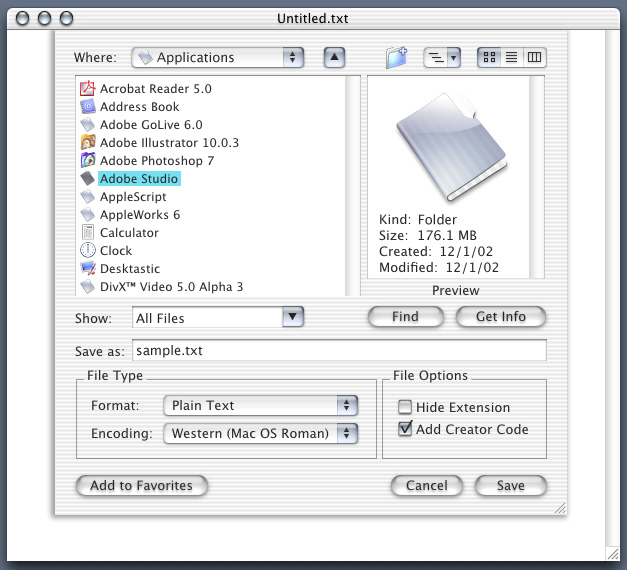
Where Pop-Up Menu Contains:
- Last Folder that was saved to appears first
- Computer- Shows Removable Media/Hard Drives (this item can be eliminated if removable media/hard drives appear in the desktop). Instead of 'Computer' it should say the Computer Name(for ex. iMac) the one that appears in the sharing pane.
- Desktop- Shows files on the desktop (again it should show the hard drive and removable media
- Home
- iDisk
- Favorites - Should be a submenu like the iDisk
- Recent Folders
New Folder:
- Required to create new folders.
Path Pop-Up Menu:
- In OS 9 you could view the hierarchy of the current folder (very handy) allowing you to move between folders easily. Adding the path menu brings this functionality back.
View Button/Item:
- Allows users to select between icon, list, and column view. The last view that was used is stored so the next time the application is opened it is the default view. In other words you select list view then close the application(or hit cancel), the setting stays on list view and does not revert to icon view next time you select open (unless of course you select icon view).
Preview:
- Preview documents, folders, and images. Also shows basic information about the file ex. file name, file size, date created etc...
Find Button:
Get Info:
- Shows the selected file in the Finder as well as activating the show info/get info command displaying more information about the file.
Show Pop-Up/Text Menu:
- Allows the user to sort files, view specific file types such as: text files, images, etc...
- The user should be able to edit this menu in order to sort the files that are displayed. Typing *w.jpg would only show the files that end with a 'w' and have a 'jpg' extension. Think of it in terms of how Unix file sorting/searching works(ex. ls *w.jpg) where you can specify the criteria with special characters like * and ?