Home | Syllabus | Access | Excel | Visual Basic | Research
VBA
Code
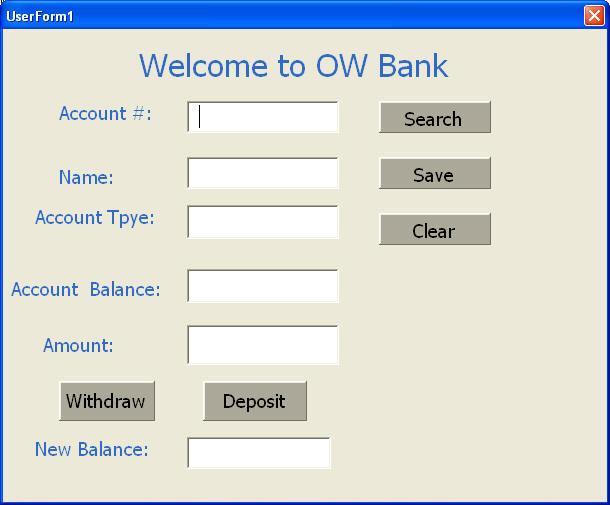
Private Sub CommandButton1_Click()
Dim Balance As Currency
Dim Amount As Currency
Dim NewBalance As Currency
Balance = Balance1.Text
Amount = Amount1.Text
NewBalance = Balance - Amount
NewBalance1.Text = FormatCurrency(NewBalance)
Cells(Account.Text, 3) = NewBalance
End Sub
Private Sub CommandButton2_Click()
Dim Balance As Currency
Dim Amount As Currency
Dim NewBalance As Currency
Balance = Balance1.Text
Amount = Amount1.Text
NewBalance = Balance + Amount
NewBalance1.Text = FormatCurrency(NewBalance)
Cells(Account.Text, 3) = NewBalance
End Sub
Private Sub CommandButton3_Click()
Cells(Account.Text, 1) = owner1.Text
Cells(Account.Text, 2) = AccountTpye1.Text
Cells(Account.Text, 3) = Balance1.Text
End Sub
Private Sub CommandButton4_Click()
Account.Text = ""
owner1.Text = ""
AccountTpye1.Text = ""
Balance1.Text = ""
Amount1.Text = ""
NewBalance1.Text = ""
End Sub
Private Sub CommandButton5_Click()
Dim frm As Form
For Each frm In Forms
Unload frm
Set frm = Nothing
Next
End
End Sub
Private Sub Label1_Click()
End Sub
Private Sub Label4_Click()
End Sub
Private Sub Search_Click()
owner1.Text = Cells(Account.Text, 1)
AccountTpye1.Text = Cells(Account.Text, 2)
Balance1.Text = Cells(Account.Text, 3)
End Sub
Private Sub UserForm_Click()
End Sub
Date
| Brenetha | Checking | $1,200.00 |
| Norman | Checking | 1000 |
| Victor | Saving | $1,420.00 |
| Olga | Checking | $1,012.00 |
| Frank | Checking | 2000 |
| Kaituo | Checking | 2000 |
| George | Saving | 1000 |
| Peter | Saving | 1000 |
| Charles | Checking | 2000 |
| Sakinah | Saving | 1000 |
| William | Checking | 2000 |
| Nicholas | Saving | 1000 |
| Jian | Saving | 2000 |