JAL Computing




|
|
|
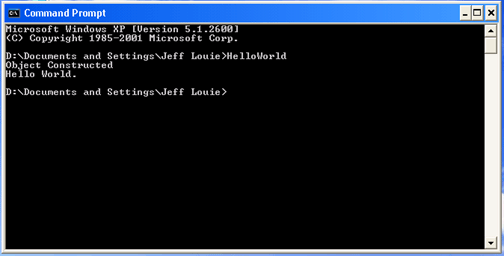
Here is the obligatory Hello World1.js console program.
Source Codeimport System; function
SayHello() { If you install the source code HelloWorld1.js in a folder "js" at the root level of the c: drive, you can compile the sample program from a MS-DOS prompt window as: c:\somePath>jsc c:\js\HelloWorld1.js The "compiled" MSIL code, HelloWorld1.exe, is placed at the level of \somePath and can be "run" using the "JIT", Just In Time, "compiler" as: Be careful. JScript is case sensitive. Learn More About JSCJSC is the JScript .NET command line compiler. It compiles the JScript source code into MSIL, the Microsoft Intermediate Language. MSIL is a platform neutral code similar to Java's byte code. Although the MSIL is an ".exe" file, it is not a native executable. Instead, the MSIL is converted on the fly by the MSIL JIT, Just In Time, "compiler", into platform specific native code "as needed" and the native code is then cached for reuse. As a result, MSIL code will not run on a client machine unless the .NET runtime is installed and available. The .NET runtime includes the CLR, Common Language Runtime (mscoree.dll), and the base class library (mscorlib.dll). Here is the JSC command line syntax: jsc [options] <source files> [[options] <source files>]] Here is a selected list of the JSC options (optional switches). To display the complete list of options type: jsc /?
Learn More About ClassesAlmost everything in .NET is based on classes. Note the key word class in the project. This tells the compiler that all of the code between the outer curly braces ({ }) is part of a class called HelloWorld. A class is a software construct that describes both properties and methods. A class is a blueprint used to construct a software object. Just like a real blueprint, you can use the information in a class to construct one or more objects. We refer to each object as an "instance" of the class. Each object is loaded into separate memory such that each object can store its own state. By analogy, you can build multiple houses from a single blueprint, and each house can have its own unique state such as color or street address. In this sample project we create an instance of the class with the call: var hw= new HelloWorld(); The variable hw is now a reference to an instance of the class HelloWorld. We can use the dot notation to invoke the SayHello() method of the class like this: hw.SayHello(); Classes lend themselves to modeling real life objects. Most real life objects have individual attributes (properties) and perform specific activities (methods). So a "Toaster" class might have a timer attribute (secondsToToast) and a toast activity (DoToast()). |
Send mail to [email protected]
with questions or comments about this web site. Copyright © 2001, 2002, 2003,
2004, 2005, 2006, 2007, 2008, 2009 ©
|