|
Menu
FAQ/Help
Utilities
MP3's
Guestbook
| |
| What
is Mp3? |
|
MP3 is an audio
compression codec that allows users to compress songs. MP3 stands for
Motion Picture Experts Group Audio Layer 3 (MPEG Audio Layer 3), and
because its ability to compress songs, it became de facto standard for
music distribution over the web.
|
| Back |
| How
can I play Mp3 files? |
| I highly recommended
Winamp because it has many functions and required little memory. Go to
the Utilities section, you will see Mp3 players available for
download. |
| Back |
| How
do I make MP3 files from my CD? |
First
Download any CD-Rippers
software and any Encoders
software.
Second
Use your CD-Rippers Software to rip the audio files on the CD to waves
(wav) format.
Third
Use your Encoders Software to convert the waves (wav) files to mp3 format. |
| Back |
| How
do I make CD Audio from my MP3 files? |
Burn MP3 to
CDs directly by using some new
CD-R Burners
such as
MP3
CD Maker.
Other method is converting your MP3 to WAV first, then burn the WAVs to
CD.
Refer to below to get WAV files from your MP3s. You can use any CD-R
Software, such as Easy CD Pro (SCSI) or Easy CD Creator,
that supports WAV files as input to burn your CDs.
|
| Back |
| How
do I decode from MP3 to Wav? |
First
Download any Decoders
software or any Players
software that supports decoding such as Winamp, Unreal Player, ScMPx, etc.
Second
Use your Decoders Software to decode the MP3 files back to waves (wav)
format
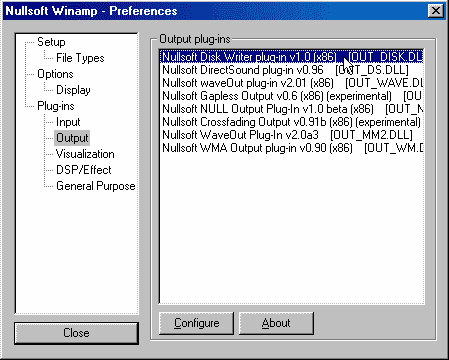
If you're using Winamp, go to preferences menu, set the output device to
WAV
Winamp 1.92 : Go to preferences, select Nullsoft Nitrane
Decoder, click Configure, set output device to WAV
Winamp 2.0+ : Go to preferences, set 'Nullsoft Disk Writer Plugin' as the
Output Plugins, and click 'Configure' to set the target wav files
directory
 |
| Back |
|
