Easy Playback
(Sierra Version) back
to homepage
This is the old version with the different layout. I keep
it just for reference.
Download(latest
version 2004-02-15) FAQ(new)
Bug fixed:
support the directory names containing spaces.
Various people have demand the Playback funtion
for SierraChart
Software. Here is an easy software to fulfill this purpose. Here are some features
of this software:
- Playback the historical data files which
are compatible with that of Ensignsoftware
- Tick by tick playback
- Playback can be done with any speed (>0), e.g.
you can do playback with 2.5 times faster than actual speed
- Temporarily pause and resume in your
playback session
- Resume your last playback session. e.g.
you are interrrupetd during your playback and you have to turn
off your pc. Next time if you would like to resume your last playback
session, then you can use this function
- Load the previous day data when
you start the playback so that you do not have to wait for more than half
of a hour, say, before your indicators appear on your chart
- The playback can be done when you are
off from the Internet
- The ensignplayback files can be obtained
(free of charge) from dacharts
and ensignftp
How to install and use it?
- In fact, there is no real installation. To
make everything convenient, make a subdirectory: playback (or other your
preferred name) under your Sierra directory.
For example: C:\SierraChart\playback. Then download and unzip the
zipped file HERE into C:\SierraChart\Playback. Finally click the icon:
Start_PB.
- After starting Start_PB, you will
find a PlayBack pull down menu on your SierraChart that looks like
this
 . If you
do not see this PlayBack pull down menu, then start your SierraChart before
starting this program
. If you
do not see this PlayBack pull down menu, then start your SierraChart before
starting this program
- Then click "PlayBack-->StartPB"
to get a pop up form
- Fill in the form, including the
time for market open, market close, ticksize, etc. where the data of your
input must be consistent with that of the ensign files. e.g. the starting
price of the ensign format file: ES031204.txt ( E-mini SP on 12/03/2004)
is 106625. So the ticksize should be 25 rather than 0.25. The time in this
file is CST. Hence the day session for ES should be 0830--1515. resume:
yes/no. After filling in the form, click next to review you input. If everything
is ok, click Next. Then you will see a new pop up window. Note: In some
ensign playback file ES may start after 0830 am CST and end before 1515.
For example, you can take a look at ES020523.txt which started at 1018 am
CST. In this case, your input of market open and close should be within
the time interval of the ensign file. So it is wise to use notepad to open the
files that you want to use before starting your playback session
- Add the two ensign playback files with
two CONSECUTIVE trading days (disregard the order of your adding).
Then click Next.
- After loading the historical data, you
can start your playback by openning your playfile C:\SierraChart\playback\easyplayback\PBDATA\pbfile.mnd
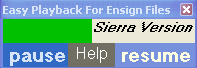 Mouse click the green area to
make the Playback window always on top; Mouse click the grey area to disable
the function
Mouse click the green area to
make the Playback window always on top; Mouse click the grey area to disable
the function- To exit the PlayBack session, simply click
x on the top right hand side
- How to uninstall the software? Easy! Just
delete the subdirectory: "playback" under your Sierra directory.
That is it!
Claim: This software is free and
for educational purpose. The author of this software takes no responsibility
of any trading loss that might occur.
Acknowledgement: The author would
like to thank various people in the bbs board of Sierra
for the discussion of the related topics.
Things to do: Although I can only work on the
programming at weekend, there are a few things are on my list: optimize
the current version; playback the tick charts on Sierra ( regardless
of the time stamps ); execution window and spot the buy/sell on Sierra similar
to that of Ensignwindows; similar version of the software for tradestation
and metastock;
Donation: If you like this software
and would like encourage me to continue working on the improvement of the current
version, then your donation is very much appreciated: