We start with the Copy of GBLayout2.java and Write GBLayout3.java , its nessasary to have older versions in case we screw up
New Version .............
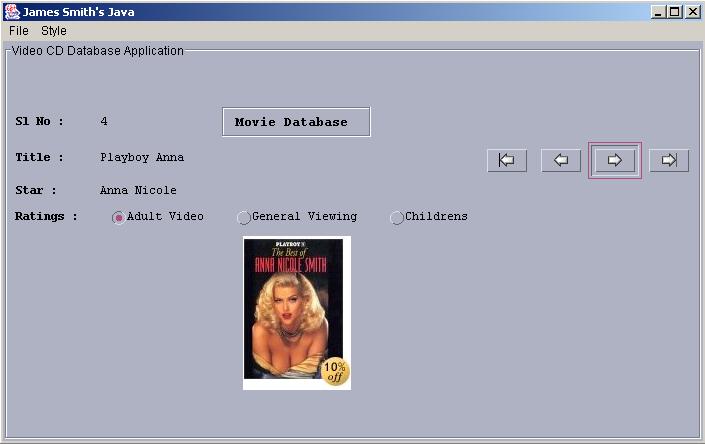
The Lines in RED indicated the way The Button Clicks are Handled
The Lines in VIOLET indicates getting the max number of Records in the Table
The Lines in BLUE indicate the way Swing Connects to DB and Loads the Data Content to the Layout
import java.awt.*;
import java.awt.event.*;
import javax.swing.*;
import javax.swing.plaf.*;
import javax.swing.plaf.metal.*;
import com.sun.java.swing.plaf.motif.*;
import com.sun.java.swing.plaf.windows.*;
import java.sql.*;

public class GBLayout3 extends JFrame
{
 JButton buttonF, buttonP, buttonN, buttonL;
 JLabel jlabel5, jlabel3, jlabel7, labelim;
 String sql;
 String driver="sun.jdbc.odbc.JdbcOdbcDriver";
 String url="jdbc:odbc:vcd";
 JRadioButton radio1, radio2, radio3;
 int LastRec=0;
 int CurrentRecord=1;
 public static void main(String args[])
 {
  GBLayout3 app = new GBLayout3();
 }
 public GBLayout3()
 {
  super("James Smith's Java");
  setupMenuBar();
  setup();
  pack();
  show();
 }
 // Setting Up Menu Bar ---------------------------------------------------
 void setupMenuBar()
 {
  MenuBar menuBar = new MenuBar();
  Menu fileMenu = new Menu("File");
  MenuItem fileExit = new MenuItem("Exit");
  fileExit.addActionListener(new MenuItemHandler());
  fileMenu.add(fileExit);
  menuBar.add(fileMenu);
  Menu styleMenu = new Menu("Style");
  MenuItem styleWin = new MenuItem("Windows");
  styleWin.addActionListener(new MenuItemHandler());
  styleMenu.add(styleWin);
  MenuItem styleMotif = new MenuItem("Motif");
  styleMotif.addActionListener(new MenuItemHandler());
  styleMenu.add(styleMotif);
  MenuItem styleMetal = new MenuItem("Metal");
  styleMetal.addActionListener(new MenuItemHandler());
  styleMenu.add(styleMetal);
  menuBar.add(styleMenu);
  setMenuBar(menuBar);
 }
 // Handling Menu Items --------------------------------------------------
 MetalLookAndFeel metalLF = new MetalLookAndFeel();
 MotifLookAndFeel motifLF = new MotifLookAndFeel();
 WindowsLookAndFeel windowsLF = new WindowsLookAndFeel();
 class MenuItemHandler implements ActionListener
 {
  public void actionPerformed(ActionEvent ev)
 {
  String s=ev.getActionCommand();
  if(s=="Exit")
  {
   System.exit(0);
  }
  else if(s=="Windows")
  {
   try
   {
    UIManager.setLookAndFeel(windowsLF);
    SwingUtilities.updateComponentTreeUI(GBLayout3.this);
   }
   catch(Exception e)
   {
    System.out.println("Could not Load Windows Look n Feel");
   }
  }
  else if(s=="Motif")
  {
   try
   {
    UIManager.setLookAndFeel(motifLF);
    SwingUtilities.updateComponentTreeUI(GBLayout3.this);
   }
   catch(Exception e)
  {
   System.out.println("Could not Load Motif Look n Feel");
  }
 }
 else if(s=="Metal")
 {
 try
 {
  UIManager.setLookAndFeel(metalLF);
  SwingUtilities.updateComponentTreeUI(GBLayout3.this);
 }
 catch(Exception e)
 {
  System.out.println("Could not Load Metal Look n Feel");
 }
}
}
}
public void setup()
{
 Font dataFont = new Font("courier new",Font.PLAIN,12);
 Font titleFont = new Font("courier new",Font.BOLD,14);
 Font titleFont1 = new Font("courier new",Font.BOLD,12);

 GridBagLayout gridbag = new GridBagLayout();
 GridBagConstraints c = new GridBagConstraints();
 c.fill = GridBagConstraints.HORIZONTAL;

 Container contentPane = getContentPane();
 contentPane.setLayout(gridbag);

 JPanel jpanel1 = new JPanel();
 jpanel1 = new JPanel()
 {
  public Dimension getPreferredSize()
 {
  Dimension size = super.getPreferredSize();
  size.width = 700;
  size.height = 400;
  return size;
 }
};

 jpanel1.setBorder
 (BorderFactory.
 createTitledBorder(BorderFactory.createEtchedBorder(),"Video CD Database Application"));
 jpanel1.setLayout(gridbag);

 // Row 1 Components -------------------------------------------
 JLabel jlabel4 = new JLabel(" Sl No : ");
 jlabel4.setFont(titleFont1);
 c.fill = GridBagConstraints.BOTH;
 c.ipady = 1;
 c.ipadx = 1;
 c.gridx = 0;
 c.gridy = 0;
 gridbag.setConstraints(jlabel4, c);
 jpanel1.add(jlabel4);

 jlabel5 = new JLabel("1");
 jlabel5.setFont(dataFont);
 c.fill = GridBagConstraints.BOTH;
 c.ipady = 1;
 c.ipadx = 1;
 c.gridx = 1;
 c.gridy = 0;
 gridbag.setConstraints(jlabel5, c);
 jpanel1.add(jlabel5);

 JLabel jlabel1 = new JLabel(" Movie Database  ");
 jlabel1.setBorder(BorderFactory.createTitledBorder(BorderFactory.createEtchedBorder()));
 jlabel1.setFont(titleFont);
 c.fill = GridBagConstraints.CENTER;
 c.weightx = 0.5;
 c.gridx = 2;       	//3rd Col  -- Very Important
 c.gridy = 0;       	//0th Row  -- Very Important
 gridbag.setConstraints(jlabel1, c);
 jpanel1.add(jlabel1);

 // Row 2 Components -------------------------------------------
 JLabel jlabel2 = new JLabel(" Title : ");
 jlabel2.setFont(titleFont1);
 c.fill = GridBagConstraints.BOTH;
 c.ipady = 1;
 c.ipadx = 1;
 c.gridx = 0;
 c.gridy = 1;
 gridbag.setConstraints(jlabel2, c);
 jpanel1.add(jlabel2);

 jlabel3 = new JLabel("Guns of Navrone");
 jlabel3.setFont(dataFont);
 c.fill = GridBagConstraints.BOTH;
 c.ipady = 1;
 c.ipadx = 1;
 c.gridx = 1;
 c.gridy = 1;
 gridbag.setConstraints(jlabel3, c);
 jpanel1.add(jlabel3);

 buttonF = new JButton(new ImageIcon("first.gif"));
 c.fill = GridBagConstraints.BOTH;
 c.ipady = 1;
 c.ipadx = 1;
 c.gridx = 4;
 c.gridy = 1;
 c.insets = new Insets(5,0,0,0);
 buttonF.addActionListener(new ButtonHandler());
 gridbag.setConstraints(buttonF, c);
 jpanel1.add(buttonF);

 buttonP = new JButton(new ImageIcon("back.gif"));
 c.fill = GridBagConstraints.BOTH;
 c.ipady = 1;
 c.ipadx = 1;
 c.gridx = 5;
 c.gridy = 1;
 buttonP.addActionListener(new ButtonHandler());
 gridbag.setConstraints(buttonP, c);
 jpanel1.add(buttonP);

 buttonN = new JButton(new ImageIcon("next.gif"));
 c.fill = GridBagConstraints.BOTH;
 c.ipady = 1;
 c.ipadx = 1;
 c.gridx = 6;
 c.gridy = 1;
 buttonN.addActionListener(new ButtonHandler());
 gridbag.setConstraints(buttonN, c);
 jpanel1.add(buttonN);

 buttonL = new JButton(new ImageIcon("last.gif"));
 c.fill = GridBagConstraints.BOTH;
 c.ipady = 1;
 c.ipadx = 1;
 c.gridx = 7;
 c.gridy = 1;
 buttonL.addActionListener(new ButtonHandler());
 gridbag.setConstraints(buttonL, c);
 jpanel1.add(buttonL);

 //Row 3 Components -----------------------------------------
 JLabel jlabel6 = new JLabel(" Star : ");
 jlabel6.setFont(titleFont1);
 c.fill = GridBagConstraints.BOTH;
 c.insets = new Insets(5,0,0,0);
 c.ipady = 1;
 c.ipadx = 1;
 c.gridx = 0;
 c.gridy = 2;
 gridbag.setConstraints(jlabel6, c);
 jpanel1.add(jlabel6);

 jlabel7 = new JLabel("Gregory Peck");
 jlabel7.setFont(dataFont);
 c.fill = GridBagConstraints.BOTH;
 c.ipady = 1;
 c.ipadx = 1;
 c.gridx = 1;
 c.gridy = 2;
 gridbag.setConstraints(jlabel7, c);
 jpanel1.add(jlabel7);

 //Row 4 ---------------------------------------------------
 ButtonGroup bg = new ButtonGroup();
 JLabel jlabel8 = new JLabel(" Ratings : ");
 jlabel8.setFont(titleFont1);
 c.fill = GridBagConstraints.BOTH;
 c.insets = new Insets(5,0,0,0);
 c.ipady = 1;
 c.ipadx = 1;
 c.gridx = 0;
 c.gridy = 3;
 gridbag.setConstraints(jlabel8, c);
 jpanel1.add(jlabel8);

 radio1 = new JRadioButton("Adult Video",false);
 radio1.setFont(dataFont);
 c.fill = GridBagConstraints.WEST;
 c.ipady = 1;
 c.ipadx = 1;
 c.gridx = 1;
 c.gridy = 3;
 bg.add(radio1);
 gridbag.setConstraints(radio1, c);
 jpanel1.add(radio1);

 radio2 = new JRadioButton("General Viewing",true);
 radio2.setFont(dataFont);
 c.fill = GridBagConstraints.WEST;
 c.ipady = 1;
 c.ipadx = 1;
 c.gridx = 2;
 c.gridy = 3;
 bg.add(radio2);
 gridbag.setConstraints(radio2, c);
 jpanel1.add(radio2);

 radio3 = new JRadioButton("Childrens",false);
 radio3.setFont(dataFont);
 c.fill = GridBagConstraints.WEST;
 c.ipady = 1;
 c.ipadx = 1;
 c.gridx = 3;
 c.gridy = 3;
 bg.add(radio3);
 gridbag.setConstraints(radio3, c);
 jpanel1.add(radio3);

 // Row 5 -------------------------------------------
 labelim = new JLabel(new ImageIcon("1.jpg"));
 labelim.setFont(dataFont);
 c.fill = GridBagConstraints.BOTH;
 c.ipady = 1;
 c.ipadx = 1;
 labelim.setPreferredSize(new Dimension(105, 154));
 c.gridx = 2;
 c.gridy = 4;
 gridbag.setConstraints(labelim, c);
 jpanel1.add(labelim);

 addWindowListener(new WindowEventHandler());
 contentPane.add(jpanel1);
}
 // Handle Button Clicks First, Prev, Next , Last ----------------
 int getLastRecord()
 {
  try
  {
   Class.forName(driver);
   Connection connection=DriverManager.getConnection(url);
   Statement statement = connection.createStatement();
   boolean hasResults = statement.execute("SELECT * FROM vcdrecords");
   LastRec=0;
   if(hasResults)
   {
     ResultSet r = statement.getResultSet();
     ResultSetMetaData rmeta = r.getMetaData();
     while(r.next())
     {
      LastRec++;
     }
    }
 }
 catch(Exception ex)
 {

 }
return LastRec;
}

void accessDB(String sql)
{
 try
 {
  Class.forName(driver);
  Connection connection=DriverManager.getConnection(url);
  Statement statement = connection.createStatement();
  System.out.println("SQL is After : "+sql);
  boolean hasResults = statement.execute(sql);
  if(hasResults)
  {
   ResultSet result = statement.getResultSet();
   if(result!=null)
   {
    displayResults(result);
   }
   connection.close();
 }
 }
 catch(Exception ex)
 {

 }
}
void displayResults(ResultSet r) throws SQLException
{
 ResultSetMetaData rmeta = r.getMetaData();
 int foundrec = 0;
 int numColumns=rmeta.getColumnCount();
 int SlNo=0;
 String SlNo_txt="";
 String Title="";
 String Star="";
 int Ratings=0;
 String imagename="";
 while(r.next())
 {
  SlNo=r.getInt(2);
  SlNo_txt=Integer.toString(SlNo);
  Title=r.getString(3);
  Star=r.getString(4);
  Ratings=r.getInt(5);
  imagename=r.getString(6);
}
 jlabel5.setText(SlNo_txt);
 jlabel3.setText(Title);
 jlabel7.setText(Star);
 if(Ratings==1)
 {
  radio1.doClick();
 }
 else if(Ratings==2)
 {
  radio2.doClick();
 }
 else
 {
  radio3.doClick();
 }
 labelim.setIcon(new ImageIcon(imagename));
}
class ButtonHandler implements ActionListener
{
  public void actionPerformed(ActionEvent ev)
 {
  if(ev.getSource()== buttonF)
  {
   CurrentRecord=1;
   sql = "SELECT * FROM vcdrecords WHERE index="+CurrentRecord;
   accessDB(sql);
   buttonF.setEnabled(false);
   buttonP.setEnabled(false);
   buttonN.setEnabled(true);
  buttonL.setEnabled(true);
 }
 else if(ev.getSource()== buttonP)
 {
  if(CurrentRecord>1)
  {
    CurrentRecord--;
    sql = "SELECT * FROM vcdrecords WHERE index="+CurrentRecord;
    accessDB(sql);
    buttonF.setEnabled(true);
    buttonP.setEnabled(true);
    buttonN.setEnabled(true);
    buttonL.setEnabled(true);
 }
 else
 {
  buttonF.setEnabled(false);
  buttonP.setEnabled(false);
 }
}
else if(ev.getSource()== buttonN)
{
 CurrentRecord++;
 sql = "SELECT * FROM vcdrecords WHERE index="+CurrentRecord;
 accessDB(sql);
 int myLastRec = getLastRecord();
 if(CurrentRecord>=myLastRec)
 {
  buttonN.setEnabled(false);
  buttonL.setEnabled(false);
}
else
{
 buttonF.setEnabled(true);
 buttonN.setEnabled(true);
 buttonP.setEnabled(true);
 buttonL.setEnabled(true);
}

}
else if(ev.getSource()== buttonL)
{
 CurrentRecord = getLastRecord();
 sql = "SELECT * FROM vcdrecords WHERE index="+CurrentRecord;
 accessDB(sql);
 buttonF.setEnabled(true);
 buttonP.setEnabled(true);
 buttonN.setEnabled(false);
 buttonL.setEnabled(false);
}
}
}
class WindowEventHandler extends WindowAdapter
{
 public void windowClosing(WindowEvent e)
 {
  System.exit(0);
 }
}
}
|




 If you like this article and/or code
  Kind Regards - James Smith