we start of with the copy of GBLayout4 and make it GBLayout5.java
Comments are included so it makes easy to understand such a Big code
 import java.awt.*;
 import java.awt.event.*;
 import javax.swing.*;
 import javax.swing.plaf.*;
 import javax.swing.plaf.metal.*;
 import com.sun.java.swing.plaf.motif.*;
 import com.sun.java.swing.plaf.windows.*;
 import java.sql.*;


 public class GBLayout5 extends JFrame
 {
  JButton buttonF, buttonP, buttonN, buttonL, getPicture, buttonPrint, buttonSave;
  JLabel jlabel5, jlabel3, jlabel7, jlabel8, labelim;
  JRadioButton radio1, radio2, radio3, radio1a, radio2a, radio3a;
  JTextField text_title, text_star,  text_pic;
  FileDialog dialog;

  String sql, dialogmessage;
  String driver="sun.jdbc.odbc.JdbcOdbcDriver";
  String url="jdbc:odbc:vcd";
  String radiosel="";
  String dialogheader = "DATABASE UPDATED";

  int LastRec=0;
  int CurrentRecord=1;
  int radiosel_int=2;
  int dialogtype = JOptionPane.PLAIN_MESSAGE;

  JTabbedPane tabbedPane = new JTabbedPane();
  final static String tab1header = " Browse Database ";
  final static String tab2header = " Add New CD ";
  Container contentPane = getContentPane();

  GridBagLayout gridbag = new GridBagLayout();
  GridBagConstraints c = new GridBagConstraints();

  Font dataFont = new Font("courier new",Font.PLAIN,12);
  Font titleFont = new Font("courier new",Font.BOLD,14);
  Font titleFont1 = new Font("courier new",Font.BOLD,12);

  ActionListener rlistener = new RadioListener();


 //Declare Main ---------------------------------------------------------------------
 public static void main(String args[])
 {
   GBLayout5 app = new GBLayout5();
 }

 //Declare constructor --------------------------------------------------------------
 public GBLayout5()
 {
   super("James Smith's Java : [email protected] ");
   setupMenuBar();
   setup();
   pack();
   show();
 }

 //Ask for tab1 to be loaded ---------------------------------------------------------
 void setup()
 {
   setuptab1();
   moveFirst();
   setuptab2();
   contentPane.add(tabbedPane, BorderLayout.CENTER);
 }


 // Setting Up Menu Bar ---------------------------------------------------------------
 void setupMenuBar()
 {
   MenuBar menuBar = new MenuBar();
   Menu fileMenu = new Menu("File");
     MenuItem fileExit = new MenuItem("Exit");
       fileExit.addActionListener(new MenuItemHandler());
       fileMenu.add(fileExit);
       menuBar.add(fileMenu);
   Menu styleMenu = new Menu("Style");
      MenuItem styleWin = new MenuItem("Windows");
       styleWin.addActionListener(new MenuItemHandler());
       styleMenu.add(styleWin);
      MenuItem styleMotif = new MenuItem("Motif");
       styleMotif.addActionListener(new MenuItemHandler());
       styleMenu.add(styleMotif);
      MenuItem styleMetal = new MenuItem("Metal");
       styleMetal.addActionListener(new MenuItemHandler());
       styleMenu.add(styleMetal);
       menuBar.add(styleMenu);
   setMenuBar(menuBar);
 }

 // Handling Menu Items --------------------------------------------------------------
 MetalLookAndFeel metalLF = new MetalLookAndFeel();
 MotifLookAndFeel motifLF = new MotifLookAndFeel();
 WindowsLookAndFeel windowsLF = new WindowsLookAndFeel();
 class MenuItemHandler implements ActionListener
 {
   public void actionPerformed(ActionEvent ev)
   {
    String s=ev.getActionCommand();
    if(s=="Exit")
    {
     System.exit(0);
    }
    else if(s=="Windows")
    {
      try
      {
        UIManager.setLookAndFeel(windowsLF);
        SwingUtilities.updateComponentTreeUI(GBLayout5.this);
      }
      catch(Exception e)
      {
        System.out.println("Could not Load Windows Look n Feel");
      }
 }
 else if(s=="Motif")
 {
    try
    {
      UIManager.setLookAndFeel(motifLF);
      SwingUtilities.updateComponentTreeUI(GBLayout5.this);
    }
    catch(Exception e)
    {
      System.out.println("Could not Load Motif Look n Feel");
    }
 }
 else if(s=="Metal")
 {
   try
   {
      UIManager.setLookAndFeel(metalLF);
      SwingUtilities.updateComponentTreeUI(GBLayout5.this);
   }
   catch(Exception e)
   {
     System.out.println("Could not Load Metal Look n Feel");
   }
 }
}
}


//Using GridBag Layout Setup Tab1 -----------------------------------------------------
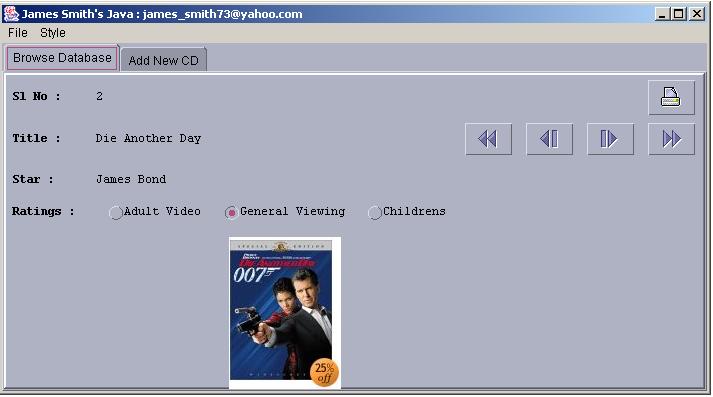
public void setuptab1()
{
 JPanel jpanel1 = new JPanel();
 jpanel1 = new JPanel()
 {
   public Dimension getPreferredSize()
   {
    Dimension size = super.getPreferredSize();
    size.width = 700;
    size.height = 320;
    return size;
   }
  };
 jpanel1.setBorder(BorderFactory.createRaisedBevelBorder());
 jpanel1.setLayout(gridbag);
 c.fill = GridBagConstraints.HORIZONTAL;

 // Row 1 Components -----------------------------------------------------------------
 JLabel jlabel4 = new JLabel(" Sl No : ");
  jlabel4.setFont(titleFont1);
  c.fill = GridBagConstraints.BOTH;
  c.weightx = 0.1;
  c.ipady = 2;
  c.ipadx = 2;
  c.gridx = 0;
  c.gridy = 0;
  gridbag.setConstraints(jlabel4, c);
 jpanel1.add(jlabel4);

 jlabel5 = new JLabel(" ");
  jlabel5.setFont(dataFont);
  c.fill = GridBagConstraints.BOTH;
  c.gridx = 1;
  c.gridy = 0;
  gridbag.setConstraints(jlabel5, c);
 jpanel1.add(jlabel5);

 buttonPrint = new JButton(new ImageIcon("printer.gif"));
  c.gridx = 7;
  c.gridy = 0;
  buttonPrint.addActionListener(new ButtonHandler());
  gridbag.setConstraints(buttonPrint, c);
 jpanel1.add(buttonPrint);

 // Row 2 Components -----------------------------------------------------------------
 JLabel jlabel2 = new JLabel(" Title : ");
  jlabel2.setFont(titleFont1);
  c.fill = GridBagConstraints.BOTH;
  c.gridx = 0;
  c.gridy = 1;
  gridbag.setConstraints(jlabel2, c);
 jpanel1.add(jlabel2);

 jlabel3 = new JLabel(" ");
  jlabel3.setFont(dataFont);
  c.fill = GridBagConstraints.BOTH;
  c.gridx = 1;
  c.gridy = 1;
  gridbag.setConstraints(jlabel3, c);
 jpanel1.add(jlabel3);

 buttonF = new JButton(new ImageIcon("first.gif"));
  c.fill = GridBagConstraints.BOTH;
  c.gridx = 4;
  c.gridy = 1;
  buttonF.addActionListener(new ButtonHandler());
  gridbag.setConstraints(buttonF, c);
 jpanel1.add(buttonF);

 buttonP = new JButton(new ImageIcon("back.gif"));
  c.fill = GridBagConstraints.BOTH;
  c.gridx = 5;
  c.gridy = 1;
  buttonP.addActionListener(new ButtonHandler());
  gridbag.setConstraints(buttonP, c);
 jpanel1.add(buttonP);

 buttonN = new JButton(new ImageIcon("next.gif"));
  c.fill = GridBagConstraints.BOTH;
  c.gridx = 6;
  c.gridy = 1;
  buttonN.addActionListener(new ButtonHandler());
  gridbag.setConstraints(buttonN, c);
 jpanel1.add(buttonN);

 buttonL = new JButton(new ImageIcon("last.gif"));
  c.fill = GridBagConstraints.BOTH;
  c.gridx = 7;
  c.gridy = 1;
  buttonL.addActionListener(new ButtonHandler());
  gridbag.setConstraints(buttonL, c);
 jpanel1.add(buttonL);

 //Row 3 Components -----------------------------------------------------------------
 JLabel jlabel6 = new JLabel(" Star : ");
  jlabel6.setFont(titleFont1);
  c.fill = GridBagConstraints.BOTH;
  c.insets = new Insets(10,0,0,0);
  c.gridx = 0;
  c.gridy = 2;
  gridbag.setConstraints(jlabel6, c);
 jpanel1.add(jlabel6);

 jlabel7 = new JLabel(" ");
  jlabel7.setFont(dataFont);
  c.fill = GridBagConstraints.BOTH;
  c.gridx = 1;
  c.gridy = 2;
  gridbag.setConstraints(jlabel7, c);
 jpanel1.add(jlabel7);

 //Row 4 ----------------------------------------------------------------------------
 ButtonGroup bg = new ButtonGroup();
  JLabel jlabel8 = new JLabel(" Ratings : ");
  jlabel8.setFont(titleFont1);
  c.fill = GridBagConstraints.BOTH;
  c.gridx = 0;
  c.gridy = 3;
  gridbag.setConstraints(jlabel8, c);
 jpanel1.add(jlabel8);

 radio1 = new JRadioButton("Adult Video",false);
  radio1.setFont(dataFont);
  c.fill = GridBagConstraints.WEST;
  c.gridx = 1;
  c.gridy = 3;
  bg.add(radio1);
  gridbag.setConstraints(radio1, c);
 jpanel1.add(radio1);

 radio2 = new JRadioButton("General Viewing",true);
  radio2.setFont(dataFont);
  c.fill = GridBagConstraints.WEST;
  c.gridx = 2;
  c.gridy = 3;
  bg.add(radio2);
  gridbag.setConstraints(radio2, c);
 jpanel1.add(radio2);

 radio3 = new JRadioButton("Childrens",false);
  radio3.setFont(dataFont);
  c.fill = GridBagConstraints.WEST;
  c.gridx = 3;
  c.gridy = 3;
  bg.add(radio3);
  gridbag.setConstraints(radio3, c);
 jpanel1.add(radio3);

 // Row 5 -----------------------------------------------------------------------------
 labelim = new JLabel(new ImageIcon("1.jpg"));
  labelim.setFont(dataFont);
  c.fill = GridBagConstraints.BOTH;
  c.gridx = 2;
  c.gridy = 4;
  labelim.setPreferredSize(new Dimension(105, 154));
  gridbag.setConstraints(labelim, c);
 jpanel1.add(labelim);

 addWindowListener(new WindowEventHandler());
 tabbedPane.addTab(tab1header, jpanel1);
}


 //Setup Tab2 to Add Records in the Database --------------------------------------------
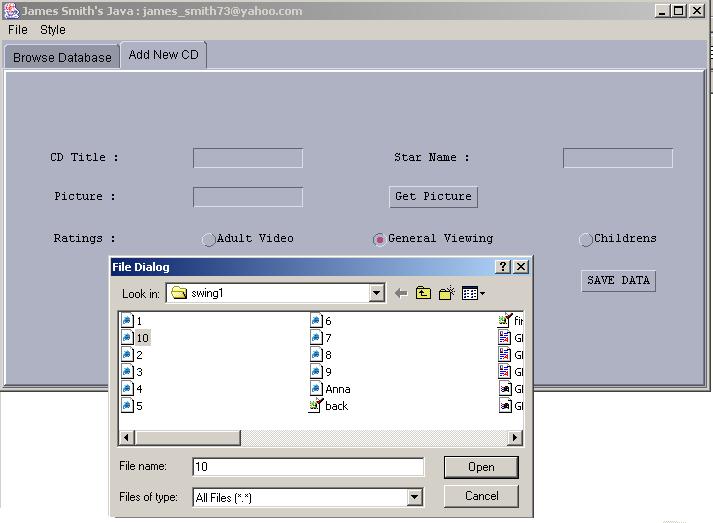
 public void setuptab2()
 {
  JPanel jpanel2 = new JPanel();
  jpanel2 = new JPanel()
  {
   public Dimension getPreferredSize()
   {
   	 Dimension size = super.getPreferredSize();
   	 size.width = 700;
     size.height = 320;
   	 return size;
   }
  };
  jpanel2.setBorder(BorderFactory.createRaisedBevelBorder());
  jpanel2.setLayout(gridbag);

  // Row 1 Components ------------------------------------------------------------------
  JLabel jlabel4a = new JLabel(" CD Title : ");
   jlabel4a.setFont(dataFont);
   c.insets = new Insets(0,10,10,0);
   c.fill = GridBagConstraints.EAST;
   c.gridx = 0;
   c.gridy = 0;
   gridbag.setConstraints(jlabel4a, c);
  jpanel2.add(jlabel4a);

 text_title =  new JTextField(10);
   c.fill = GridBagConstraints.EAST;
   c.insets = new Insets(0,10,10,0);
   c.gridx = 1;
   c.gridy = 0;
   gridbag.setConstraints(text_title, c);
 jpanel2.add(text_title);

 JLabel jlabel5a = new JLabel(" Star Name : ");
  jlabel5a.setFont(dataFont);
  c.fill = GridBagConstraints.EAST;
  c.insets = new Insets(0,10,10,0);
  c.gridx = 2;
  c.gridy = 0;
  gridbag.setConstraints(jlabel5a, c);
  jpanel2.add(jlabel5a);

 text_star =  new JTextField(10);
  c.fill = GridBagConstraints.EAST;
  c.insets = new Insets(0,10,10,0);
  c.gridx = 3;
  c.gridy = 0;
  gridbag.setConstraints(text_star, c);
 jpanel2.add(text_star);

 // Row 2 -----------------------------------------------------------------------------
 JLabel jlabel6a = new JLabel(" Picture : ");
  jlabel6a.setFont(dataFont);
  c.fill = GridBagConstraints.EAST;
  c.insets = new Insets(0,10,10,0);
  c.gridx = 0;
  c.gridy = 1;
  gridbag.setConstraints(jlabel6a, c);
 jpanel2.add(jlabel6a);

 text_pic =  new JTextField(10);
  c.fill = GridBagConstraints.EAST;
  c.insets = new Insets(0,10,10,0);
  c.gridx = 1;
  c.gridy = 1;
  gridbag.setConstraints(text_pic, c);
 jpanel2.add(text_pic);

 getPicture = new JButton("Get Picture");
  getPicture.setFont(dataFont);
  c.fill = GridBagConstraints.EAST;
  c.gridx = 2;
  c.gridy = 1;
  getPicture.addActionListener(new ButtonHandler());
  gridbag.setConstraints(getPicture, c);
 jpanel2.add(getPicture);

 // Row 3 ----------------------------------------------------------------------------
 ButtonGroup bg2 = new ButtonGroup();
  JLabel jlabel8a = new JLabel(" Ratings : ");
  jlabel8a.setFont(dataFont);
  c.fill = GridBagConstraints.WEST;
  c.gridx = 0;
  c.gridy = 2;
  gridbag.setConstraints(jlabel8a, c);
 jpanel2.add(jlabel8a);

 radio1a = new JRadioButton("Adult Video",false);
  radio1a.setFont(dataFont);
  c.fill = GridBagConstraints.WEST;
  c.gridx = 1;
  c.gridy = 2;
  bg2.add(radio1a);
  radio1a.addActionListener(rlistener);
  gridbag.setConstraints(radio1a, c);
 jpanel2.add(radio1a);

 radio2a = new JRadioButton("General Viewing",true);
  radio2a.setFont(dataFont);
  c.fill = GridBagConstraints.WEST;
  c.gridx = 2;
  c.gridy = 2;
  bg2.add(radio2a);
  radio2a.addActionListener(rlistener);
  gridbag.setConstraints(radio2a, c);
 jpanel2.add(radio2a);

 radio3a = new JRadioButton("Childrens",false);
  radio3a.setFont(dataFont);
  c.fill = GridBagConstraints.WEST;
  c.gridx = 3;
  c.gridy = 2;
  bg2.add(radio3a);
  radio3a.addActionListener(rlistener);
  gridbag.setConstraints(radio3a, c);
 jpanel2.add(radio3a);

 // Row 4 ----------------------------------------------------------------------------
 buttonSave = new JButton("SAVE DATA");
  c.gridx = 3;
  c.gridy = 3;
  buttonSave.addActionListener(new ButtonHandler());
  gridbag.setConstraints(buttonSave, c);
  jpanel2.add(buttonSave);

 addWindowListener(new WindowEventHandler());
 tabbedPane.addTab(tab2header, jpanel2);
}


 // Get Pointer to Last Record --------------------------------------------------------
 int getLastRecord()
 {
  try
  {
   Class.forName(driver);
   Connection connection=DriverManager.getConnection(url);
   Statement statement = connection.createStatement();
   boolean hasResults = statement.execute("SELECT * FROM vcdrecords");
   LastRec=0;
   if(hasResults)
   {
     ResultSet r = statement.getResultSet();
     ResultSetMetaData rmeta = r.getMetaData();
     while(r.next())
     {
      LastRec++;
     }
   }
 }
 catch(Exception ex)
 {

 }
 return LastRec;
}


// GO TO First Record --------------------------------------------------------------------
 void moveFirst()
 {
  CurrentRecord=1;
  sql = "SELECT * FROM vcdrecords WHERE index="+CurrentRecord;
  accessDB(sql);
  //Enable Next and Last , Disable First and Previous
  buttonF.setEnabled(false);
  buttonP.setEnabled(false);
  buttonN.setEnabled(true);
  buttonL.setEnabled(true);
 }


// GO TO Prev Record by moving decreasing pointer by 1 ------------------------------------
 void movePrev()
 {
  if(CurrentRecord>1)
  {
   CurrentRecord--;
   sql = "SELECT * FROM vcdrecords WHERE index="+CurrentRecord;
   accessDB(sql);
   buttonF.setEnabled(true);
   buttonP.setEnabled(true);
   buttonN.setEnabled(true);
   buttonL.setEnabled(true);
 }
 else
 {
   buttonF.setEnabled(false);
   buttonP.setEnabled(false);
 }
}


// GO TO Next Record by moving increasing pointer by 1 ---------------------------------
void moveNext()
{
 CurrentRecord++;
 sql = "SELECT * FROM vcdrecords WHERE index="+CurrentRecord;
 accessDB(sql);
 int myLastRec = getLastRecord();
 if(CurrentRecord>=myLastRec)
 {
  buttonN.setEnabled(false);
  buttonL.setEnabled(false);
 }
 else
 {
  buttonF.setEnabled(true);
  buttonN.setEnabled(true);
  buttonP.setEnabled(true);
  buttonL.setEnabled(true);
 }
}


 //GO TO Last Record Take pointer from getLastRecord() ------------------------------
 void moveLast()
 {
  CurrentRecord = getLastRecord();
  sql = "SELECT * FROM vcdrecords WHERE index="+CurrentRecord;
  accessDB(sql);
  buttonF.setEnabled(true);
  buttonP.setEnabled(true);
  buttonN.setEnabled(false);
  buttonL.setEnabled(false);
 }


// Access Database to Show Record as Per SQL -------------------------------------------
 void accessDB(String sql)
 {
  try
  {
   Class.forName(driver);
   Connection connection=DriverManager.getConnection(url);
   Statement statement = connection.createStatement();
   System.out.println("Current SQL is : "+sql);
   boolean hasResults = statement.execute(sql);
   if(hasResults)
   {
     ResultSet result = statement.getResultSet();
     if(result!=null)
     {
      displayResults(result);
     }
     connection.close();
   }
  }
  catch(Exception ex)
 {

 }
}
//Once u Get Result Populate Data on Screen ------------------------------------------
 void displayResults(ResultSet r) throws SQLException
 {
  ResultSetMetaData rmeta = r.getMetaData();
  int foundrec = 0;
  int numColumns=rmeta.getColumnCount();
  int SlNo=0;
  String SlNo_txt="";
  String Title="";
  String Star="";
  int Ratings=0;
  String imagename="";
  while(r.next())
  {
   SlNo=r.getInt(2);
   SlNo_txt=Integer.toString(SlNo);
   Title=r.getString(3);
   Star=r.getString(4);
   Ratings=r.getInt(5);
   imagename=r.getString(6);
 }
 jlabel5.setText(SlNo_txt);
 jlabel3.setText(Title);
 jlabel7.setText(Star);
 if(Ratings==1)
 {
   radio1.doClick();
 }
 else if(Ratings==2)
 {
   radio2.doClick();
 }
 else
 {
  radio3.doClick();
 }
 labelim.setIcon(new ImageIcon(imagename));
}


 //Use Java's FileDialog to Browse the exisiting files --------------------------------
 void openFile()
 {
  dialog = new FileDialog(this,"File Dialog");
  dialog.setVisible(true);
  String filename = dialog.getFile();
  text_pic.setText(filename);
 }


 //When Print Button is Pressed Print the Contents -------------------------------------
 void printFile()
 {
  PrintJob printjob = getToolkit().getPrintJob(this,"Printing....",null);
 }


 //Save Data means insert the CD Data into Database ------------------------------------
 void saveData()
 {
  try
  {
   Class.forName(driver);
   Connection connection=DriverManager.getConnection(url);
   Statement statement = connection.createStatement();
   int lastrec_now = getLastRecord();
   lastrec_now = lastrec_now+1;
     sql = "INSERT INTO vcdrecords (SlNo, Title, Star, Ratings, Picture)
     VALUES ("+lastrec_now+",'"+text_title.getText()+"',
     '"+text_star.getText()+"',"+radiosel_int+",'"+text_pic.getText()+"')";
   System.out.println("sql is : "+sql);
   statement.executeUpdate(sql);
   connection.close();
  }
  catch(Exception ex)
  {

  }
  saySaved();
 }


 //After Inserting Data , Display Message , Clean the Textfields --------------------
 void saySaved()
 {
  dialogmessage = " "+text_title.getText().toUpperCase()+" Record is Saved ";
  dialogtype = JOptionPane.INFORMATION_MESSAGE;
   JOptionPane.
   showMessageDialog((Component) null, dialogmessage, dialogheader, dialogtype);
  text_title.setText(" ");
  text_star.setText(" ");
  text_pic.setText(" ");
  radio2a.doClick();
 }


 //Catch All which Button where clicked :-) --------------------------------------------
 class ButtonHandler implements ActionListener
 {
  public void actionPerformed(ActionEvent ev)
  {
   if(ev.getSource()== buttonF)
   {
    moveFirst();
   }
   else if(ev.getSource()== buttonP)
   {
    movePrev();
   }
   else if(ev.getSource()== buttonN)
   {
    moveNext();
   }
   else if(ev.getSource()== buttonL)
   {
    moveLast();
   }
   else if(ev.getSource()== getPicture)
   {
    openFile();
   }
   else if(ev.getSource()== buttonPrint)
   {
    printFile();
   }
   else if(ev.getSource()== buttonSave)
   {
    saveData();
   }
  }
 }


 //Catch Window Event when close is Clicked ---------------------------------------
 class WindowEventHandler extends WindowAdapter
 {
  public void windowClosing(WindowEvent e)
  {
   System.exit(0);
  }
 }


 //Catch All Radio Button Clicked Event ----------------------------------------------
 class RadioListener implements ActionListener
 {
   public void actionPerformed(ActionEvent e)
   {
     radiosel = e.getActionCommand();
    if(radiosel.equals("Adult Video"))
    {
      radiosel_int = 1;
    }
    else if(radiosel.equals("General Viewing"))
    {
      radiosel_int = 2;
    }
    else if(radiosel.equals("Childrens"))
    {
      radiosel_int = 3;
    }
   }
 }
}
|




 If you like this article and/or code
  Kind Regards - James Smith