1) Fonts in Maroon Color are Responsible for Setting up a Menu Bar and Fixing it to our Application
2) In the above Maroon Block of Code observe the Line in Bold , this shows the way Menu item Click Event is Handled
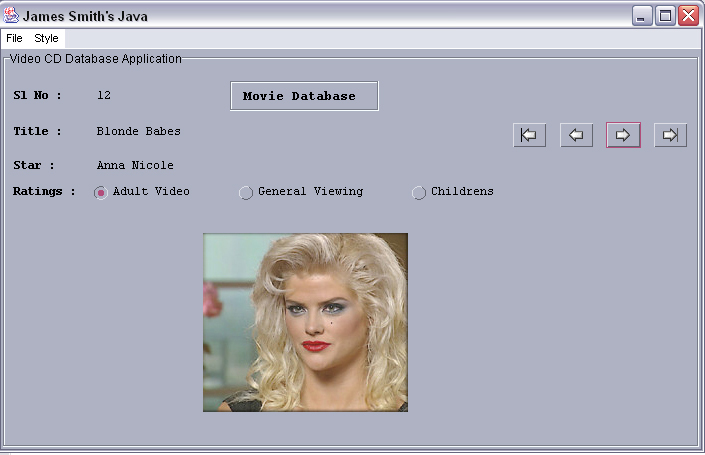
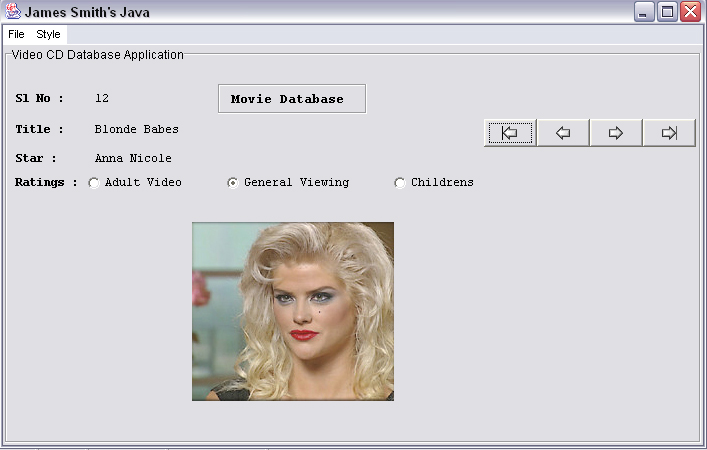
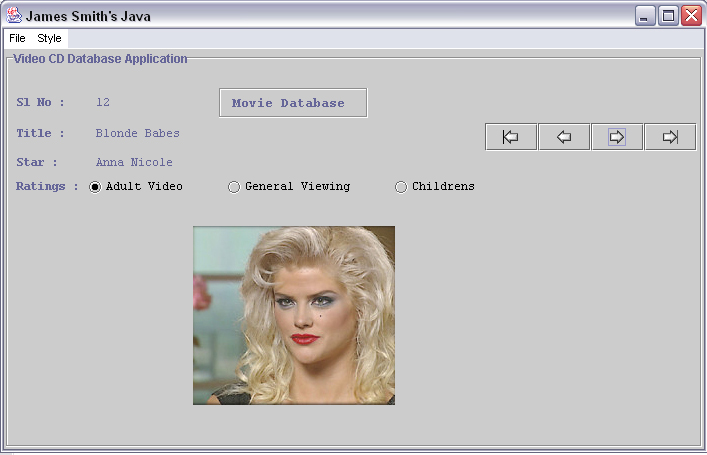
3) Fonts in Blue are Responsible for Capturing the Menu Item Click Event and Loading Corresponding Display Styles
4) Observe the Line Blue and Bold UIManager.setLookAndFeel(motifLF) which show how UIManager is Loaded
5) For our User Interface to Have many Stylish layout our import statement has been changed observe the one in Bold
6) The Lines in Red buttonF.addActionListener(new ButtonHandler()); is responsible for making the Button "ButtonF" Sensitive
7) The ButtonHandler Block in Red is Responsible to trigger an Event in case of Button Click, Observe the one in Bold and Red
8) We are not Doing any Hi Fi Event Handling Just Sending a Message in to the DOS Prompt which button is clicked
import java.awt.*;
import java.awt.event.*;
import javax.swing.*;
import javax.swing.plaf.*;
import javax.swing.plaf.metal.*;
import com.sun.java.swing.plaf.motif.*;
import com.sun.java.swing.plaf.windows.*;

public class GBLayout2 extends JFrame
{
 JButton buttonF, buttonP, buttonN, buttonL;
 public static void main(String args[])
 {
  GBLayout2 app = new GBLayout2();
 }
 public GBLayout2()
 {
  super("James Smith's Java");
  setupMenuBar();
  setup();
  pack();
  show();
 }
// Setting Up Menu Bar ---------------------------------------------------
void setupMenuBar()
{
  MenuBar menuBar = new MenuBar();

  Menu fileMenu = new Menu("File");
   MenuItem fileExit = new MenuItem("Exit");
    fileExit.addActionListener(new MenuItemHandler());
     fileMenu.add(fileExit);
   menuBar.add(fileMenu);

   Menu styleMenu = new Menu("Style");
   MenuItem styleWin = new MenuItem("Windows");
    styleWin.addActionListener(new MenuItemHandler());
     styleMenu.add(styleWin);
   MenuItem styleMotif = new MenuItem("Motif");
    styleMotif.addActionListener(new MenuItemHandler());
     styleMenu.add(styleMotif);
   MenuItem styleMetal = new MenuItem("Metal");
    styleMetal.addActionListener(new MenuItemHandler());
     styleMenu.add(styleMetal);
      menuBar.add(styleMenu);
     setMenuBar(menuBar);
}

// Handling Menu Items --------------------------------------------------
MetalLookAndFeel metalLF = new MetalLookAndFeel();
MotifLookAndFeel motifLF = new MotifLookAndFeel();
WindowsLookAndFeel windowsLF = new WindowsLookAndFeel();
class MenuItemHandler implements ActionListener
{
 public void actionPerformed(ActionEvent ev)
 {
  String s=ev.getActionCommand();
  if(s=="Exit")
  {
   System.exit(0);
  }
  else if(s=="Windows")
  {
   try
   {
    UIManager.setLookAndFeel(windowsLF);
    SwingUtilities.updateComponentTreeUI(GBLayout2.this);
   }
   catch(Exception e)
   {
    System.out.println("Could not Load Windows Look n Feel");
   }
  }
 else if(s=="Motif")
 {
  try
  {
   UIManager.setLookAndFeel(motifLF);
   SwingUtilities.updateComponentTreeUI(GBLayout2.this);
  }
  catch(Exception e)
  {
   System.out.println("Could not Load Motif Look n Feel");
  }
}
else if(s=="Metal")
{
  try
  {
   UIManager.setLookAndFeel(metalLF);
   SwingUtilities.updateComponentTreeUI(GBLayout2.this);
  }
  catch(Exception e)
  {
   System.out.println("Could not Load Metal Look n Feel");
  }
 }
}
}
public void setup()
{
 Font dataFont = new Font("courier new",Font.PLAIN,12);
 Font titleFont = new Font("courier new",Font.BOLD,14);
 Font titleFont1 = new Font("courier new",Font.BOLD,12);

 GridBagLayout gridbag = new GridBagLayout();
 GridBagConstraints c = new GridBagConstraints();
 c.fill = GridBagConstraints.HORIZONTAL;

 Container contentPane = getContentPane();
 contentPane.setLayout(gridbag);

 JPanel jpanel1 = new JPanel();
 jpanel1 = new JPanel()
 {
  public Dimension getPreferredSize()
  {
   Dimension size = super.getPreferredSize();
   size.width = 700;
   size.height = 400;
   return size;
  }
};
 jpanel1.setBorder
 (BorderFactory.createTitledBorder(BorderFactory.createEtchedBorder(),
 "Video CD Database Application"));
 jpanel1.setLayout(gridbag);

 // Row 1 Components -------------------------------------------
 JLabel jlabel4 = new JLabel(" Sl No : ");
 jlabel4.setFont(titleFont1);
 c.fill = GridBagConstraints.BOTH;
 c.ipady = 1;
 c.ipadx = 1;
 c.gridx = 0;
 c.gridy = 0;
 gridbag.setConstraints(jlabel4, c);
 jpanel1.add(jlabel4);

 JLabel jlabel5 = new JLabel(" 12 ");
 jlabel5.setFont(dataFont);
 c.fill = GridBagConstraints.BOTH;
 c.ipady = 1;
 c.ipadx = 1;
 c.gridx = 1;
 c.gridy = 0;
 gridbag.setConstraints(jlabel5, c);
 jpanel1.add(jlabel5);

 JLabel jlabel1 = new JLabel(" Movie Database  ");
 jlabel1.setBorder
 (BorderFactory.createTitledBorder(BorderFactory.createEtchedBorder()));
 jlabel1.setFont(titleFont);
 c.fill = GridBagConstraints.CENTER;
 c.weightx = 0.5;
 c.gridx = 2;       	//3rd Col  -- Very Important
 c.gridy = 0;       	//0th Row  -- Very Important
 gridbag.setConstraints(jlabel1, c);
 jpanel1.add(jlabel1);

 // Row 2 Components -------------------------------------------
 JLabel jlabel2 = new JLabel(" Title : ");
 jlabel2.setFont(titleFont1);
 c.fill = GridBagConstraints.BOTH;
 c.ipady = 1;
 c.ipadx = 1;
 c.gridx = 0;
 c.gridy = 1;
 gridbag.setConstraints(jlabel2, c);
 jpanel1.add(jlabel2);

 JLabel jlabel3 = new JLabel(" Blonde Babes ");
 jlabel3.setFont(dataFont);
 c.fill = GridBagConstraints.BOTH;
 c.ipady = 1;
 c.ipadx = 1;
 c.gridx = 1;
 c.gridy = 1;
 gridbag.setConstraints(jlabel3, c);
 jpanel1.add(jlabel3);

 buttonF = new JButton(new ImageIcon("first.gif"));
  c.fill = GridBagConstraints.BOTH;
  c.ipady = 1;
  c.ipadx = 1;
  c.gridx = 4;
  c.gridy = 1;
  c.insets = new Insets(5,0,0,0);
  buttonF.addActionListener(new ButtonHandler());
  gridbag.setConstraints(buttonF, c);
 jpanel1.add(buttonF);

 buttonP = new JButton(new ImageIcon("back.gif"));
  c.fill = GridBagConstraints.BOTH;
  c.ipady = 1;
  c.ipadx = 1;
  c.gridx = 5;
  c.gridy = 1;
  buttonP.addActionListener(new ButtonHandler());
  gridbag.setConstraints(buttonP, c);
 jpanel1.add(buttonP);

 buttonN = new JButton(new ImageIcon("next.gif"));
  c.fill = GridBagConstraints.BOTH;
  c.ipady = 1;
  c.ipadx = 1;
  c.gridx = 6;
  c.gridy = 1;
  buttonN.addActionListener(new ButtonHandler());
  gridbag.setConstraints(buttonN, c);
 jpanel1.add(buttonN);

 buttonL = new JButton(new ImageIcon("last.gif"));
  c.fill = GridBagConstraints.BOTH;
  c.ipady = 1;
  c.ipadx = 1;
  c.gridx = 7;
  c.gridy = 1;
  buttonL.addActionListener(new ButtonHandler());
  gridbag.setConstraints(buttonL, c);
 jpanel1.add(buttonL);

 //Row 3 Components -----------------------------------------
 JLabel jlabel6 = new JLabel(" Star : ");
 jlabel6.setFont(titleFont1);
 c.fill = GridBagConstraints.BOTH;
 c.insets = new Insets(5,0,0,0);
 c.ipady = 1;
 c.ipadx = 1;
 c.gridx = 0;
 c.gridy = 2;
 gridbag.setConstraints(jlabel6, c);
 jpanel1.add(jlabel6);

 JLabel jlabel7 = new JLabel(" Anna Nicole ");
 jlabel7.setFont(dataFont);
 c.fill = GridBagConstraints.BOTH;
 c.ipady = 1;
 c.ipadx = 1;
 c.gridx = 1;
 c.gridy = 2;
 gridbag.setConstraints(jlabel7, c);
 jpanel1.add(jlabel7);

 //Row 4 ---------------------------------------------------
 ButtonGroup bg = new ButtonGroup();
 JLabel jlabel8 = new JLabel(" Ratings : ");
 jlabel8.setFont(titleFont1);
 c.fill = GridBagConstraints.BOTH;
 c.insets = new Insets(5,0,0,0);
 c.ipady = 1;
 c.ipadx = 1;
 c.gridx = 0;
 c.gridy = 3;
 gridbag.setConstraints(jlabel8, c);
 jpanel1.add(jlabel8);

 JRadioButton radio1 = new JRadioButton("Adult Video",false);
 radio1.setFont(dataFont);
 c.fill = GridBagConstraints.WEST;
 c.ipady = 1;
 c.ipadx = 1;
 c.gridx = 1;
 c.gridy = 3;
 bg.add(radio1);
 gridbag.setConstraints(radio1, c);
 jpanel1.add(radio1);

 JRadioButton radio2 = new JRadioButton("General Viewing",true);
 radio2.setFont(dataFont);
 c.fill = GridBagConstraints.WEST;
 c.ipady = 1;
 c.ipadx = 1;
 c.gridx = 2;
 c.gridy = 3;
 bg.add(radio2);
 gridbag.setConstraints(radio2, c);
 jpanel1.add(radio2);

 JRadioButton radio3 = new JRadioButton("Childrens",false);
 radio3.setFont(dataFont);
 c.fill = GridBagConstraints.WEST;
 c.ipady = 1;
 c.ipadx = 1;
 c.gridx = 3;
 c.gridy = 3;
 bg.add(radio3);
 gridbag.setConstraints(radio3, c);
 jpanel1.add(radio3);

 // Row 5 -------------------------------------------
 JLabel labelim = new JLabel(new ImageIcon("Anna.jpg"));
 labelim.setFont(dataFont);
 c.fill = GridBagConstraints.BOTH;
 c.ipady = 1;
 c.ipadx = 1;
 labelim.setPreferredSize(new Dimension(200, 221));
 c.gridx = 2;
 c.gridy = 4;
 gridbag.setConstraints(labelim, c);
 jpanel1.add(labelim);

 addWindowListener(new WindowEventHandler());
 contentPane.add(jpanel1);
}
// Handle Button Clicks First, Prev, Next , Last ----------------
class ButtonHandler implements ActionListener
{
  public void actionPerformed(ActionEvent ev)
  {
  if(ev.getSource()== buttonF)
  {
   System.out.println("First is Clicked");
  }
  else if(ev.getSource()== buttonP)
  {
   System.out.println("Prev is Clicked");
  }
  else if(ev.getSource()== buttonN)
  {
   System.out.println("Next is Clicked");
  }
  else if(ev.getSource()== buttonL)
  {
   System.out.println("Last is Clicked");
  }
 }
}
//Handle Window Application Exit ------------------------
class WindowEventHandler extends WindowAdapter
{
 public void windowClosing(WindowEvent e)
 {
  System.exit(0);
 }
}
}
|




 If you like this article and/or code
  Kind Regards - James Smith