|
Hardware Requirement
|
|
1. I am using Intel Pentium 3 Processor with 256 MB RAM and Windows XP Operating System
|
|
Software Requirement
|
1. I am using JavaTM Development Kit 1.2.1 even thought I have higher version I don't want to use it
file name: jdk1_2_1-win.exe
Download URL: http://java.sun.com/
[ This also works with jdk1.3.1 file name is j2sdk-1_3_1_02-win.exe ]
2. Jakarta-Tomcat 3.2.1 Higher versions I had bad experience with them so I prefer this
file name: jakarta-tomcat-3.2.1.zip
Download URL: http://jakarta.apache.org/
Download URL: If they have lost the above zip Try to Download from here !
[ This also works with Tomcat 4, file name is jakarta-tomcat-4.0.2.exe somehow i dont love this version ] 
3. Jakarta-Struts 1.0.2
file name: jakarta-struts-1.0.2.zip
Download URL: http://jakarta.apache.org/struts/
[ Higher Versions of Struts i am yet to try ]
3. Macromedia Homesite 5 [Optional] I say one of the best Editors Available
file name: Homesite5.exe
Download URL: http://www.macromedia.com/software/homesite/
[ Smart Guys can crack the key too ] 
|
|
Theory Behind The Jakarta Tomcat
|
Official Web Page : http://jakarta.apache.org/tomcat/index.html
Tomcat is the servlet container that is used in the official Reference
Implementation for the JavaTM Servlet and Java Server Pages technologies.
The Java Servlet and JavaServer Pages specifications are developed by Sun under
the JavaTM Community Process.
Tomcat is developed in an open and participatory environment and released
under the Apache Software License. Tomcat is intended to be a collaboration of
the best-of-breed developers from around the world. We invite you to participate
in this open development project. To learn more about getting involved,
Click Here 
|
|
Installing Tomcat 3.2.1
|
I request you to read my Tutorial CONFIGURING TOMCAT section first if u have not done that by now
or you are new to Tomcat Environment
[*** It is a must ***] ,
If u have already Tomcat running on your System and its working fine u can as well skip this section, You are a Tomcat GURU by now 
|
|
Theory Behind The Jakarta Struts framework
|
The goal of this project is to provide an open source framework
for building web applications.
The core of the Struts framework is a flexible control layer based on standard
technologies like JavaTM Servlets, JavaBeans, ResourceBundles, and Extensible Markup
Language (XML), as well as various Jakarta Commons packages. Struts encourages
application architectures based on the Model 2 approach, a variation of the classic
Model-View-Controller (MVC) design paradigm.
Struts provides its own Controller component and integrates with other technologies
to provide the Model and the View. For the Model, Struts can interact with any standard
data access technology, including Enterprise Java Beans, JDBC, and Object Relational
Bridge. For the View, Struts works well with JavaServer Pages, including JSTL and JSF,
as well as Velocity Templates, XSLT, and other presentation systems.
The Struts framework provides the invisible underpinnings every professional web
application needs to survive. Struts helps you create an extensible development
environment for your application, based on published standards and proven design
patterns.
Struts is part of the Apache Jakarta Project, sponsored by the Apache Software
Foundation. The official Struts home page is at http://jakarta.apache.org/struts.
|
|
Installing Struts 1.0.2
|
01. Unzip this jakarta-struts-1.0.2.zip file into your D:\ 
02. This creates D:\jakarta-struts-1.0.2 directory
03. Now copy D:\jakarta-struts-1.0.2\webapps\struts-documentation.war into d:\tomcat\webapps\struts-documentation.war
04. And copy D:\jakarta-struts-1.0.2\webapps\struts-blank.war into d:\tomcat\webapps\struts-blank.war
05. Please DON'T! be tempted to copy struts.jar into ur d:\tomcat\lib\ directory
06. I assume that your Tomcat is at d:\tomcat directory and u have tested it and found its working
07. now start your tomcat by clicking on d:\tomcat\bin\startup.bat
08. Tomcat is kind enough to unzip all .war files into respective directories in webapps folder
09. If u can see a yellow cat at http://localhost:8080/index.html it means your tomcat is working and well configured and go ahead
10. If u get all errors on the earth ,please read my Tutorial CONFIGURING TOMCAT u cant proceed further
11. If u can see Hello World Message by struts at this URL http://localhost:8080/struts-blank/index.jsp
You have won your second battle look no further
12.If u are a theory freak load this URL http://localhost:8080/struts-documentation/index.html u can see the documentation about Model-View-Controller
(MVC) and Struts this documentation is official and written by pundits of Java Programming unlike me
|
|
Theory Behind The Enterprise JavaBeans Technology
|
Enterprise JavaBeans 2.1 Specification Proposed Final Draft Now Available at http://java.sun.com/products/ejb/
Since its introduction over four years ago, Enterprise JavaBeans (EJB) technology
has gained unprecedented momentum among both platform providers and enterprise developers.
That's because the EJB component model simplifies the development of middleware
applications by providing automatic support for services such as transactions,
security, database connectivity, and more.
The EJB 2.1 specification enhances the EJB architecture with support for Web services.
Enterprise developers can implement and deploy Web service applications with the same
level of ease as other server-side applications.
In addition, EJB 2.1 provides a container-managed Timer Service; enhancements to EJB
QL -- the declarative language for container-managed persistence -- to support
aggregate and order-by operations; and a generalization of message-driven beans
to support additional messaging types.
|
|
Configuring jamesj2ee Application on your Struts Environment
|
1. Unzip this jamesj2ee.zip file into your D:\
2. This creates D:\jamesj2ee directory
3. Copy D:\jamesj2ee folder into your d:\tomcat\webapps\jamesj2ee directory
4. Shutdown ur tomcat by clicking on d:\tomcat\bin\shutdown.bat
5. Re-Start tomcat by clicking on d:\tomcat\bin\startup.bat
6. Setup your ODBC Database Connection
click on start -
setting -
control panel -
Administrative tools -
Data sources ODBC -
System DSN Tab-
Add Button -
Select Microsoft access driver *.mdb Option-
finish Button -
Type in james as Data Source name -
click on select button -
Browse for d:\tomcat\webapps\jamesj2ee\database\james.mdb
Select it click OK
and OK again
Your ODBC is Setup
7. Click Here http://localhost:8080/jamesj2ee/introduction.jsp to launch your IE browser
8. You should see my J2EE application , you have won the Battle :-) have a smile and coffee and Relax !
9. If u got any error messages or any problems
Please Read install instruction of Tomcat and Struts from its Official web sites or mails me I will try to figure it out :-(
|
|
Theory Behind The Model-View-Controller MVC Architecture
|
|
Model
|
View
|
Controller
|
|
The model object knows about all the data that need to be displayed.
It also knows about all the operations that can be applied to transform that object.
However, it knows nothing whatever about the GUI, the manner in
which the data are to be displayed, nor the GUI actions that are used to manipulate the data.
The data are accessed and manipulated through methods that are independent of the GUI.
|
The view object refers to the model. It uses the query methods of the model to obtain data from
the model and then displays the information. The display can take any form,
|
The controller object knows about the physical means by which users manipulate data within
the model. In a GUI for example, the controller object would receive mouse clicks or
keyboard input which it would translate into the manipulator method which the model
understands.
|
|
|
Theory Behind J2EE Platform !
|
|
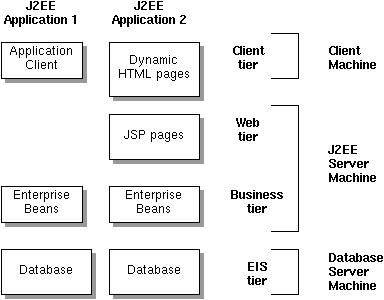
The Application I have developed is of J2EE Application 2 pattern
|
|
Client Tier
|
Web Tier
|
Business Tier
|
Database Tier
|
Mr. Peter Norton is a wellknown Graphic Designer and HTML Programmer Spent his lifetime at minor Details, He asks whad iz java ?

|
Mr. Micheal ShoeMaker is a wellknown HTML Programmer with Good Knowledge in Java He is the man who writes our JSP Pages

|
Mr. Rocky CyberMall is a complete Java Programmer Good Knowledge in Database Concepts
He is the man who writes our EJB Files and Compiles them.
He Writes our
DATABASE CONNECTION POOL

|
Mr. Hen Fisherman is a our DBA Database Admin Good Knowledge in Database Concepts like Oracle n All,
He is the man who creates our Database

|
This consists of HTML pages, Style Sheets, Images Gif and JPG
Mr. Peter Norton need not know java at all, his main area of focus will be to
present the HTML pages which pleases user font wise, Image wise and Resolution wise
he is not worried about the Dynamic Data contents as long as it does not spoil his
page look and alignments.
|
Web Tier consists of Dynamic JSP Pages Mr. Micheal ShoeMaker must be aware of both
HTML and Java JSP in particular.
He must be able to call EJB components.
He is least bothered by what Mr. Peter Norton does with images or font or html layout
|
Mr. Rocky CyberMall is a Hard Core Programmer, writes hi-tech java files called EJB's or
Enterprise Java Beans and compiles them into .class files
He is the one who is responsible for business logic like for example student in class A
will have to attend classes 6 days a week where as students in class B need to attend
classes 5 days a week etc..
|
Mr. Hen Fisherman does Nothing But Database Design, Backup and Maintanace if u ever lose Data catch him !
|
|
|
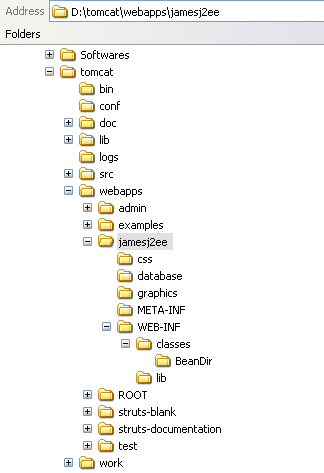
The Directory Alloted to Client Tier is
|
D:\tomcat\webapps\jamesj2ee\css for style Sheets
D:\tomcat\webapps\jamesj2ee\graphics for Images
D:\tomcat\webapps\jamesj2ee for HTML pages
|
|
The Directory Allotted to Web Tier is
|
|
D:\tomcat\webapps\jamesj2ee for JSP
|
|
The Directory Allotted to Business Tier is
|
|
D:\tomcat\webapps\jamesj2ee\WEB-INF\classes\BeanDir for .JAVA that is EJB Files and the famous DATABASE CONNECTION POOL Code
|
|
The Directory Allotted to Database Tier is
|
|
D:\tomcat\webapps\jamesj2ee\database for .mdb file , He uses james.mdb file
|
|
The Directory Allotted to Templates and XML
|
|
D:\tomcat\webapps\jamesj2ee\WEB-INF *.tld and *.xml files are
|
|
The Directory Allotted to Java Archive File
|
|
D:\tomcat\webapps\jamesj2ee\WEB-INF\lib struts.jar
|
|
D:\>set
JAVA_HOME=d:\jdk1.2.1
TOMCAT_HOME=d:\tomcat
OS=Windows_NT
Path=C:\Windows\system32;
C:\Windows;D:\jdk1.2.1\bin
Windir=C:\WINDOWS
// And few more lines which are not important to us //
|
|
| Explaining Code behind Client Tier as said by Mr. Peter Norton ! |
|
Cosider this code , in our introduction.jsp
<%@ taglib uri='/WEB-INF/struts-template.tld' prefix='template' %>
<template:insert template='/chapterTemplate.jsp'>
<template:put name='title' content='Templates' direct='true'/>
<template:put name='header' content='/header.html' />
<template:put name='sidebar' content='/sidebar.jsp' />
<template:put name='content' content='/showrec.jsp'/>
<template:put name='footer' content='/footer.html' />
</template:insert>
This File simply calls a file named chapterTemplate.jsp passing four filenames viz
header.html, sidebar.jsp, showrec.jsp, footer.html with each file handler being named as
header, sidebar, content, footer respectively
chapterTemplate.jsp decides where should the four files header.html, sidebar.jsp, showrec.jsp,
footer.html be placed on a single page alignment wise inside a table so the code here looks like this,
<%@ taglib uri='/WEB-INF/struts-template.tld' prefix='template' %>
<table BORDER=0 WIDTH=100%>
<tr valign='top'>
<td><template:get name='sidebar'/></td>
<td><table>
<tr><td><template:get name='header'/></td></tr>
<tr><td><template:get name='content'/></td></tr>
<tr><td><template:get name='footer'/></td></tr>
</table>
</td>
</tr>
</table>
Just Changing one line in above file can Turn Header and Footer upside down in all the page :-)
And Of coure other stuffs are pure html and style sheets which Mr. Peter Norton feels no need to explain
|
| Explaining Code behind Web Tier as said by Mr. Micheal ShoeMaker ! | |
|
This is simple explanation of a File modrecresp1.jsp which is called once u submit modrecresp.jsp and this file is responsible
for modifying the contents of a Record in Database
//Call Template File
<%@ taglib uri='/WEB-INF/struts-template.tld' prefix='template' %>

//If you Get Errot Call ErrorPage.jsp and import
//all java packages which are needed like java.sql.*
<%@ page language="java" import="java.sql.*" errorPage="ErrorPage.jsp"%>

//Use the Data Base Connection Pool Bean inside BeanDir
//Directory whose name is DbBean.java compiled into DbBean.class
<jsp:useBean
id="db"
class="BeanDir.DbBean"
scope="request"/>

<jsp:setProperty
name="db"
property="*"/>

<%
//Declare and Capture All Variables which we will
//be getting from a Previous file in this case modrecresp.jsp
 int numCols;
 ResultSet rs = null;
 ResultSetMetaData rsmd = null;
 String Name = request.getParameter("sname");
 String Address = request.getParameter("saddr");
 String FName = request.getParameter("fname");
 String Sex = request.getParameter("sex");
 String Yearsel = request.getParameter("myclass");
 String Sectionsel = request.getParameter("mysec");
 String SSLC = request.getParameter("SSLC");
 String PHOTO = request.getParameter("PHOTO");
 String CHARCERT = request.getParameter("charCERT");
 String NCCCERT = request.getParameter("nccCERT");
 String imagename = request.getParameter("imname");

//Write an UPDATE SQL Statement please Observe
//the way i have used Single and Double Quotes
 String sql="UPDATE student_det SET Name='"+Name+"',
 Address='"+Address+"', FName='"+FName+"',
 Sex='"+Sex+"', Yearsel='"+Yearsel+"', Sectionsel='"+Sectionsel+"',
 SSLC="+SSLC+", PHOTO="+PHOTO+", CHARCERT="+CHARCERT+",
 NCCCERT="+NCCCERT+", imagename='"+imagename+"'
 WHERE RegistrationNo="+request.getParameter("RegistrationNo");

try
{
  //Connect to Database or in other words call connect()
  //method inside DbBean.java File
  db.connect();
}
catch (ClassNotFoundException e)
{
  //If Unable to Connect to DB Give Error Message
  //something wrong with DB Driver
  throw new ServletException("Db Driver not found !", e);
}
catch (SQLException e)
{
  //If something wrong with SQL Give Error Message
  //something wrong with SQL Statement
  throw new ServletException("SQL not correct !", e);
}

try
{
  //If you could connect to DB and SQL is correct
  //then call execSQLupdate() method with in DbBean.java which Updates DB Record
  db.execSQLupdate(sql);
}
catch (SQLException e)
{
  //Something Really Wrong Please chek out
  throw new ServletException("Your Query is Wrong", e);
}
|
| Explaining Code behind Database Connection Pool Bean as said by Mr. Rocky CyberMall ! | |
|
//First Thing First this is a Part of Java Package
//named BeanDir so u place this in BeanDir Directory
package BeanDir;

//Import all that is wanted
import java.util.*;
import java.sql.*;
import java.io.*;

public class DbBean
{

 //Some Lines about the Bean This can vary from people to people
 //the way to chose to write it
 //Written by James Smith : mail me at [email protected]
 //my URL http://www.geocities.com/james_smith73
 //Code Date : 07 - July - 2003

 //dbDriver is a String type variable that is initialised
 //as "sun.jdbc.odbc.JdbcOdbcDriver"
 String dbDriver = "sun.jdbc.odbc.JdbcOdbcDriver";
 //dbURL is a String type variable that is initialised as
 //"jdbc:odbc:< my datasource name as in ODBC setup >"
 String dbURL = "jdbc:odbc:james";

 //Guys using Oracle may try these lines

 //Oracle oci7 drivers
 //JDBC driver: oracle.jdbc.driver.OracleDriver
 //Database URL: jdbc:oracle:oci7:

 //Oracle oci8 drivers
 //JDBC driver: oracle.jdbc.driver.OracleDriver
 //Database URL: jdbc:oracle:oci8:@localhost:1521:

 //Oracle thin drivers
 //JDBC driver: oracle.jdbc.driver.OracleDriver
 //Database URL: jdbc:oracle:thin:@localhost:18

 private Connection dbCon;

 public DbBean()
 {
  super();
 }

 public boolean connect() throws ClassNotFoundException, SQLException
 {
  //Make Database Connection using DriverManager.getConnection
  Class.forName(this.getDbDriver());
  dbCon = DriverManager.getConnection(this.getDbURL());
  return true;
 }

 public void close() throws SQLException
 {
  //Good Practice to always to close connection
  dbCon.close();
 }

 public ResultSet execSQL (String sql) throws SQLException
 {
  //You can always see SQL Getting execute while using
  //SELECT statement of SQL at your command Prompt
  //This will help u debug SQL Errors
  System.out.println("sql is "+sql);
  Statement s = dbCon.createStatement();
  ResultSet r = s.executeQuery(sql);
  //Return the Result you Get from the
  //Select Query to the JSP File which called
  return (r == null) ? null : r;
 }

 public void execSQLupdate (String sql) throws SQLException
 {
  //Used for UPDATE and DELETE SQL Statements
  System.out.println("sql is "+sql);
  Statement s = dbCon.createStatement();
  s.executeUpdate(sql);
  //You need not return anything back Just Execute the statements
 }

 public String getDbDriver()
 {
  //Return the value of variable dbDriver to the one
  //which call this, see line getConnection(this.getDbURL());
  return this.dbDriver;
 }

 public void setDbDriver(String newValue)
 {
  this.dbDriver = newValue;
 }

 public String getDbURL()
 {
  return this.dbURL;
 }

 public void setDbURL(String newValue)
 {
  this.dbURL = newValue;
 }
}
|
|
web.xml
|
web.xml is the most important file which binds our application it has the following lines
<!-- The below lines means in simple english when some one
types in address bar http://localhost:8080/jamesj2ee/ u actually load the
home page as http://localhost:8080/jamesj2ee/introduction.jsp -->

<welcome-file-list>
	 <welcome-file>introduction.jsp </welcome-file>
</welcome-file-list>

<!-- The below lines means include struts-template.tld file
for reference -->

<taglib>
	 <taglib-uri>/WEB-INF/struts-template.tld</taglib-uri>
	 <taglib-location>/WEB-INF/struts-template.tld</taglib-location>
</taglib>
|
|
Templates
|
JSP-Struts comes with a feature where in u can include other html or jsp files like the way
we use frames in our HTML like shown below the advantage of such an approach is files can be independently handled and still bound together
<%@ taglib uri='/WEB-INF/struts-template.tld' prefix='template' %>

<template:insert template='/chapterTemplate.jsp'>
  <template:put name='title' content='Templates' direct='true'/>
  <template:put name='header' content='/header.html' />
  <template:put name='sidebar' content='/sidebar.jsp' />
  <template:put name='content' content='/showrec.jsp'/>
  <template:put name='footer' content='/footer.html' />
</template:insert>
|
|
Learning Curve Errors and MY MISTAKES Type 1 : We Learn from our mistakes and help others to over come it
|
Error: 500
Location: /jamesj2ee/chosen1resp.jsp
Internal Servlet Error:

org.apache.jasper.JasperException:
Unable to compile class for JSPD:\tomcat\work\localhost_8080%2Fjamesj2ee\
_0002fchosen_00031resp_0002ejspchosen1resp_jsp_3.java:65:
Class BeanDirS.mysimplebean not found.
BeanDirS.mysimplebean mybeanid = null;
                        ^
D:\tomcat\work\localhost_8080%2Fjamesj2ee\
_0002fchosen_00031resp_0002ejspchosen1resp_jsp_3.java:68:
Class BeanDirS.mysimplebean
not found.
mybeanid= (BeanDirS.mysimplebean)
                                       ^
D:\tomcat\work\localhost_8080%2Fjamesj2ee\
_0002fchosen_00031resp_0002ejspchosen1resp_jsp_3.java:73:
Class BeanDirS.mysimplebean not found.
mybeanid = (BeanDirS.mysimplebean)
Beans.instantiate(this.getClass().getClassLoader(), "BeanDirS.mysimplebean");
                                                ^
3 errors
SOLUTION
I am trying to call a bean which is not there , BeanDirS should have been BeanDir
|
|
Learning Curve Errors Type 2 :
|
Error Page
We are clue less
SOLUTION
My SQL was wrong calling unknown table
String sql = "SELECT * FROM student_detd WHERE RegistrationNo="+request.getParameter("RegistrationNo");
Should have been ,
String sql = "SELECT * FROM student_det WHERE RegistrationNo="+request.getParameter("RegistrationNo");
|
|
Learning Curve Errors Type 3 :
|
Error: 500
Location: /jamesj2ee/chosen1resp.jsp
Internal Servlet Error:
org.apache.jasper.JasperException:
Unable to compile class for JSPD:\tomcat\work\localhost_8080%2Fjamesj2ee\
_0002fchosen_00031resp_0002ejspchosen1resp_jsp_4.java:282:
';' expected.
db.connect()
SOLUTION
I forgot ; in the line db.connect()
db.connect() should have been db.connect();
|
|
Learning Curve Errors Type 3 :
|
Error: 500
Location: /jamesj2ee/chosen1resp.jsp
Internal Servlet Error:
org.apache.jasper.JasperException:
Unable to compile class for JSPD:\tomcat\work\localhost_8080%2Fjamesj2ee
\_0002fchosen_00031resp_0002ejspchosen1resp_jsp_4.java:319:
Invalid type expression.

rs.getString(3)
                 ^
D:\tomcat\work\localhost_8080%2Fjamesj2ee\
_0002fchosen_00031resp_0002ejspchosen1resp_jsp_4.java:322:
Invalid declaration.
out.write("\"> Student Address
SOLUTION
<INPUT type='text' size='34' value="<% rs.getString(3) %>">
should have been
<INPUT type='text' size='34' value="<%= rs.getString(3) %>">
I forgot Equals Symbol =
|
|
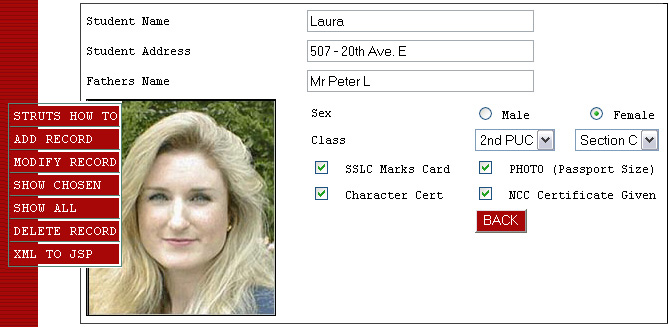
Final Output will be something like this
|
|
|
Reach me!
|
|
|
Java, J2EE, J2SE and all Java-based marks are trademarks or registered trademarks of Sun Microsystems, Inc.
in the United States and other countries. 
|



 ? Complete J2EE with FUN