MOVIE HELP
 How do I tape video in Sims?
Push the V Key while your playing Sims. If you push it the 2nd time your video will stop taping. What you see happing in the game is what is being taped.
Where is the video being stored?
My Documents/EA Games/The Sims/Movies
Why are my videos blury?
Go in your settings and click on the camera. Set you video capture size to Largest size. Then under video quality click on high or even high uncompressed.
**On slower machines when you record video the action on the screen will slowdown**
**Remember Storing a lot of video clips will take up a lot of your hard drive**
What are Cheat Codes?
Go Here
DOWNLOADING CUSTOM CONTENT
There are many places you can download custom content. If you visit my links page you can see ones I visit often. There is one thing to know about custom content MESHES!
What is a Mesh anyway? I hear this question all the time.
THE MESH- is the actual shape of the custom content. It's a 3D model of the style. You may also need to download meshes for some clothing as creators design their own body shapes that are not provided in the game by maxis.
Look around the link to the mesh should be on the page you downloaded the custom content from. You download and extract the mesh exactly the same way you do for other stuff. At the moment I am learning how to create a mesh for Sims. You need a 3D creator program to do this.
NeptuneSuzy has a good tutorial you might want to check out.
Custom Content Download Location:
C:\Documents and Settings\your user name\My Documents\EA Games\The Sims 2\Downloads
***To make life easier create a shortcut on the desktop that goes right to that folder so you don’t have to keep going though the steps over and over.***
File Types:
ZIP Files - Need to be unzipped into your downloads folder using the program Windows gives you.
RAW Files – These are very similar to ZIP but you need the program WinRar to unzip the files. To get WinRar http://www.download-zone-free.com/winrar I like this program the best because you can select a lot of zip files at once. Right click on them and “Extract Here” makes life easier when you have a lot of files to do at once. WinRar can also unzip regular Zip files so you can’t go wrong.
Packaged Sims – These look like little blue icon with a white Sim in the middle. These are very easy to install. All you do is double click on the icon it will ask you if you want to install. Click ok and you’re done! Easy huh? Well there is one important thing to this you need to make sure you have all MESHES necessary to complete the look of the packaged Sim. A good custom content maker will give credit to where they downloaded the mesh from so you can do the same. If you do not have the required Meshes you will end up with one funky looking Sim!!
This type of file can also contain floors, walls, and lots. When we upload a lot for download it is packaged as well. Same rule goes here when installing lots some creators put custom content in the lot that you might not have!!! Stinks huh? Well if you lot has items that are flashing blue you don’t have the right files for that item. You can go back to see where you missed the download you need or just delete the item from your lot.
Ok, now you have custom content! Are you excited yet? Now start Sims you might notice it loading slower then normal that’s ok. You just added more things to Sim’s brain and now it has to think longer.
***DOWNLOAD FOLDER HAS NO LIMIT***
So be careful you can crash your Sims everything depends on two things good Custom Content and the size of your computer. You can over do it take it from me I had 3 gig download folder once and Sims took a long time to load.
***NEVER DO A LOT AT ONCE***
If you download BAD CC can your kill your Sims finding the bad CC will be like finding a needle in a haystack. When you unpack files a lot of them are labeled with just numbers! If you don’t know a heck of a lot about computers and Sims Files this can be a nightmare! If your new at this do a little by little until you get a grasp on things.
Good Free Program what you can organize your crap! If you plan on downloading a lot then this is a must.
CC ORGINAZER Created By Delphy
If you don’t have an account to www.modthesims2.com
Why not its free has tons of good things and a lot of people willing to help you in your time of need.
Back to your Sims loading you should have a window popup on the screen telling you have introduced CC to the game. Click the enabled circle and continue.
HAVING PROBLEMS???
WAIT ITS NOT HERE NOTHING IS HERE?!?!
Calm down now sometimes but not always you have to start Sims up for a 2nd time to get the CC to show up. Don’t ask me why I don’t know it happens to me when first introduce CC.
IT’S STIL NOT SHOWING UP?!?!
Well in this case you have one of three problems or all.
1) You need to make sure you have downloaded the appropriate MESH for the items.
If the item is just a recolor of EA Item then it should be just fine!
2) Are your files in the Downloads folder? The place we talked about before.
3) You might not have the EP (Expansion Pack) used in creating the CC.
If the creator is a good one they will let you know the EP you need to use that item.
CREATING CUSTOM CONTENT
First thing is first you need to download EA's HomeCrafter Plus.
HomeCrafter Plus is a powerful tool that lets you create unique design elements that you can use to personalize your environments in The Sims 2. Use any paint program to create custom content such as floor tiles, wall coverings and ground cover -- and then combine them in new ways for endless variety. Preview them in HomeCrafter Plus before importing them to The Sims 2.
Ok now you have the program installed turn it on.
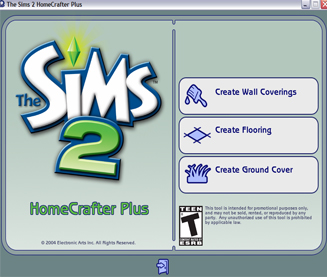
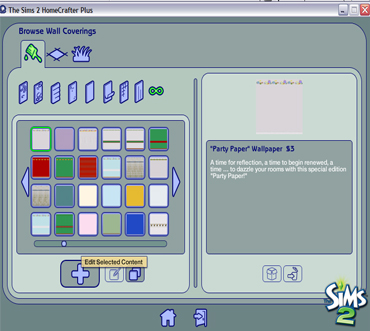
I'm going to walk you through create Wall Coverings. (The rest are the same)
There are two ways to create walls;
1) Create New Content (The Big Plus Sign)
When you create new content a template will appear. It will save this file:
C:/My Documents/EA Games/The Sims 2/Projects/Working Directory
***Don't Close this out***
Open your image editor I use Photoshop; you can use what you feel good with. (Paint,Gimpshop. Etc..)
Make your changes and save the file. I should be bmp format. You can refresh now in the
Homecrafter Plus program you should see your changes. Here you can change the name, description, and cost of your floor. When everything is as you like it click the import button.
All Done
2) Clone Selected Content (Pic of two windows on top of each other)
Same as the other way expect you are making a copy of the original Wall Covering so you can change it as you wish; save; import.
Creating Custom Clothing Recolors
Sims comes with the program that you need to make recolors of your clothes you have. The program you need is Sims Body Shop. You should find this in your start menu Programs/EA Games/ EP/Body Shop.
The body shop works the same way as the HomeCrafterPlus. When you extract the clothes makeup, Etc.. it wants you to name it. Now your extracted clothes is saved to;
C:/My Documents/ EA Games/ Projects/ FileName
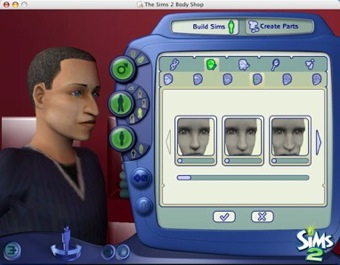
You edit your clothes, skin, etc.. save them like before to the same file.