English
Home ] Main Page ] [ English ] Vietnamese ]
http://www.welcome.to/SaigonTown


Home
Main Page

Counter

Visitors

1. Register for a screen name (nick name):

New Users Click Here

2. Download American Instant Messenger (AIM):

Click here to download AIM version 4.3

Please remember where you save the file, so you can install it later. How to download and install.

If the link doesn't work go to
http://www.aol.com/aim
and click on the latest version of AIM Windows 4.3

If your browser has Java, you might try AIM Express without downloading AIM. AIM Express might not work if you are calling from Vietnam or behind firewall.

3. Install AIM. How to download and install.

Double click on the file you just have downloaded to install. After the installation process, go to next step.

4. Sign on your internet connection.
5. Sign on AIM with your registered screen name and password.
4. Firewall: only for callers from Vietnam, behind firewall, or having difficulties to get connected.

If you are calling from Vietnam, you are probably behind the firewall.

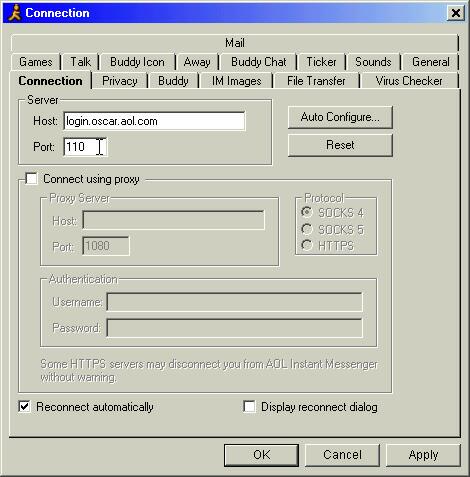
1. In AIM window, click Setup

2. Click Connection tab.

3. The default port is 5190. Change it to port 110. Click Apply and OK.

Notes: Port 110 is for POP mail; hence, you won't be able to use all features of AIM such as Talk, IM Images... However, you are still able to use AIM for private or group chat.

You can click Auto Configure... button, and AIM will detect open ports automatically. The process will take a while. In testing, we had port 110 and port 23 available. Unfortunately, port 23 is not encrypted which means it's not secure. The bottom line is if you are calling from Vietnam (or behind firewall), use port 110.


Next ]
http://www.welcome.to/SaigonTown: Please use this address to bookmark my homepage for later visit.

If this website appeared fuzzy to you, please adjust your Display Properties to 800 by 600 pixels " High Color (16 bit)" or higher resolution.

Hosted by www.Geocities.ws

1