Creating a Realistic Light Bulb ...
Creating the glow ...
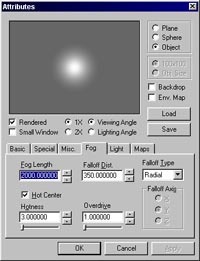
The glow around the light bulb is a perfect CSG sphere with a few of its fog attributes modified.
- Add a new CSG sphere to the scene (size it so that it encompasses the bulb to the extent that you want to glow to surround the
bulb when rendered).
- Display the attributes of the sphere.
- Set the fog value of the sphere to "2000"
- Set the falloff distance to "350"
- Set the falloff type to "Radial"
- Set Hot Center to true
- Set the Hotness value to "3"
That's it for the glow! The attributes dialog should look like the following:
OK, so that's all there is to it to creating a realistic light bulb. I hope this helped out.
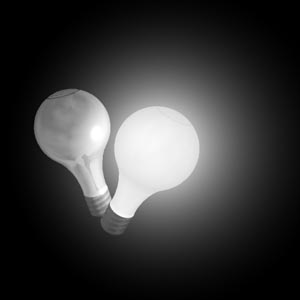
Rendered together, the two objects should look like this:
Please email me any comments or criticisms.
Previous
Back to Stills
Home