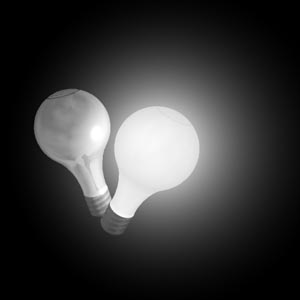
Recently, an IML member asked how the members of the list dealt with creating a realistic looking light bulb that could emit shadow-casting light and whose rays would not be blocked by the surface of the bulb.
Several suggestions were forwarded, and this tutorial is my solution to the problem.
One IML member mentioned that it would be nice to see the bulb in a color scene. Curious as well, I did a quickrender of a project that I am working on and included the bulb. To see it, click here.
A number of suggestions were forwarded for the creation of a realistic light bulb. The most common solution in Imagine is to assign a fog value of something like .1 to the bulb object. This results in a bulb which has no shading (as with a fully bright object) but which allows light rays to pass through the surface of the object to illuminate other objects in the scene. Before Ingvar Lybing's NOSHADOW.ITX texture was created, this is likely the solution I would have chosen as well.
Recently, a new texture (called NOSHADOW.ITX) was created by Ingvar Lybing. This texture allows an object to retain a fully shaded appearance but to pass all light rays through an object. In effect, the affected object will not cast shadows even in a raytraced scene in the presence of shadow casting lights. In order for this texture to work, the fog setting of the object must be set to some non-zero value (it will effectively be reset to 0 when the object is rendered)
This, then, allows the creation of a bulb that can have some shading to its surface (as it is not really a fog object) yet pass the rays of a shadow casting lightsource which is encased in the bulb object itself (casting more realistic shadows and illuminating the bulb in a more realistic fashion).
For me, the reason is simple. I don't like the way a completely flat shaded object looks in Imagine. I have never seen a bulb that is has completely flat shading in life -- there is some shading to the bulb, though very subtle.
Besides, I'm picky.
You can download the bulb and glow objects (minus attributes) and maps used in this tutorial from here.
Note that I created the bulb as one object, rather than creating separate objects for the glass and metal portions of the bulb. I have created three subgroups in the object that will be used in this tutorial:
Top -- the crown of the bulb.
Bulb --- the entire glass portion of the bulb (including TOP).
Bottom -- the metal threaded portion of the bulb.