Package contents


In your Aplio/Phone package, you will find:


An Aplio/Phone NP-100
An AC adapter
A telephone cord
A warranty registration card
A User's Manual
A list of compatible ISPs
A Getting Started Guide

You will also need to have:

A dial-up Internet account
A touch-tone phone
An analog phone line
An electrical outlet

If you do not have an Internet account, you will need to contact an ISP in your area. Presently, the Aplio/Phone functions only with the standard Point-to-Point (PPP) Internet Access Type.

The Aplio/Phone is not currently compatible with certain commercial services, such as America Online (AOL), which are proprietary and do not follow the PPP standard.

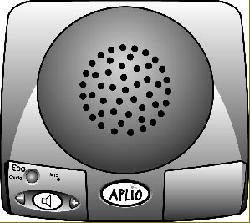
A brief tour of the Aplio/Phone NP-100

Activates the 100% Free Mode and the Configuration Mode. The button is illuminated while 100% Free Mode is in use. In addition, it flashes during activation or deactivation of 100% Free Mode and during configuration. This button also flashes intermittently when a software upgrade is available.

Switches your call from the long distance carrier to the Internet. This button is illuminated during Internet connection. It flashes during Internet dialing and the upgrade process, and will also flash to alert you of congestion on the Internet.

Activates or deactivates the speakerphone for hands-free operation. It is illuminated when the speakerphone is active and flashes while the Aplio/Phone is in the Hands-free Mode.

Raises or lowers the speakerphone and handset volume. These buttons do not illuminate.

Aplio/Phone Introduction | How Aplio/Phone Works | Aplio/Phone Features | Package Contents | Protocols

Contact Us
E-mail: [email protected]
Hosted by www.Geocities.ws

1