 |
|
|
|
|
|
|
|
|
|
|
|
|
|
|
|
|
|
|
|
|
|
|
|
|
|
|
|
|
| Me & My HTML | ||||||||||||||||||||||||||||
 |
||||||||||||||||||||||||||||
 |
||||||||||||||||||||||||||||
| Lesson 7.2 for Classreport.org Administratiors | ||||||||||||||||||||||||||||
| Lesson 7.2 | ||||||||||||||||||||||||||||
 |
||||||||||||||||||||||||||||
| Lesson 7.2 Picture | ||||||||||||||||||||||||||||
| Home | ||||||||||||||||||||||||||||
 |
||||||||||||||||||||||||||||
| Email: | ||||||||||||||||||||||||||||

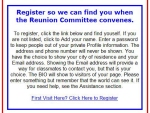
| Lesson 7 part 2 One other thing I think that you might find interesting is the "First Visit Here?" link. I placed it 2 other places on my site. This way those that are reading the instructions do not have to go find the link near the Logon. It is right there in the instructions. Let us look for it in your site source code. This is the reason why I wanted the code displayed when you were not logged on. This is not there when you have logged in. Look at Your home page and you will see that near the link in the logon section it says "First Visit Here?". Do a search for that. (This is site specific so yours will be different.) You will find something like: <tr> <td align="center" bgcolor="#FFFFFF" style="border-style:none; border-width:medium; "> <font face="Arial" size="2"> Log on to update your profile<br>or post messages.<p><b>First Visit Here?<br> </b> <a href="/main/signin.asp?dname=/usa/oh/toledo/whs/&clid=326934&cl=1986&hs=WHS&clr1=mediumblue&clr2=gold&clr3=lightgrey&stcnt= 665&p=/usa/oh/toledo/whs/1986&ln=blank&school=Whitmer High School"> Click Here to Register</a> </tr> I used the <div> tag to make the instructions that lead into the link. I wanted the text to look uniform so I centered it in my box and I used the font that was provided in the Site Source Code. You may vary your choice but using what I did in combination with instructions. Using the code provided and your own instructions, it would something like this: <!-- Registration Help - start --> <div> <br> <font face="Arial" size="2"><center> {Put your registration instructions here.} <!-- Registration Link --> <!-- Registration End --> Now we need to add the link. Using most of the borrowed code, I came up with: <!-- Registration Help - start --> <div> <br> <font face="Arial" size="2"><center> {Put your registration instructions here.} <!-- Registration Link --> <a href="/main/signin.asp?dname=/usa/oh/toledo/whs/&clid=326934&cl=1986&hs=WHS&clr1=mediumblue&clr2=gold&clr3=lightgrey&stcnt= 665&p=/usa/oh/toledo/whs/1986&ln=blank&school=Whitmer High School"> First Visit Here? Click Here to Register</a></center></div><br> <!-- Registration End --> These practices can not be tried outside of the Home Page. You must put them in one of the HTML Blocks to test and use them. If you test it on the Praticeboard, you get a "Webpage can not be found". You must start with your own sites information that is found in your site source code. The <a ref..> tag must be as gleaned from that original code as it determines the school and class. It will vary form website to website. I hope that this helps and I have no other lessons planned. If you come across tags that you want to talk about, do not hesitate to drop me a line. Again we will not be using all of the lead-in provided in this link but we have enough to work with. First let us select what we want to say in the Link Label. I one of my links I used "First Timer? Click here to Register" and the other is part of a set of instructions, which ends with the link words "First visit here? Click here to Register". The original used " Click Here to Register". I used the <div> tag to make the instructions that lead into the link. I wanted the text to look uniform so I centered it in my box and I used the font that was provided in the Site Source Code. You may vary your choice but using what I did in combination with instructions. Using the code provided and your own instructions, it would something like this: <!-- Registration Help - start --> <div> <br> <font face="Arial" size="2"><center> {Put your registration instructions here.} <!-- Registration Link --> <!-- Registration End --> Now we need to add the link. Using most of the borrowed code, I came up with: <!-- Registration Help - start --> <div> <br> <font face="Arial" size="2"><center> {Put your registration instructions here.} <!-- Registration Link --> <a href="/main/signin.asp?dname=/usa/oh/toledo/whs/&clid=326934&cl=1986&hs=WHS&clr1=mediumblue&clr2=gold&clr3=lightgrey&stcnt= 665&p=/usa/oh/toledo/whs/1986&ln=blank&school=Whitmer High School"> First Visit Here? Click Here to Register</a></center></div><br> <!-- Registration End --> These practices can not be tried outside of the Home Page. You must put them in one of the HTML Blocks to test and use them. If you test it on the Praticeboard, you get a "Webpage can not be found". You must start with your own sites information that is found in your site source code. The <a ref..> tag must be as gleaned from that original code as it determines the school and class. It will vary form website to website. I hope that this helps and I have no other lessons planned. If you come across tags that you want to talk about, do not hesitate to drop me a line. |