-
This works for Netscape
Navigator 4.75, but should also work for previous versions.
-
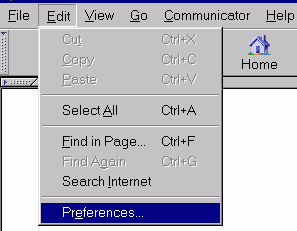
Click on Edit.
-
Click on Preferences
-
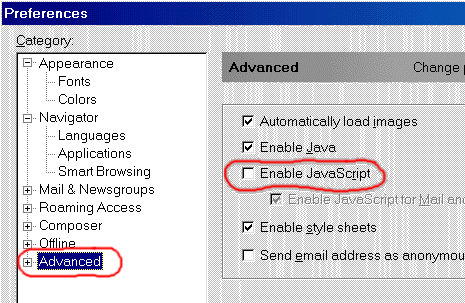
This will open the Preferences
window shown below.
-
First - Click on Advanced.
-
Then - Click on Enable
JavaScript so that you REMOVE THE CHECK MARK as shown.
-
Then - Click OK and the
window will close.
-
Now you can view the Hockey
For Women pages with no advertising in your way.
-
Be sure to restore the
check mark for Enable JavaScript when you are done viewing the Hockey For
Women pages, since many web sites use javascript in useful and sometimes
essential ways to view their web sites.
Previous versions of Netscape
Navigator have security problems associated with them,
-
you should make sure you
are using version 4.75 (click on Help - About Communicator...)
|
