10base2:
Decide on the Networking Type
When I state that you need to decide on the networking type, I did
not mean to review technologies
like "ARCnet" (completely obsolete
by now) or "TokenRing" (professional network with high
investment cost, too expensive for Home use), but on the different types of
"Ethernet" Networks with different Network speeds and costs:
|
10base2:
|
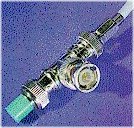
Uses a coaxial cable (with T-connectors and Terminators ) , rated at 10 mbs (=Mega Bit per second), which results in actual network throughputs of approx. 700-800 KBytes/second |
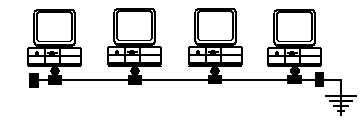 |
The coax-cable is used to connect the PC's in a line,and MUST have at each end a Terminator: ( one open Terminator and one grounded Terminator) |
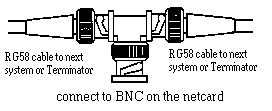 |
the Coax-cables are connected via a T-connector to the BNC-connector of the Network card. |
Note : Coax cabling is widely regarded to be "mature" / "obsolete", there are only few network adapters available with a BNC connector.
|
10baseT
|
Uses a Twisted-Pair (TP) cable , one from
EACH PC to a central connection box, called a HUB, rated at 10 mbs
(=Mega Bit per second), which results in actual network throughputs of
approx. 700-800 KBytes/second |
|
100baseT:
|
Uses a Twisted-Pair (TP) cable , one from
EACH PC to a connection box, called a HUB, rated at 100 mbs (=Mega
Bit per second), which results in actual network throughputs of approx.
3-4 MBytes/second |
| Cabling of 10baseT and
100baseT
|
The rules for 10baseT-cabling and 100baseT-cabling are very similar: A central connection box , called HUB, is required : 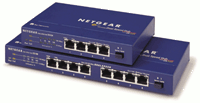 Hubs are
available with different number of connectors, called "Ports": Hubs are
available with different number of connectors, called "Ports":4, 8, 12, 16 |
Hubs are available for different speeds:
- 10 mbs
ONLY
- 100 mbs ONLY
- 10
mbs and 100 mbs dual-speed with either manual or auto-detect
selection
(for professional networks with high throughput, there are also
special versions
of hubs called "Switch", which
offer for home-usage NO additional advantage)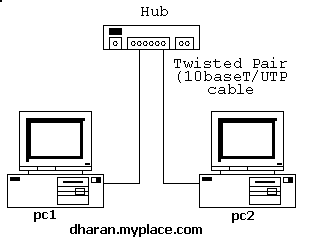
There is ONE exception:
If you only
need to connect 2 PC's in a network, you can use a "Cross-over Cable" to directly connect 2 PC's
without a hub: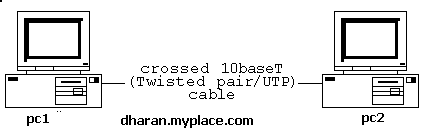
If you decide to use 100baseT, you need to use high-grade
Twister-Pair
cables: Category 5, called CAT5.
I know, it is all confusing, so let me try to list the advantages and disadvantages:
|
Coax -10base2 |
Twisted-Pair |
Twisted-Pair | |
| Rated Speed on Network (mbs =MegaBit/second) |
10 mbs |
10 mbs (10baseT) |
10 mbs (10baseT) |
| Actual NetworkThroughput ( kBytes / Sec) |
700-800 |
700-800 (10baseT) |
700-800 (10baseT) |
| Max. no of system on the network |
30 |
2 |
4, 8, 12, 16 |
| required parts | 1 card/PC 2 terminators coax-cables |
1 card/PC |
1 card/PC |
| Costs |
low |
low |
medium |
You need to decide:
- 10base2 Coax or Twisted-Pair (it is
strongly suggested not to use Coax anymore )
- if you select
Twisted-Pair: at which speed : 10 or 100 ?
(the cost of 100baseT is only
marginally higher than 10baseT, so unless you have already
some
10baseT-parts, I strongly suggest to invest in 100baseT
)
