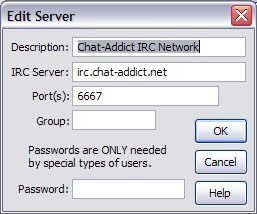
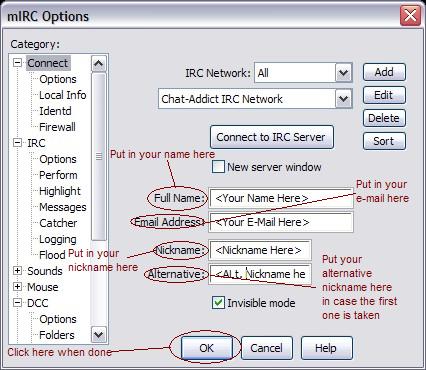
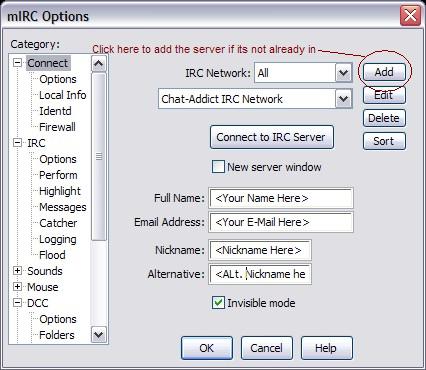
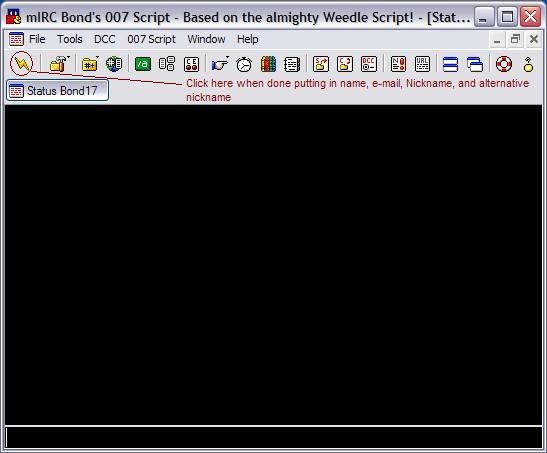
| Chat This is the part of the site where you can chat with your fellow RuneScape users. You can use the Java Applet installed on the site itself or you can download a custom-made mIRC script crafted by yours truly which is specifically designed to help you reach our chat. If you have your own IRC client, here are the server and channel: Server: oblivion.caelestia.net Channels: #rstimes & #rshelp Click here to go to the Java Chat Click here to download the 007 Script mIRC NOTE: 007 Script is encased in a zip file. If you need a zip utility go to Winzip.com or some other place if you wish. mIRC Tutorial Ok, here's a walk through of the 007 Script which is designed to help you reach my channel. When you unzip the files and open mIRC, a window asking you to register appears. Close the window and another window like the one below appears: Fill in your name, e-mail address, nickname, and alternative nickname just in case the first is taken and press enter. Next, you should be at the main window which looks like this: Click the lightning bolt icon shown above and everthing else should happen automatically. If you have to manually enter the server to connect to here's how: Go to the main window shown above and click "File" at the top. Select "Options". A window like the one below should pop-up: Select the "Connect" option from the left menu if its not already done. Anyway click the "Add" button shown above at the right part of the window. A window like the one shown below pops up: Description: Caelestia.net IRC Server: oblivion.caelestia.net Ports: 6667 I would update the above picture, but I'm lazy. |
 |
 |
 |
 |
 |