
TOPOLOGY

NETWORKING · TOPOLOGY · HARDWARE · CABLES
Ethernet Networking
Ethernet is the most popular and considered the networking topology standard for most computer connections. There have been many kinds of Ethernet, but the most popular is 10/100Mbps running over copper twisted pair wires. 100Mbps Ethernet is also called 100baseT and Fast Ethernet. Older Ethernet standards ran on COAX cable and were referred to as 10base2 Thin Ethernet and 10base5 Thick Ethernet. Some hubs still have a coax connector to bridge together twisted pair and Thin Ethernet networks.
Ethernet can operate at 10Mbps or 100Mbps. When shopping for ethernet equipment, be sure to look for 100Mbps or 10/100Mbps equipment. 10Mbps equipment is older and slower than the 10/100Mbps equipment and the price difference has become nigligible. Note, older 10Mbps equipment will work just fine on 10/100Mbps networks.
If only two computers are being connected, a single CROSSOVER cable can be used instead of the standard cables + switch method.
Price for 2 computers at 100Mbps: $70
Price for 3 computers at 100Mbps: $85
Price for 4 computers at 100Mbps: $100
10/100 Ethernet
Connections: Connections between 10/100 Ethernet adapters are made using cables that run to an Ethernet HUB or Switch. Hubs electrically connect your computers together and switches act like traffic cops making your network more efficient. When only two computers are present. A special kind of Ethernet cable can be used called a CROSSOVER cable.
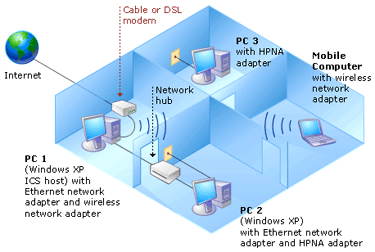
Wireless Ethernet Networking
802.11b or Wi-Fi is now the standard for wireless networking in both the home and business. It has become inexpensive, has good speed but may not is not apporporiate for secure communications.It runs up to 11Mb/second, about as fast as a normal 10BaseT LAN and much faster than my 1.5Mb/second (maximum) cable modem.
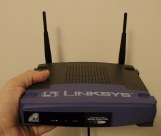
To connect wirelessly, your PC or laptop needs a wireless adapter To make part of your LAN wireless you need what's called a Wireless Access Point. The wireless access point connects to your LAN like any other device and then lets any computer connected to it wirelessly act as if it were on the same LAN.
Phone Line
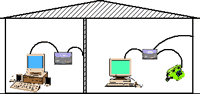
PhoneLine networking, as it�s name applies, uses your existing phone lines to connect your computers. It does not interfere with voice operations or DSL on your existing live telephone line. Your HPNA network, DSL and voice communications can happen on the SAME phone lines simultaneously. The Connections between computers are made with standard phone line cables. Like other phone line devices, Phoneline network adapters have two jacks so that computers and HPNA enabled peripherals can be daisy chained together. No hubs or switches are necessary.
JOHN O. HARGROVE
CIS172.334
[email protected]
Wake Technical Community College
© 2003