Nayori Graphics 2003
For this Tutorial you will need PSP 6 or 7
Eyecandy 4000 (You can get it Here)
Use my Winterland Graphic
HERE

Or use one of your own.
Okay, Here we go~! First open a 400X400 transparent image. Now go to your
preset shapes with our foreground set on White and your Background set at Null
I your preset shapes tool options use the following settings.
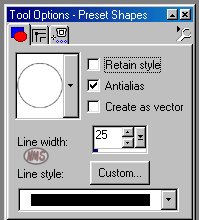
Now draw an oval in the middle of your canvas
Using your Magic Wand click on any of the white area of the oval. You should
now have marching ants around the inside and outside of your oval.
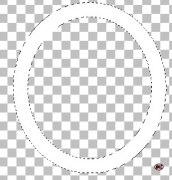
You should now have this