|
 |
|||||||||||||||||||||
|
You are in ::::: Home | Images
Appropriate selection of image formatsProblems with image formatsCompression techniquesThe GIF (Graphic Interchange Format) file formatThe JPG (Joint Photographic Experts Group) file formatThe PNG (Portable Network Graphic) file format
|
||||||||||||||||||||||
Problems with image formats |
 |
|||||||||||||||||||||
|
The greatest
annoyance when accessing web pages is the long wait for graphic to download
and display. Indiscriminate use of graphics, no matter how cool, will only
antagonise the reader. |
||||||||||||||||||||||
Compression techniques |
|
|||||||||||||||||||||
|
Using compression techniques large graphic can download and display quicker that a smaller one. The two main graphic file formats used on the web GIF (Graphic Interchange Format) and JPEG (Joint Photographic Experts Group) treat picture compression in different ways. Another format is Portable Network Graphic (PNG).
|
||||||||||||||||||||||
The GIF (Graphic Interchange Format) file format |
|
|||||||||||||||||||||
|
The GIF file format is for 8-bit (256 colour) images or less. Now, it normally takes 24 bits of data to describe the colour of each pixel on the screen. Eight bits each for Red, Green and Blue. This can give each of these colours a brightness level between 0 and 255 and by mixing them, 16,777,216 colours are possible. GIF compression is non-lossy and good for simple shapes. Better compression with fewer colours. |
||||||||||||||||||||||
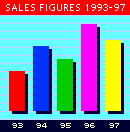
This 8-bit GIF file compresses quite efficiently because of the flat areas of colour. |
||||||||||||||||||||||
|
With GIF compression technique an image that changes consecutive pixel values often, as in the below image, will not compress so efficiently.
|
||||||||||||||||||||||
|
A similar enlargement of
the photograph in the next
section shows very few |
||||||||||||||||||||||
|
In extreme cases, where nearly every pixel changes colour, the 'compressed' file size may be even larger than the uncompressed original. Interlaced images appear gradually: Good for larger images, slows down smaller images.
|
||||||||||||||||||||||
The JPG (Joint Photographic Experts Group) file format |
|
|||||||||||||||||||||
|
The JPEG file format works with 24-bit images regardless of whether the monitor can display them correctly or not. This format is best for continuous tones E.g. photographs. JPEG compresses the picture by intelligently removing information to reduce the file size. This process is called 'lossy' because picture information is loosing to simplify the image. However compression level can be set.
|
||||||||||||||||||||||
 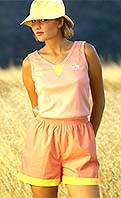
The GIF picture on the left is 24K and the JPEG on the right 16K On an 8-bit display they will look similar but on a 16 or 24-bit display the JPEG will look better |
||||||||||||||||||||||
|
As a general rule, it is best to use GIF for graphic images - icons, logos, buttons and JPEG for photographic ones.
|
||||||||||||||||||||||
The PNG (Portable Network Graphic) file format |
|
|||||||||||||||||||||
|
Was developed as a non proprietary alternative to GIF, but does more. It supports a full range of colour depths e.g. 24 bit, transparency, interlacing, automatic correction for monitor gamma, embedded text descriptions useful for searching. But only on later browser versions. Thus not universally available. |
||||||||||||||||||||||





















Home |
Animation |
Fonts & Colours |
Target Audience | Images |
Navigation |
Table-Based Layout
Stylesheets |
Online Test
(Last modified : 2003-03-19)