


|
| How does the trainer work? |
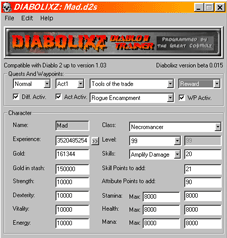 |
- Load the character to hack:
File->Open...
- Backup your character:
File->Backup
- Edit all the stats you want on the main windows.
- Save your changes:
File->Save
|
| Where are my character files? |
Learn how to use Windows, search "my computer"
for "*.d2s".
You can usually find it there:
C:\Program Files\Diablo2\Save\
| What should i do if my character became corrupted? |
- Load the character you corrupted.
File->Open...
- Retrive your last backup:
File->Retrive
- Save the retrived version:
File->Save
| How do i edit a value you didn't listed yet? |
| |
- Load your character and backup it if you feel like it
|
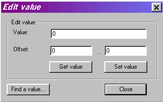 |
- Open the Edit Value dialog:
Edit->Edit Value...
- Open the Find Value dialog:
Click the "Find a value..." button.
|
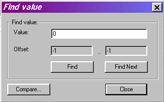 |
- Write the actual value of the stat you want to change in
the "Value" field.
- The Offset of your stat should now show up. Hit the "Find"
button if need to start the search.
- An offset of -1 mean "not found" or "begining
of the search".
- Use the "Find Next" button to see if there is
other possible offsets for that stat.
- Don't be stupid, be sure that you used the Backup option
before editing anything, check it twice if you are about to
edit a value that you found at many place.
- Hit the "Close" button once you got the offset
you need.
|
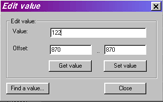 |
- You are now back to the Edit Value dialog.
- If as a result of the search you got 3 bytes, be wise:
it's most likely 4 bytes so if you got 102..104 it's
probably 102..105 (take note that it can't be 101..104).
- Now set the value you want for your stat:
Change the "Value" field and hit the "Set
Value" button.
- Hit the "Close" button.
|
| |
|
| About the gold in stash ... ? |
First of all, take a look in Diablo2 at your maximum gold
in stash. NEVER put more gold than that maximum using the trainer.
That would reset your amount of gold if you are lucky. If you are
not lucky, you will get a negative amount of gold in stash (and it
might be really annoying to pay it back, lol).
|
|