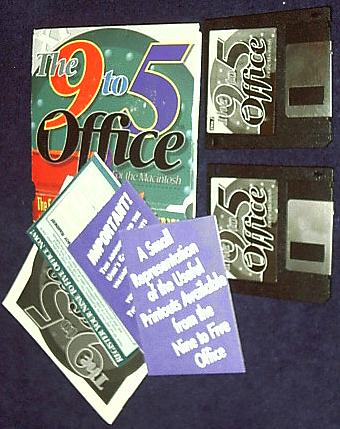
You never see this anywhere anymore. Worked great on a Mac LC, and will work anywhere HyperCard 2.1 or better works. If you still write HyperCard or SuperCard stacks, this is the best example of any commercial stack system.
Two 800KB diskettes and manual plus paperwork. Everything is in perfect condition except the original mailer. So why do you need this? You LOVE Filofax, Dayrunner and all the popular personal organizers that preceded those munchkin PCs all the office nerds have. You like it on paper, printed where you can access it FAST. 9-5 is the ultimate HyperCard organization tool. Maps, Daily Quotations -/ Inspirations, Contacts, Calendars, Personal Schedulers, To-Dos, Addresses. Very very VERY structured HyperCard stack. Once data is entered, you can easily manipulate it. The Reports section is a complete engine that sits in the System Folder to complement HyperCard's already powerful possibilities. HC is included, version 2.1.
You will need at least 1.5MB RAM, 2MB under System Update 7.x. I've run it on 7.6.1. Works great. Remember, HyperCard remembers everything you enter without Saving. This is the greatest File-and-Forget tool you can have because it is so easy to use the special Search engine. You'll find things you never knew you entered, if you're as busy as most Dayrunner types. Makes great use of HC's palettes. Very Stack Design Guidelines aware, in fact, probably the world's best example of Apple's HyperCard Stack Guidelines. Before you know it, you'll max out the 20,000-plus cards you can put into 9-to-5. That's when the Index function shines. MasterView gives you the spread(sheet) on every contact, field, label, etc. There's even a full word processor from within HyperCard with complete mail-merge built in.
$15 TimesTwo
When Golden Triangle issued TimesTwo, it immediately went to Finalist status at MacUser's annual Editor's Choice ratings. It was the first disk compression utility to go into development for the Macintosh, and was either the first or second to be released to the public along with AutoDoubler. It excels where More Disk Space and Stuffit Deluxe fail. It matches AutoDoubler, and it's faster than all of them. TimesTwo needs to be on a disk that does not have third-party disk security. It says it will work, but it is problematic with things like FolderBolt or Citadel. Just saving you some hassle. It is still very collectible.
The manual and disk are in perfectly new condition. This disk compressor doubles the size of your hard drive. TimesTwo is compatible with a Mac Plus or above with System 6.0.4 or later. It needs 2MB RAM and a SCSI hard disk, removeable or optical included. For sure with Bernoulli, SyQuest, Erasable Optical, SCSI Floptical and Richoh. PowerBook users should love TimesTwo, and yes, this version is on a 1.4MB diskette so it will start from disk. Nice feature is the Verify function to make sure when your hard disk is approaching capacity, that you don't smash the bits together tooo tight. Verify is also a file-recovery tool.
$15 Central Point Safe & Sound 1.0
Both the 800KB and 1.4MB diskette are included in this package with the like-new manual and registration. Safe & Sound is the simplest disk utility every created. If you have NO technical knowledge, it's OK. Forget Norton or S&S's big-brother MacTools. Dis' DiskExpress.
Based on the superior MacTools engine, Safe&Sound operates by inserting it into your troubled Macintosh. It works on a Plus on up. How simple? The manual is an 8-panel fold-out brochure. Once you start-up the Mac with the diskette, it runs through the entire diagnostic routine all by its lonesome.
Set it to automatically fix errors if you really want to keep it simple. When finished, it will shut down, and your disk is Safe & Sound. Fixes all the usual culprits: mutliple systems, bad dates, bundle bits, viruses, bad blocks and much more. You can undo repairs, check out complete disk information and analyze your hard drives even if you never touched a diagnostic program before. Was a lifesaver on my Plus and LC III. Insert, start-up, go have coffee, come back and take the disk out, restart. Voila! Instant nirvana for your Mac.