
 |
 |
1. Introduction > Special Features


1.2. SPECIAL FEATURES | Turtle |
LOGO Screen | Main Screen |
Commander Window |
| Turtle |
LOGO Screen | Main Screen |
Commander Window |
1.2.1. Turtle
The turtle carries a pen and when it moves according to the instructions given by you, it draw a line on the window screen. The turtle represents a cursor in LOGO. It show the position on the screen where your instructions will be carried out.
The turtle moves on the screen according to the instructions given to it and these instructions are called as commands or primitives.
| The shape of TURTLE in MSW LOGO | The shape of TURTLE in PC LOGO |
 The pointed end of the turtle is called its head and the wide end is called as its tail. The turtle is like a shape of a triangle. |
 The head of the turtle and its tail are just exactly like a shape of a real turtle. |

1.2.2. LOGO Screen
LOGO Screen is split into two parts:
 Main Screen
Commander Window
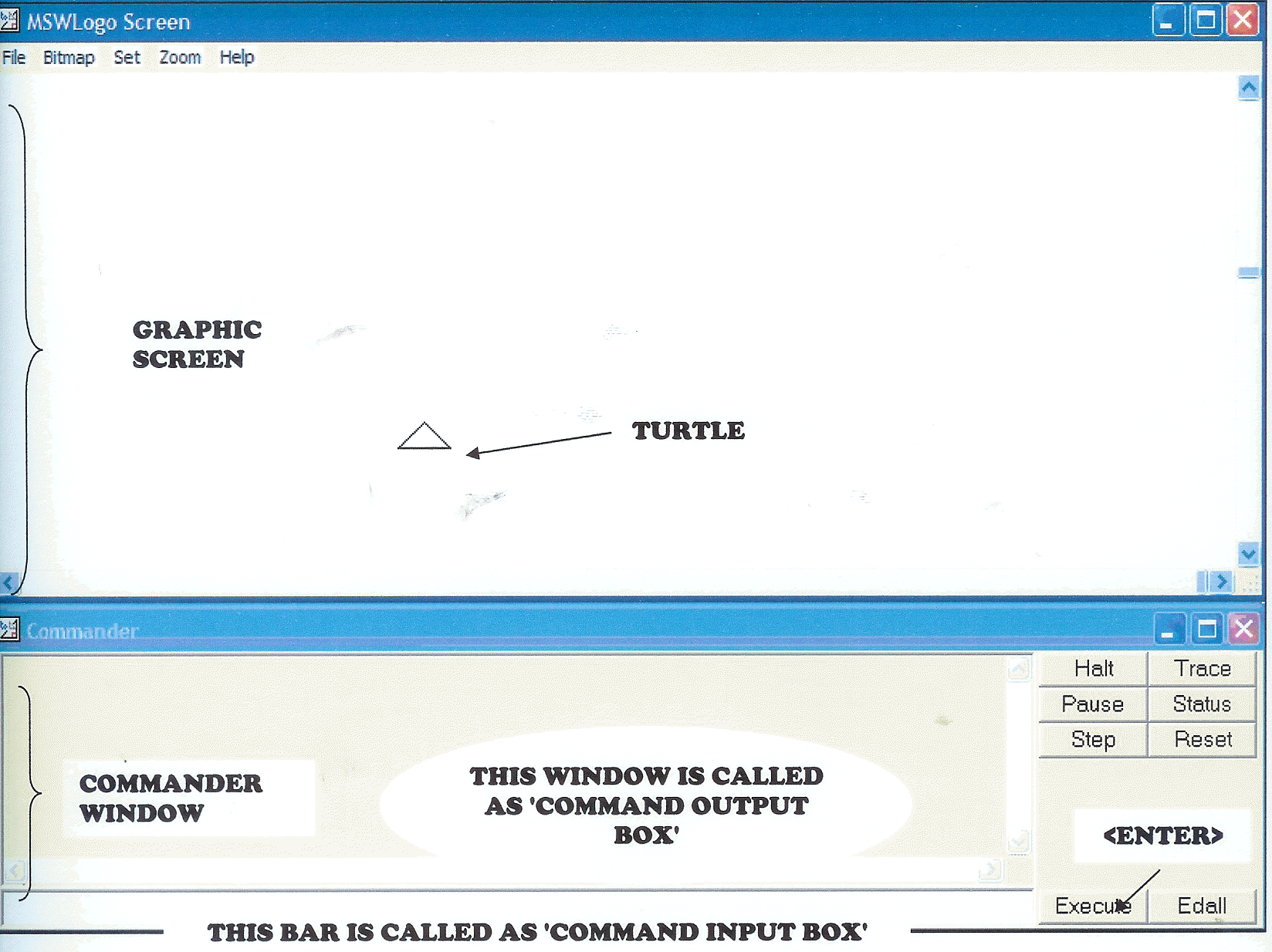
1.2.2.1. Main Screen
Main Screen is also known as the Graphic Screen. It is the place to draw pictures or figures. The triangle shape in the centre of the Graphic screen is called Turtle. Turtle moves on the screen according to the commands given by you. These commands are also known as primitives.
1.2.2.2. Commander Window
The Commander Window is the place to give commands to the turtle. The Commander Window has three important components:-
Command Input Box
- It is where you type commands in and execute them by clicking on the <Execute> button
or by pressing the <Enter> key on the keyboard.
- It is located in the bottom left portion of the Commander Window.
Output or
Command-Recall List Box
- Displays and records all the commands that are executed and also any messages which are
output as a result of these commands.
- It is located above the Command Input Box.
Execute
button
- Similar like the <Enter> button on the keyboard.
 How does the Commander Window work
out?
How does the Commander Window work
out?
Command Input Box is linked to the Output/Command-Recall List Box. If you click on a line in the Output/Command-Recall List Box, it is automatically appeared in the Command Input Box. It can be executed by clicking on the <Execute> button or by pressing the <Enter> key on the keyboard.
 HOME
HOME