 |
 |
| This tutorial will probably seem a bit long, but don't let that scare you. It is not very time consuming at all. The length of the tutorial is due to the screenshots, as well as little details to help even the rookie animator create these signatures. There are many sites that offer animated alphas for download. The animated alphabet used in this tutorial was downloaded from THIS site and are the sole property of the creator, Jim Chou. Please read his terms and respect them. |
| First you will need to download the alphas needed for your name, saving them to your hard drive or disk. Once you have them all, you will need to do a little math before you get started. You will need to know the size and number of frames for the alpha. You will also need to determine the frame speed, so that when you have completed your signature, you will have the same effect as the alphabet you downloaded. This is very important, and I know you want to get along with making your signature, but bear with me here. If you learn how to do this now, you will be able to create other signatures, using other alphabets later on.....and without a tutorial! :) Let's get started by opening Animation Shop. Go ahead and open the first letter of your name and we will count the frames. |
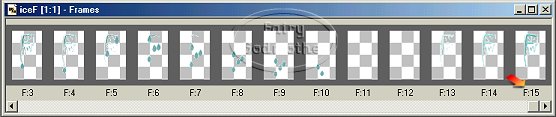
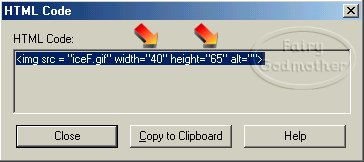
| Using the scroll bar at the bottom of your animation, scroll all the way to the right. You will see that in this case, there are 15 frames. It is important to note that it just so happened that all the letters in this particular set did contain 15 frames (I checked them one by one!). However, if you should choose to use a different set, you will need to check the number of frames on each letter. All the letters must have the same number of frames. If you should happen to have a set that each letter has a different number of frames, you will have to modify them in order for your animation to work properly. I will give a short discussion on how to do this at the end of this tutorial. We have established that each letter has 15 frames. Now we will determine the size of each frame. Click on VIEW>HTML Code. |
| The width is 40 and the height is 65. This means that for each letter of your signature, you will need 40 pixels width. For my signature of 3 letters, I will need 120 pixels width. Now let's get the frame speed. Click on Animation>Frame properties. You will see that the first frame has a speed of 50. Click CLOSE. Click on the second frame. Then Animation>Frame properties. You will see that the second frame has a speed of 20. You should move on to all the frames of the animation doing the same process, making note of the speed of each individual frame. I wrote all mine down on a notepad so I would have it later. This particular set of alphas ALL have the first frame speed at 50, and the remaining frames at 20, so that makes it easy for us. If you use a different set you will need to check each frame. It is a bit time consuming, but once you have all this information, you can go to town making these signatures for yourself and your friends in no time flat. |
| This tutorial was written July 27, 2002 and may not be copied. Passing the link along is fine. Thank you! |
 |
|
 |
 |
| Click HERE for a printable version of this tutorial, without the screenshots. |