


HUD text big enough to read.
Why? It's inside your helmet visor.
These pictures are full screen in the program.
The HUD is positioned in the pilots line of sight and inside the helmet visor.
Information useful to the pilot not wishing to look down into his cockpit displays is shown on the HUD in 5 selectable modes,
Air to Air (AA), Air to Ground (AG), Instrument Landing System (ILS),
Navigation (NAV), Air Refueling (REF),,
all of which can be selected by cycling through H on the keyboard.
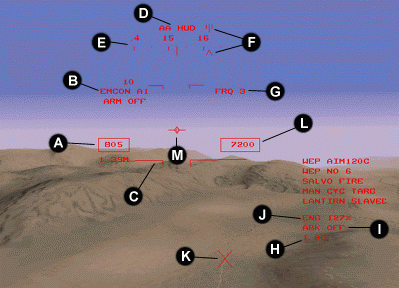
A Airspeed in Knots, B Current EMCON status, C Pitch ladder, D Current HUD mode
E Compass ribbon, F Waypoint carets, G Current radio frequency, H G-Force readout
I Airbrake status, J Engine power, K Next waypoint, L Altitude in feet, M Velocity vector
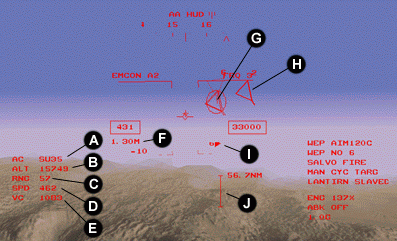
A First A/C in shoot list type, B Target altitude, C Target range (Nm)
D Target speed, E Closing velocity, F Ground speed (Mach)
G Enemy A/C tracked and first in shoot list, H Enemy A/C tracked and in shoot list
I Target range and priority, J Currently selected weapon range bar
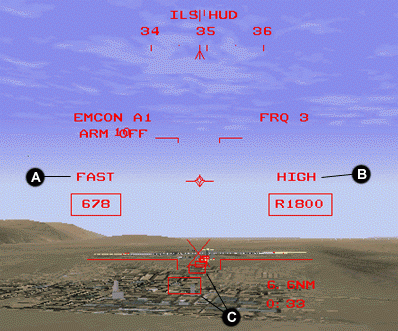
A Landing approach speed warning
B Landing approach altitude warning
C Instrument landing system markers
C Terrain Following Box
The HUD Terrain Following Box
To allow your F-22 to fly at low level your HUD shows a rectanlge at the bottom of the display. As your plane flies lower the rectangle rises up the display. If you keep the velocity vector in or above the box then there is no risk of your plane hitting the ground.
