


We play games for FUN, right?
My job will be to help you achieve that objective.
I am not some hot shot game player. I'm sure you will find that some of you will be kicking my ass as soon as you get the hang of this fun combat flight simulator.
F22 TAW will be one of the games of choice you can select to play at Tweak't Gaming Center.
If you would like me to help you learn the basics of F22 TAW, just sign up for a lesson.
My hope is that you will think about taking a break from the rest of those great 1st person shooter games available at Tweak't , and select this fun flight simulator.
Yes, F22 TAW contains a very good multiplayer mode. If you find this game to be fun, ask a friend to join you in one of the multiplayer options. Tweak't Gaming Center can set you up for a LAN session the same way you play the other games.
Overview
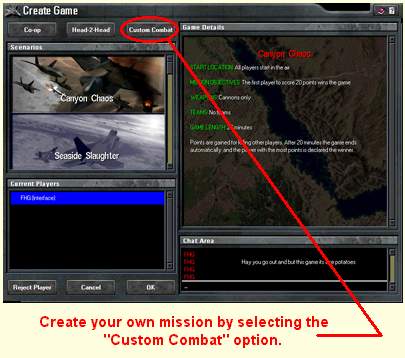
TAW has a new module called Custom Combat. This module allows you to set up a Basic Fighter Maneuvers (BFM) engagement with any of the aircraft available in TAW. It can also be played multiplayer to let you and your wingmen fly in a dogfight of your choosing. Select the Custom Combat tab from the main menu to launch the TAW aircraft custom combat editor.
Set the Scene
Using the Custom Combat editor, you can control what your BFM mission will be like. These options can be selected in any order you desire. The environmental conditions available allow you to choose the time and location of your mission. From within the Global Options section of the interface select your desired Location (Desert, Hills, or Sea) and Time of Day (Midday, Dusk, or Night).
Using the Advantage selection buttons you can opt to give your flight the benefit of starting the engagement in a good position - behind the enemy. If you desire, you can choose that no side should have the advantage at the start and this will result in you confronting your foe head on. You can also give the advantage to the enemy, which will place them behind your flight. Keep in mind that these settings only apply to the start and after the mission begins it is up to you and your wingmen to determine the final outcome of the fight!
Add Enemy Forces
A summary of your current mission can be viewed in the Formation Selection window. In this window you will see the results of any Insert or Delete actions you have performed. All aircraft and vehicles that are currently in your mission will be displayed here.
The Mission Goals for Custom Combat are:
1. Stay alive
2. Destroy all enemys.
3. Have fun! Remember,, That's what it's all about.