

|
|
| ShareMail OverviewShareMail is an Email server for Windows . Different from other email server , it just fit for SOHO . ShareMail only needs ONE internet email account , it expands the account to several mailbox and also keep everybody's privacy . You can also define anonymous mailbox , broadcasting mailbox , mail list with ShareMail . ShareMail also provide a FREE software called "Notifyer" to check email periodically and inform you the new coming email. ShareMail Enterprise version support multiple public mailbox and up to 100 private mailboxes .
Principle
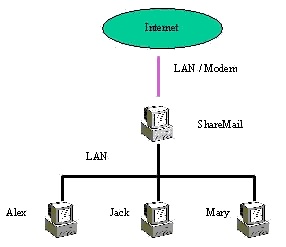
How ShareMail expand one email address for several person ? ShareMail use the additional information to distinguish each body's private mail --- the prefix before email address . Let's see an example . You have a internet email address ( Public Mailbox is
this document ) . The address is [email protected] . ShareMail will add a
prefix before the address to expand and identify everybody . You have 3 private
mailbox : "Alex", "Mary" and "Jack" . Then their
email address would be like that :
ShareMail also support email exchange for local users . When you want to write a mail to local user , use this format: Name@local . So as a ShareMail user , every user has 2 mail address :
When inner user send out mails , the mail will first send to ShareMail . After collecting these mails , it will analysis each mail to get the destination . If the mail is sent to the inner user , the mail will be moved to his mailbox directly . If the mail is for outside , ShareMail will send them on schedule . When you write mail to inner user , you must specify the private mailbox. Indeed, The mail will be sent to the Internet mailbox first , then ShareMail receive these mails, analysis each mail's content , dispatch them to the destination mailbox. If not find the right mailbox , the message would be moved to administrators mailbox or specified mailbox . Both receiving and sending mails are working at the same time in multithread mode .
ShareMail Features
Keep PrivacyAlthough share one Email account , ShareMail still keep everybody's privacy. Only provide correct password can read from the email server. Auto Recv-Send EmailShareMail will receive and send email automatically . It can work in two method. One is working every predefined time , the other is working by schedule . Also user can send urgent mails . ShareMail will deliver this mail out right now . Support AliasShareMail support Alias for email box. An alias to be defined for a particular mailbox. Messages addressed to the alias will then be delivered to the selected mailbox. Email BroadcastingBroadcasting is an advanced feature for user. The mail send to this account will copy it to everyone of ShareMail , so everybody will receive this email . It like mail list but needn't subscribe it. Often broadcasting is used for Notice and Announcement . Dialup NetworkingDial-Up Networking enables ShareMail to connect to the Internet with phone line. ShareMail will automatically use Microsoft's Dial-Up-Networking to dial the modem and connect to your service provider. Run As NT ServiceShareMail can also work in NT Service method . POP3 ProxyThrough POP3 proxy user can receive any mail from internet. Refuse Email SpamShareMail check every message according to where it come from and its size. avoiding large and spam full of your mailbox . Activity LoggingShareMail provides the ability to log all network activities that passing through it. Email backupAll the email received and sent by ShareMail can be backup. This may enforce the management .Support firewall/proxyShareMail can work behind firewall/proxy server . ShareMail use SOCKS v5 protocol to cross the the firewall/proxy . Most of the firewall/proxy support this protocol . Remote ControlEveryone can change their account password remotely. Exchange for Inner emailsIf email is from private mailbox to private , ShareMail will exchange locally , not send to internet again . Support Mailing ListList mailboxes allow a single message to be sent to many list members. A list has several options to control how it works and can be configured to allow members to subscribe and leave the list by the use of simple messages.
Information Request Form
|
|
Send mail to [email protected] with
questions or comments about this web site.
|