





uses PSP 7


|
|
|
|
|
|
|
|
|
|
|
|
|
|
|
|
|
|
|
|
|
|
|
|
|
|
|
|
|
|
|
|
|
|
|
|
|
|
|
|
|
|||||||||||||||||||||||||||||||||||||||
|
|||||||||||||||||||||||||||||||||||||||
|
|||||||||||||||||||||||||||||||||||||||
|
|
||||||||||||||||||||||||||||||||||||||
|
|||||||||||||||||||||||||||||||||||||||
|
|
||||||||||||||||||||||||||||||||||||||
| Hair uses PSP 7 |
|||||||||||||||||||||||||||||||||||||||
|
|||||||||||||||||||||||||||||||||||||||
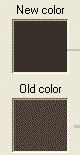
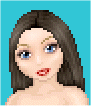
| 1) prepare your doll like you would normally. Pick the colour of hair you would like your doll to have. Find a colour a few shades darker than that to be the outline. | |||||||||||||||||||||||||||||||||||||||
|
|||||||||||||||||||||||||||||||||||||||
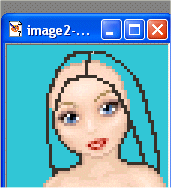
| 2) make the outline with the darker colour. Fine the approx. shape you want and when you have figured out what that is, use your eraser tool and get rid of the edges. Fill it in with the lighter colour. | |||||||||||||||||||||||||||||||||||||||
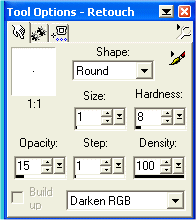
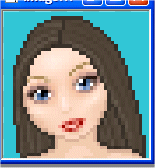
| 3) get the darken tool and make it to approx. these settings. When this is done, make "lines" in the hair that are a few pixel widths apart like so. . . (depending on how dark the hair colour is you may have to make the "Opacity" higher so it shows up more. So the same with the Lighten Tool but in between the darken lines (when getting the settings for the lighten tool you may want to increase the Opacity to about 24 or so) | |||||||||||||||||||||||||||||||||||||||
|
|||||||||||||||||||||||||||||||||||||||
|
|||||||||||||||||||||||||||||||||||||||
| When you are done making the single lines with the lighten/darken tools, get the darken tool and made the size (depending on how big the doll is, if it is huge make it bigger. . .likewise for if it is small) about 6-10. Darken were the shadows would be on the doll. You can look at my example doll to see what I mean. |
|||||||||||||||||||||||||||||||||||||||
|
|||||||||||||||||||||||||||||||||||||||
| 5) Now onto lightening the dolls hair. Make the brush bigger than you would have used for the darken by about 2. So if you used size 8 for darken, make it about 10 for lighen. Look at my example doll to see where to shade. | |||||||||||||||||||||||||||||||||||||||
|
|||||||||||||||||||||||||||||||||||||||
|
|||||||||||||||||||||||||||||||||||||||
| 6) now clothe and accessorise her and you're done! See, that was pretty easy :) | |||||||||||||||||||||||||||||||||||||||