|
Function
View and print client account between two dates or according to reservation date and number. Client or agent is organization that guests belonging to. They are defined in the general accounting module (GAS). The program shows all room bills belonging to the specified client and of arrival and departure dates between the specified dates or of the specified reservation date and number. If the reservation number and date are specified, the program use them and ignore the start and end dates.
Opening Form
This form is opened from the front office main interface by clicking on (Client Account Statement) button. The program then opens a form to enter and select the parameters required to view the client account.
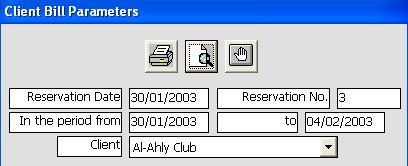
The parameter form is initialized with the current room data if the current room is an occupied room that belong to a client. The user may change the parameters and specify a client by selection from the list of clients and enters reservation date and number or the start and end dates. The user displays the client account by clicking on the view button or press (Alt+V) keys, or prints the statement by clicking on print button or press (Alt+P) keys, or close the form by clicking on the exit button or press (Esc) key.
Data Fields
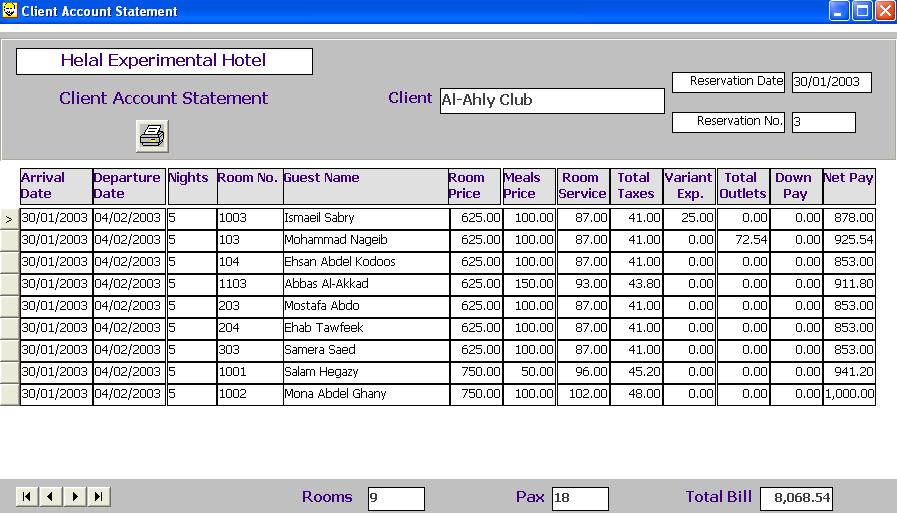
The client account statement is shown as a grid, each row in the grid corresponds to a room belonging to the client during the specified dates or with the reservation date and number specified. Each row includes the following data fields:
Arrival and departure dates, number of nights, room number, principal guest name, room price, meals price, room service value (12% value), total taxes, total variant expenses, total outlet orders, total down payments, and the net bill value.
The form also includes total of the net value for all rooms, total number of rooms, and total number of guests. The form also shows at the top client name, reservation date, and resrvation number.
Function Buttons
The function buttons in the form include four buttons for browsing the rooms (First, Last, Next, and previous) in addition to a button for print the client account statement.
Command Keys/Short cuts
|
Function
|
Key
|
|
Close the form
|
Alt-Q
|
|
Set focus to current room record
|
F4
|
|
Print Client Account Statement
|
Alt-P
|
|
Last Record
|
End
|
|
First Record
|
Home
|
|
Next Record
|
Down Arrow Or Page Down
|
|
Previous Record
|
Up Arrow Or Page Up
|
|