|
Function:
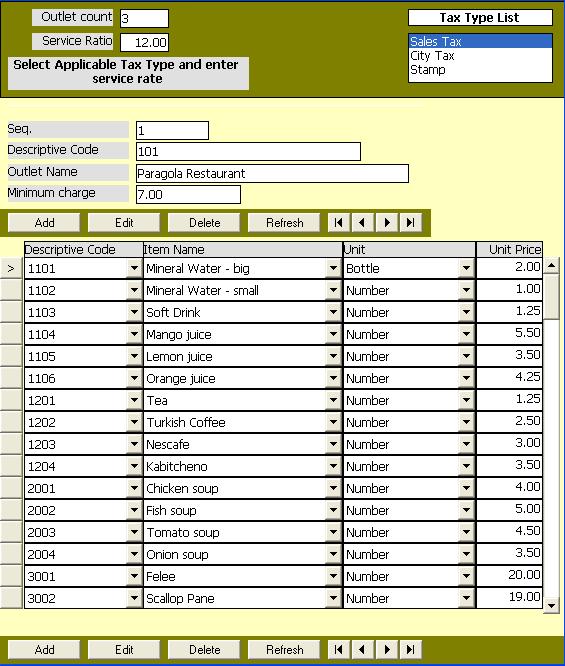
This page is used to define the outlets of the hotel along with the items sold in it.
Outlets include resturants, cofe shops, lundary, telephone, ... etc. are using the same module (HOT) for order processing.
Opening Page:
The page is opened by clicking on the button (Outlet Definition) in the main menu of the Basic data module.
Data Fields
The page is devided into three areas.
The first area include a list box containing the tax types defined in the tax definition page. The user selects the applicable taxes from this list.
It also include a field to specify the service percent ratio which is usally 12%.
It also include a field to show the number of outlets defined so far. The user can not modify this field.
The Second area contains the fields specific to the outlet as follows:
Sequence number assigned by the program to the outlet at the time of creation to uniquely identify it for internal program use.
The Outlet name is entered and updated by users.
The outlet code description is entered and updated by users.
The name and Descriptive Code of the outlet identify the outlet and used for display on forms and reports.
Descriptive code might follow a standard coding scheme adopted by the hotel. Both fields should not be duplicated for other outlets.
The fourth field is the minimum charge for the outlet. The user specifies in this field the minimum value to charge the client if the items total value does not exceed it.
The third area contains the definition of the items belonging to the outlet. Each row represents an item sold by the outlet.
Each row contains the following fields:
The item name and item descriptive code are selected from the items defined in Item Catalog module. The selection is done either by name or code. Items are not duplicated for the same outlet but it may be sold in different outlets with different price or even different unit.
Unit Code field is selected from the units table created in the Item Cataloge module. Unit of item in outlet my be different from the unit of the same item in Catalog, but in this case their shoud be conversion between the two units defined in the conversion table.
The last field is the unit price of the item.
Function Buttons:
In addition to the four buttons to transfere control between records for both outlets and items, there are the following function buttons:
Add new outlet and another add button for adding new item to the current outlet.
Edit to change the data of existing outlet and another edit button for changing the data of the item of the current outlet.
Delete Delete an existing outlet and another button for deleting an item of the current outlete. Deletion is not permited for outlets used or items used.
In Add and Edit mode two buttons appear for accepting and saving changes (Update button) and the other for canceling the changes (Cancel button).
Function Keys/Short cuts:
Outlet:
|
Function
|
Key
|
|
Move to next field
|
tab
|
|
Edit
|
Alt+E
|
|
Add
|
Alt+A
|
|
Delete
|
Alt-D
|
|
Update
|
F2 Or Alt+U
|
|
Cancel
|
Esc Or Alt+C
|
|
Exit
|
Alt-Q
|
|
Last Record
|
End
|
|
First Record
|
Home
|
|
Next Record
|
Down Arrow Or Page Down
|
|
Previous Record
|
Up Arrow Or Page Up
|
Items:
|
Function
|
Key
|
|
Move to next field
|
tab
|
|
Edit
|
Ctrl+E
|
|
Add
|
Ctrl+A
|
|
Delete
|
Ctrl-D
|
|
Update
|
Ctrl+U
|
|
Cancel
|
Ctrl+C
|
|
Last Record
|
Shift+End
|
|
First Record
|
Shift+Home
|
|
Next Record
|
Shift+Down Arrow Or Shift+Page Down
|
|
Previous Record
|
Shift+Up Arrow Or Shift+Page Up
|
|