|
Function:
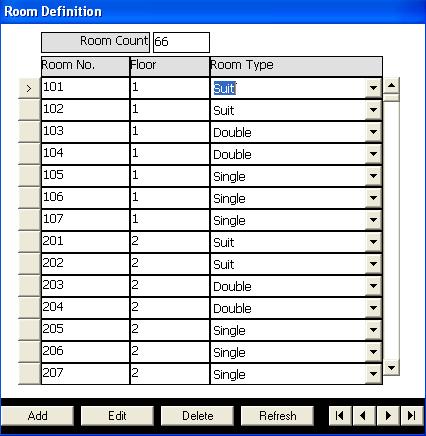
Enter and update rooms and specify their types.
Openning Page:
Click on room definition button in the main menu of basic data module.
Data Fields:
Data necessary to define hotel roomes are:
Room No. is an identifier to room, contains alphanumeric characters of maximum length 10 characters.
Floor No. is a numeric field that identify the floor of the room.
Room Type is selected from the types entered in Room Type Definition page.
The page also includes a field showing the total number of rooms defined.
Function Buttons:
In addition to the buttons userd to transfer control between rooms defined, there are buttons to perform the following functions:
Add to add new rooms.
Edit to change the fields of existing room.
Delete to delete an existing room. The room in this case must not been used in reservation or check in.
In the edit or add mode two buttons apears: Cencel button to cancel changes done and Update button to accept and save changes done.
Function Keys/Short cuts
|
Function
|
Key
|
|
Move to next field
|
tab
|
|
Edit
|
Alt+E
|
|
Add
|
Alt+A
|
|
Delete
|
Alt-D
|
|
Update
|
F2 Or Alt+U
|
|
Cancel
|
Esc Or Alt+C
|
|
Exit
|
Alt-Q
|
|
Last Record
|
End
|
|
First Record
|
Home
|
|
Next Record
|
Down Arrow Or Page Down
|
|
Previous Record
|
Up Arrow Or Page Up
|
|