
HMS 2003
Function
Open Page
Data Fields
Functional Buttons
Function
Key
Go to next field
tab
Program Exit
Alt-Q
Update
F2 Or Alt+U
Cancel
Esc Or Alt+C
Edit
Alt+E
Add
Alt+A
Delete
Alt+D
Last Record
End
First Record
Home
Next Record
Down Arrow Or Page Down
Previous Record
Up Arrow Or Page Up

Applications' Users
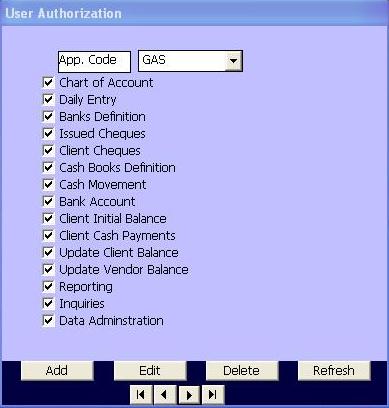
This page is associated with User Definition page. It assigns for each user the applications that is accessable to him and the functions that he has the access rights to them.
This page is opened when the Application Users System is loaded with it's associated form for user definition.
The data fields of the form is a combo box to select the applications installed from the list and set of check boxes for the functions of the application selected.
When the user changes the selected application, the program displays the functions of the selected application to mark the functions that the user has the right to perform.
The function buttons in this page include the following:
Add: to add a new application to user.
Edit: to edit data of existing application.
Delete: to delete an axisting application to disable user's right to run it.
Update: to save the midified data after Add or Edit
Cancel: to regect the modifications done in Add Or Edit functions
Plus the button that move cursor to First Record, Last Record, Next Record, and Previous Record.