
HMS 2003
Function
Open Page
Data Fields
Functional Buttons
Function
Key
Go to next field
tab
Program Exit
Alt-Q

Company Profile
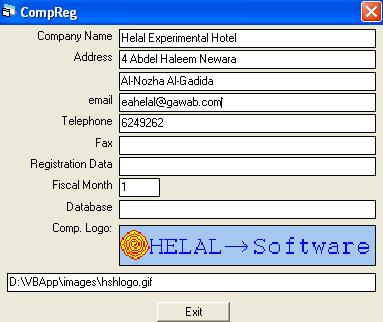
Enter or update company profile.
This page is opened by clicking on the company definition button on the main page.
The data fields that define the company profile include: Company Name, Address (in two lines), email, Telephone,
Fax number, Legal Registration data, Fiscal Month number, The company database directory, company logo, and the logo's directory.
To change the company logo click on the field with the mouse left button to open a form that looks for a file on the computer's drives. by selecting a picture file, the picture is displayed
in the company logo field and it's directory in the logo's directory field. The logo is printed on company bills and some other reports.
Registration data used for bills issued by the system. if no data entered, the corresponding lines in bills will be empty.
Fiscal Month number represent the start month of the financial year. All bills' numbers initialized at the beginning of this month and start from one.
Company Name is the only required field and it is entered in registration of any application module in the system.
The only function available in this page is the exit function which closes the page.