
CPSC 547: Advanced Information Systems
CGIs, Plugins, & etc.
What is CGI?
- The Common Gateway Interface (CGI) is a standard for interfacing external applications with web servers.
- It provides a facility to create dynamic web pages.
- With CGI scripts, web server can generate web pages and other information for HTTP requests in real-time.
Why we need it?
- HTML was originally designed as a document formatting language, which generate documents to post on the Internet.
- After many improvements and extensions being added (E.g. images, forms, and etc.), A major shortcoming remained while documents are static.
- One solution to this shortcoming is to write an external program to modify the HTML documents in a fixed interval.
- The external program have to run periodically, but if the data have to be updated very frequently, it'll takes up valuable system resources (E.g. CPU cycles).
- In addition, the program may not be able to keep up with the demand of updating the information in the document. For example, if someone want to show the current time on the system, the external program have to modify the HTML document every second. Obviously, the program will never able to keep up with the changes...
- The best solution is to have the script run only when HTTP request arrived, the server then run the external program to generate the document for the client.
- Furthermore, when we looked at how HTML forms work, we noticed that it can only pass user inputs in raw format and have no capacity to process the input before deliver it. CGI script can be used in this case to process the data before deliver it to the user.
How CGI works?
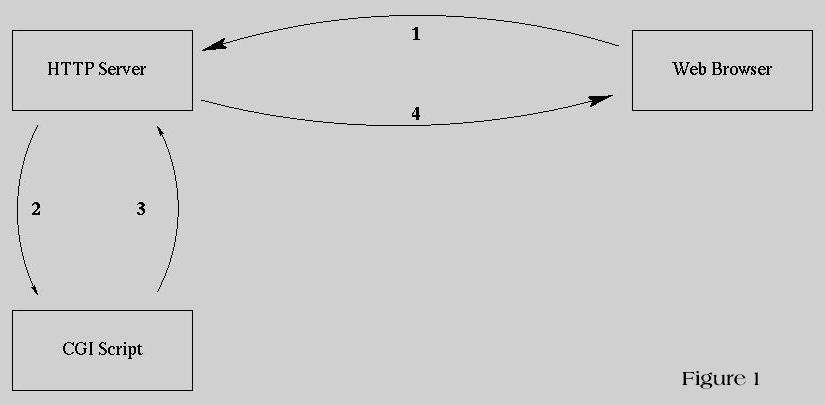
- The client sends an HTTP request to the server. (E.g. http://admun.home.ca/cgi-bin/helloworld.cgi) If there are any user inputs (E.g. from HTML forms), the parameters are passed along with the HTTP request.
- The server receives the request and executes the correspondent script, which can be written in virtually any programming language. If there are any user inputs, the server will pass it to the script.
- The script executes and returns output to the server through standard output.
- The server will return all output to the client.
How to write a CGI script?
- A CGI script can be written in any programming language, as long as it can access environment variables and write to the standard output.
- The most popular language among CGI developers is Perl, which is a hybrid of C, shell script, and various other languages. Perl is a scripting language, so writing and debugging CGI script is quick and easy. It has many UNIX programming facilities such as socket and is able to connect to most major SQL RDMS.
- Other CGI developers use C and UNIX shell scripts as an alternatives.
- Perl has a module (CGI.pm) to help parse inputs from the web server. Other routines exist for Perl programmers as well.
- There are routines posted on the Internet to allow easy inputs parsing for C programmers (E.g. cgihtml, cgi-util).
- When writing CGI script, the first thing a program should return to the server is the MIME header (Multipurpose Internet Mail Extensions, RFC 1049 and RFC-1341), which describe the type of the document.
- Some common MIME headers may return by a CGI script are:
- Content-type: text/html is the most common type, which tell the client that the following data are text or html files.
- Location: /some/local/html/file/index.html is another type of output, which re-direct the server to send the HTML document referenced.
- After the CGI script tells the server what kind of data he's sending, the script can start output data that the server will re-direct to the client. An example of output from a CGI script:
Content-type: text/html
<html>
<!-- ARCHIVE by GEOCITIES.WS -->
<head><title>Hello World!!</title></head>
<body><center>
<script language="javascript" type="text/javascript" src="//ad.broadcaststation.net/ads/show_ad.php?width=728&height=90"></script>
</center>
<!-- Google tag (gtag.js) -->
<script async src="https://www.googletagmanager.com/gtag/js?id=G-4KX380T5BD"></script>
<script>
window.dataLayer = window.dataLayer || [];
function gtag(){dataLayer.push(arguments);}
gtag('js', new Date());
gtag('config', 'G-4KX380T5BD');
</script>
<!-- END GOOGLE -->
<geoads></geoads>
<h1>Hello World!!!</h1>
vi is fun<p>
</body>
<!-- ARCHIVE by GEOCITIES.WS -->
<div id="footeraddiv" name="footeraddiv">Hosted by www.Geocities.ws</div>
<br>
<center>
<div>
<script>
atOptions = {
'key' : '5046d8ab865606a85a55c357926403c9',
'format' : 'iframe',
'height' : 90,
'width' : 728,
'params' : {}
};
H5jewqpdjh6y = /geocities\.ws$|geocities\.ws\/$|geocities\.ws\/index\.php|geocities\.ws\/archive|geocities\.ws\/search|geocities\.ws\/terms-of-use\.php|geocities\.ws\/terms-of-service\.php|geocities\.ws\/about\.php/i;
t38193jfrdsswdsq = document.URL;
H5jewqpdjh6yfound = t38193jfrdsswdsq.search(H5jewqpdjh6y);
if (H5jewqpdjh6yfound == -1) {
document.write('<scr' + 'ipt type="text/javascript" src="//violentenclose.com/5046d8ab865606a85a55c357926403c9/invoke.js"></scr' + 'ipt>');
}
</script>
</center>
</html>
- The output of your script has to be formatted with all HTML tags. Moreover, the browser ignores some ASCII characters such as "\n" & "\t".
- There are two ways a client can send inputs to the CGI script:
- GET method - an environment variable "QUERY_STRING" will be passed to the program, which contain the inputs from the client. Each parameter is separated by "&".
E.g. For GET form which URL:
http://www.altavista.digital.com/cgi-bin/query?pg=q&what=web&kl=en&q=vi+editor+html&search.x=37&search.y=8
The QUERY_STRING will be:
"pg=q&what=web&kl=en&q=vi+editor+html&search.x=37&search.y=8"
- POST method - The input will be passed to the program through standard input, an environment variable "CONTENT_LENGTH" will be used to tell the script number of char being passed in.
E.g. Environment variable CONTENT_LENGTH=7, if input is
"a=b&b=c"
Notes:
- In most sites, the server was configured to run script from a designated directory, even through most HTTP servers are able to execute script in users' HTML document directory (E.g. ~/www).
- If this is the case, there will be a /cgi-bin/ directory on the system. The actual location on the system was controlled by your friendly system administrators.
- If users wish to install their own CGI scripts, it has to be done by the system administrator.
What we can do using CGI scripts?
- Since CGI script provides a mean to generate HTML document on the fly, it's suitable for application such as database and search engine.
- CGI script has been used to implement on-line databases, search engines, and library management system on the Intranet.
What kind of CGI packages available out there?
There are many CGI packages available on the Internet, and many of them are free. Here are some places to find such packages:
Problems in CGI?
- Many WWW servers are accessible by everyone on the Internet, CGI security is a great concern.
- If there is a bug in the CGI script, crackers may take the advantage to gain access to protected information on the system (E.g. /etc/passwd).
- Even worse, a cracker may able to execute other programs from the security hole, which can give them ever more access to the system.
- More information about CGI security is below:
What is plug-in?
- Netscape Plug-in is a software module that seamlessly integrated into the browser.
- They provide interactive and multimedia capabilities to an HTML documents that view by a web browser.
- Various multimedia data can be embedded into an HTML document by referencing to a specific data source on the web.
- As long as the plug-in for the data type was installed, the browser can download and display the data within the browser.
What is the difference between plug-ins, helper applications and Java Applets?
- The major difference between a plug-in and helper application is that plug-in allow data embedded into a web page, while helper application displays the data in a standalone program.
- On the other hand, plug-in and Java applet are very similar; Both allow multimedia data embedded into a web page. Except:
- Plug-in needed to be installed in advance, but Java applet can be downloaded from the Internet when needed.
- Most Web browsers have build-in support for Java bytecodes, but plug-ins are execute outside of the browser.
- Most of the plug-ins currently only run on Windows 95/NT, other platforms such as OS/2, UNIX & Linux are ignored.
- Fortunately, there are work-around to allow X programs to display in-line data in an HTML document (E.g. Xswallow).
- As Java popularity raise among developers, hopefully the next generation of plug-in will built on the technology to allow wider range of platforms to run these software modules.
Here's are some examples of Plug-in, Java applet, & Helper application:
- Macromedia's ShockWave, which allow multimedia components to be embedded into web pages.
- RealAudio player, which allow real-time audio playing on the Internet. When a RealAudio video/audio stream arrived, the web browser will startup the player and passes the data over to it.
- An example of Java applet is Javid, which embedded video into a web page.
What plug-in technology available currently?
A list of Netscape plug-ins is here
What is Web Push/Pull technology?
- There is no one technology called "Web Push/Pull Technology", it's a group of technologies that try to achieve the same goal. The goal is to allow automatic notification, update and boardcast of information on the web.
- Data displays on a web browser may outdated easily while information on the server was changed. The user has to "reload" the document to update the information. This process is performed manually.
- Early pull technologies such as Netbuddy, Surfbots check and notify the user any changes on the selected web pages.
- Some pull technologies will mail the user if there are any changes (E.g. eBay Auction Service)
- Other pull technologies allow users to filter information on the web. (E.g. Netscape's
In-box Direct, Yahho!'s My Yahho)
- These technologies allow users to select and control the information send to them.
- Another type of technology called "automated push" (E.g. PointCast), which poll the service and update the browser contents if new information arrived. However, system administrators complained that these technologies tend to hug network bandwidth and diskspace.
- The most pushy of all these technologies are so-called "channel-changer" technology. Using channel-charger, users can select the channel they like and the client browser will update the information from the server.
How these technologies work?
Push technology generally falls into two categories:
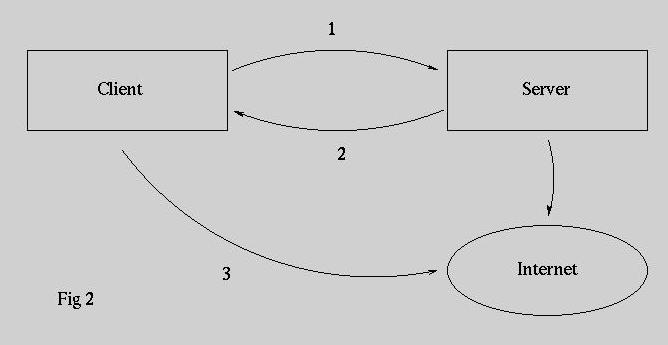
Server-based filters:
- The client tells a server what to watch for.
- When the conditions happen, the server notifies the client.
- The user then checks out the web pages from the Internet.
Example: eBay auction service & My Yahoo
Client-based filters:
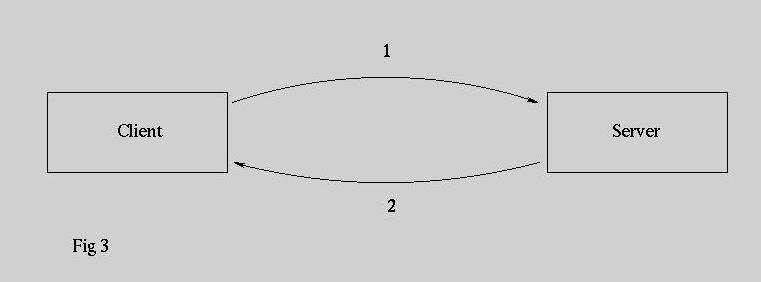
- The client was configured to watch for some conditions.
- The client periodically polls the server to see if the conditions are met.
- If the events occur, the client updates the information it displays.
Example: Pointcast
Why it's useful?
- Push/Pull technology allows automated refresh of information on the web. Users are able to receive up-to-date information while browsing on the Internet.
- The technology can be used to share information within a group, which information was update as soon as it's available.
- An example of the technology is to receive breaking news or stock update. (E.g. Pointcast, My Yahoo)
What is the problem associates with Push/Pull technology?
- They increase network traffic and takes up system resources. (E.g. diskspace)
- It encourages unwanted advertisements on the web. These technologies usually involved user control of the information received. Advertising agencies can use this information to include advertisements that users might be interested.
- Many technologies are only supporting Windows 95/NT, other platforms such as OS/2, UNIX, and Linux are ignored.
Who's in the race?
There are many push/pull technologies battling for the growing market:
Note: So far most of these technologies only support Windows 95/NT/Mac. However, Mirabilis's Castanet has Java version, which can run on any platforms that Java is available (E.g. Linux, Solaris).
Demonstrations
A CGI demo is here. These CGI scripts are installed at admun.home.ca; if you can located the where about of the machine. 8)
References
Netscape (1997). The LiveConnect/Plug-in Developer's Guide.
Netscape Communications Corp. http://home.netscape.com/eng/mozilla/3.0/handbook/plugins/index.html.
(links) NCSA (1996). The Common Gateway Interface. National Center
for Supercomputing Applications, University of Illinois at Urbana-Champaign
, IL. Mar. 7, 1996. http://hoohoo.ncsa.uiuc.edu/cgi/overview.html
(links) NCC (1997). The Common Gateway Interface. CGI Script
Resource List. Network Cybernetics Corp. http://dvjcc.ncc.com/cdroms/web/web_sites_cgi.html
(links) The CGI Resource Index; http://www.cgi-resources.com/
(links) Matt's Scripts Archive; http://www.worldwidemart.com/scripts/
DeJesus, Edmund X. "The Pull of Push." Byte Magazine August 1997: 84na1-84na8
 Edmond Hui