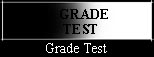
Grade Tuning Test
B
efore you view this homepage, this is very important that you have tuned your monitor correctly.P
lease set your monitor as follow:
(If you can see any part of the "G" or "T", then your monitor is too bright to view this homepage.)
Now it's done! Enjoy the pictures in this homepage!