


Thanks to all the math we did in step #2 we should have the following information written down:
scene beginning = 84 seconds = 28174 LBA
scene ending = 120 seconds = 40249 LBA
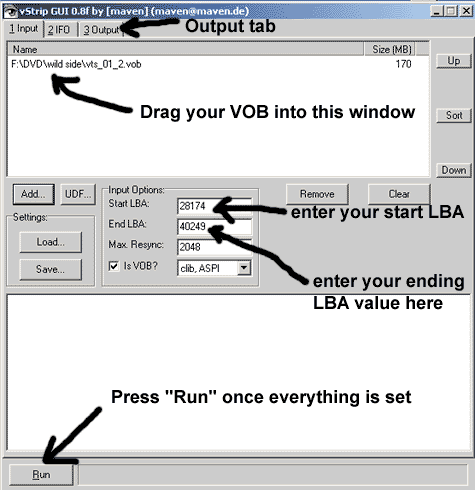
With the approximate start and end LBA know, editing your VOB in Vstrip GUI is a snap. Launch Vstrip GUI and drag you VOB file into the window below:
Next:
- enter your start LBA value from step #2
- enter your ending LBA value from step #2
- Click on the "Output" tab on the top and select a directory to save the file to.
- Click on "Run" below and in a minute or two you will have
your trimmed VOB file.
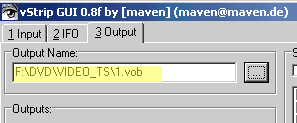
Name your file 1,2, 3, ...etc. to keep your timed VOBs in sequence..