
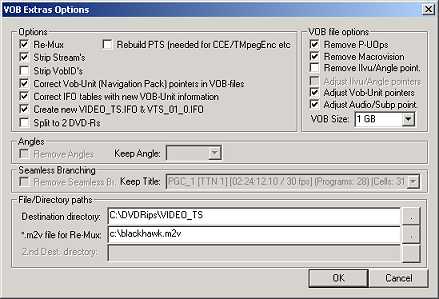
30) Tick everything that is ticked in the box above. and leave blank what is shown blank.
31) In the box '.mv2 file for Re-mux' , fill in the directory and filename of the file that you got out of ReMpeg. Click OK.
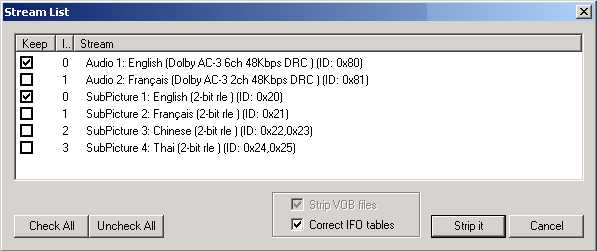
32) Click 'Strip It'
Let it run and when it's finished it'll say 'Finished Correcting VOBU pointers'
33) Close and re-open IfoEdit
34) Click Open, go to your Directory (Step 29), and open VIDEO_TS.IFO. Do NOT open VTS_01_1.IFO.
35) Click 'Get VTS Sectors'
It'll now ask you if you want to process all VOB files. Do so. now OK all the following dialogue boxes and when you see 'finished correcting sector addresses', your done.
36) Open Nero
Use Nero in 'Expert Mode'
Select 'DVD Video' and click on the ISO tab